Hacking SNEEK+DI quick guide

  • Thread starter Thread starter ChokeD
  • Start date Start date
  • Views Views 592,188
  • Replies Replies 3,091
  • Likes Likes 4
i know, i did format with 32kB clusters, so your saying i need 16kB?

smaller then 16 isn't possible, so i'll try 16.
 
VashTS said:
will this be updated to include uneek + di?

i really want to try it. i hope crediar makes an installer for it soon.
Yes I will add it to the guide, I am trying to wait until the Auto installers are a little more stable as they do not work for everyone. Basically your boot2_usb.bin and di.bin goes on your USB with a boot2_usb.bin on your SD also. boot2_usb.bin renamed to boot2.bin. "I believe without looking" don't quote me on that cause I already did.
laugh.gif

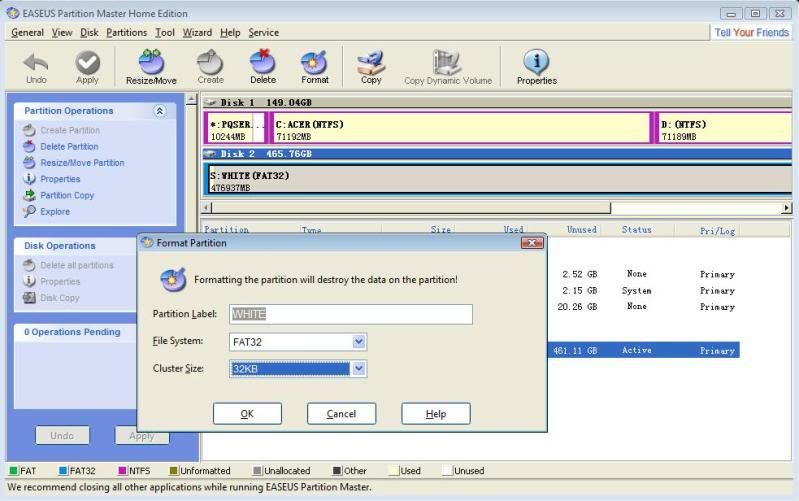
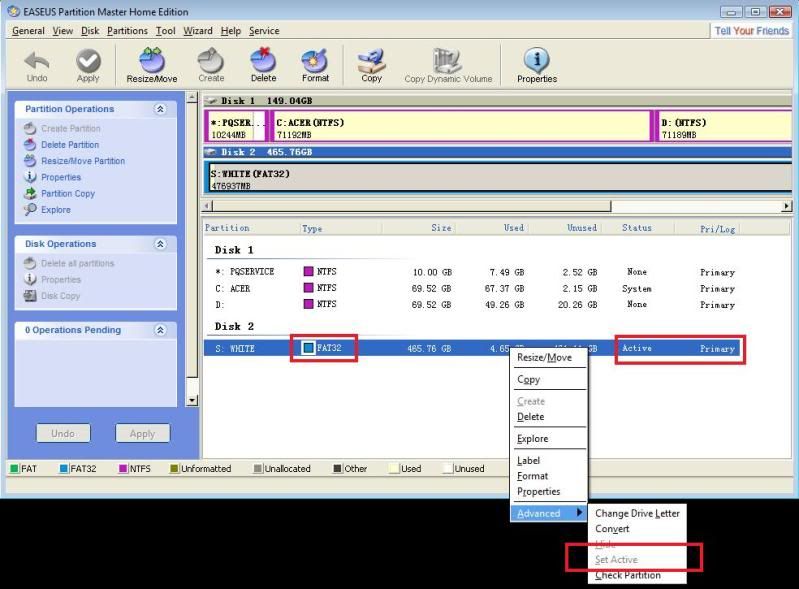
QUOTE(longtom1 @ Jul 26 2010, 07:40 AM) unless the hard drive partition has clusters sizes 32K and lower then you'll just get a black screen
format32KBclusters.jpg

Active.jpg
 
I finally got the latest version to run the way its supposed to( without using files from the wrong IOS).
Here is what I did:
1) Compile r110 manually. (Shouldn't matter which IOSes files we use here.)
2) Start SNEEK Installer v0.1b4, set the folder and download the IOS files with it.
3) Open the folder we set for Sneek files in the installer and copy these files from the svn folder into it:
-mini-tree-mod\armboot.bin->armboot.bin
-di\dimodule.elf->dimodule.elf
-es\esmodule.elf->esmodule.elf
-fs\iosmodule.elf->fsmodule-sd.elf
-fs-usb\iosmodule.elf->fsmodule-usb.elf
4) Use the installer to install the wanted version of Sneek.
5) Move boot2.bin and di.bin from SD:\ to SD:\sneek and rename boot2.bin to kernel.bin.
 
M[u said:
ddy]
I finally got the latest version to run the way its supposed to( without using files from the wrong IOS).
Here is what I did:
1) Compile r110 manually. (Shouldn't matter which IOSes files we use here.)
2) Start SNEEK Installer v0.1b4, set the folder and download the IOS files with it.
3) Open the folder we set for Sneek files in the installer and copy these files from the svn folder into it:
-mini-tree-mod\armboot.bin->armboot.bin
-di\dimodule.elf->dimodule.elf
-es\esmodule.elf->esmodule.elf
-fs\iosmodule.elf->fsmodule-sd.elf
-fs-usb\iosmodule.elf->fsmodule-usb.elf
4) Use the installer to install the wanted version of Sneek.
5) Move boot2.bin and di.bin from SD:\ to SD:\sneek and rename boot2.bin to kernel.bin.
If this is the case then a lot about this guide is going to change huh !!!

nice work.
 
F***ING UNBELIEVABLE, I finally got Sneek+DI working.

And after about ± 25 attempts i saw the problem.
For me it was because a small mistake in the guide.

QUOTE said:
Download "WiiJManager" The Multiplataform Wii Game Manager
Open up WiiJManager and choose where the drive/folder your games are located
It will then identify the game/s
Then right click the game and choose "convert to SNEEK"
When done converting rename the folder to what you like and place it on your drive if not already there. (Thanks zon7 and Wiimm)

when done converting i get a folder named "Mario Kart [RMCP01]"
So i simply renamed it to RMCP01 and placed it on the drive, just like the guide says.

This time i opened that folder for the first time to see what's inside.
When converted, you get a folder named "sneek", the .wbfs and a .text file
Inside the "sneek" folder there are typical system files and folders, so i thought, lets rename the folder "sneek" to RMCP01.

And finally it works, so maybe it would save a lot of people some time to add a line in the guide which says:

Then right click the game and choose "convert to SNEEK"
When done converting, open de folder and rename the folder "sneek" to the Game_ID and place it on your drive in folder "games".

So the sneek r106, installer v0.4 works fine for sneek+di.
tongue.gif
 
Glad to see you got it, I didn't write that cause I don't use WiijManager, but I put in these changes so it doesn't happen again.

Wii and Gamecube Game File and Folder Structure
Wii Game File and Folder Structure (The Easy Way)
Download "WiiJManager" The Multiplataform Wii Game Manager
Open up WiiJManager and choose where the drive/folder your games are located
It will then identify the game/s
Then right click the game and choose "convert to SNEEK"
When done converting open the folder up and rename the /sneek folder to what you like and place it on your drive if not already there. (Thanks zon7 and Wiimm)
EXAMPLE:
On a FAT32, 32KB clusters, Primary, Active usb:
usb:/games/CODMW2/files/ (a lot of files....)
usb:/games/CODMW2/sys/main.dol
usb:/games/CODMW2/sys/apploader.img
usb:/games/CODMW2/sys/fst.bin
usb:/games/CODMW2/sys/boot.bin
usb:/games/CODMW2/sys/bi2.bin
usb:/games/CODMW2/ticket.bin
usb:/games/CODMW2/cert.bin
usb:/games/CODMW2/tmd.bin
 
lol, thanks, happy to help improve guides.

When i first booted sneek+di, mario kart was already loaded in the disc channel, and i played it a while.
Afterwards i pressed 1 on wii-mote to load another game (also have MH3 and dirt 2 on it)

But no selection menu pops up, so i will first do some reading in previous posts again.
tongue.gif


I must say this is great, my real Wii won't play dvd backups, so this is fun.
1 question, since sd nand simulates a real disc, can you use sneek+di with a lego indiana backup to softmod a virgin fw4.3 nand?

I have build a fw4.3 nand, with forwarder channel, and can install HBC and stuf.
problem is, that after that i need to install Priiloader, but that works only with HBC.
Problem with sneek is, instead of returning into HBC, MMM returns to sneek Wii menu, and then HBC is gone.
So you get a vicious circle.
 
add the hacks to smenu.c for 4.3 so it wont delete the HBC and recompile it that's what I did and theres no need for pre/priiloader on sneek and it doesn't work well with sneek
 
hetfield said:
lol, thanks, happy to help improve guides.

When i first booted sneek+di, mario kart was already loaded in the disc channel, and i played it a while.
Afterwards i pressed 1 on wii-mote to load another game (also have MH3 and dirt 2 on it)

But no selection menu pops up, so i will first do some reading in previous posts again.
tongue.gif


I must say this is great, my real Wii won't play dvd backups, so this is fun.
1 question, since sd nand simulates a real disc, can you use sneek+di with a lego indiana backup to softmod a virgin fw4.3 nand?No, the Wii has to have Bootmii installed for SNEEK to boot. it wouldn't be a virgin if it had bootmii.

I have build a fw4.3 nand, with forwarder channel, and can install HBC and stuf.
problem is, that after that i need to install Priiloader, but that works only with HBC.
Problem with sneek is, instead of returning into HBC, MMM returns to sneek Wii menu, and then HBC is gone.
So you get a vicious circle. Use CustomizeMii to change the title name of an HBC.wad and install that with ShowMiiWads to your 4.3 NAND, so your 4.3SM doesn't find it or delete it.

Or do what longtom1 said
smile.gif
 
anyone tried uneek yet tried a few times with virgin nand and will boot once and let you do all the settings and then take you to the system menu then when you power down and try to reboot all you get is 3-4 seconds of hard drive activity and then nothing but black screen happens when you quit to system menu from HBC also only way I've got it to reboot properly is to leave priiloader installed on the nand
 
longtom1 said:
anyone tried uneek yet tried a few times with virgin nand and will boot once and let you do all the settings and then take you to the system menu then when you power down and try to reboot all you get is 3-4 seconds of hard drive activity and then nothing but black screen happens when you quit to system menu from HBC also only way I've got it to reboot properly is to leave priiloader installed on the nand

I can't get UNEEK to work at all, flash drive blinks with activity once and that's it, no video signal or anything. The same drive works fine with sneek-di. I posted an issue about it on sneek's googlecode page
 
can get it to boot an old nand dump with priiloader installed and it works a charm reboot as many times as you want and it'll load remove priiloader from the nand(manual and uninstall from HBC) and you get the 3-4 second hard drive flash then black screen do you need to patch the system menu or something???
 
NReale3370 said:
longtom1 said:
anyone tried uneek yet tried a few times with virgin nand and will boot once and let you do all the settings and then take you to the system menu then when you power down and try to reboot all you get is 3-4 seconds of hard drive activity and then nothing but black screen happens when you quit to system menu from HBC also only way I've got it to reboot properly is to leave priiloader installed on the nand

I can't get UNEEK to work at all, flash drive blinks with activity once and that's it, no video signal or anything. The same drive works fine with sneek-di. I posted an issue about it on sneek's googlecode page
Foez has told me he is getting the same results... from the sounds of it, UNEEK is currently broken (and UNEEK+DI)
 
what I can't understand a virgin nand will boot and let you set it up but won't let you reboot it

sneek+di works a charm haven't tested sneek

uneek+di is only "dlc" only select people(who made a donation) are getting it I think
 
longtom1 said:
can get it to boot an old nand dump with priiloader installed and it works a charm reboot as many times as you want and it'll load remove priiloader from the nand(manual and uninstall from HBC) and you get the 3-4 second hard drive flash then black screen do you need to patch the system menu or something???


XFlak said:
NReale3370 said:
QUOTE(longtom1 @ Jul 26 2010, 12:13 PM) anyone tried uneek yet tried a few times with virgin nand and will boot once and let you do all the settings and then take you to the system menu then when you power down and try to reboot all you get is 3-4 seconds of hard drive activity and then nothing but black screen happens when you quit to system menu from HBC also only way I've got it to reboot properly is to leave priiloader installed on the nand

I can't get UNEEK to work at all, flash drive blinks with activity once and that's it, no video signal or anything. The same drive works fine with sneek-di. I posted an issue about it on sneek's googlecode page
Foez has told me he is getting the same results... from the sounds of it, UNEEK is currently broken (and UNEEK+DI)
Did you guys see that post from Muddy ?? You may have to rename boot2.bin to kernal.bin. I'm busy or I'd go back a page or 2 to see exactly what he wrote.

Well, I see the .sh still hasn't been fixed.
frown.gif
 
The armboot.bin from r110 doesn't work for me on IOS 80 or 70 (I've never been able to get 80 to work like most of you). Does the same behavior as uneek did before, drive blinks once and then idles
 
NReale3370 said:
vpd said:
Is anybody else having trouble compiling r107 & r108?
My current setup compiles r106 and previous fine, but when i try r107 & r108 i always get an empty 0kb di.bin
change the di/iosmodule.elf in build_boot2.sh/cmd to dimodule.elf. he changed the name and hasn't updated the build file yet
This needs reported.

I'm still getting a 0KB di.bin
 

Site & Scene News

Popular threads in this forum