Homebrew RELEASE [Overlay]SysDVR Overlay

RednaxelaNnamtra

Well-Known Member
Member
Joined
Dec 8, 2011
Messages
1,262
Reaction score
1,049
Trophies
2
XP
4,099
Country
Germany
What is it:
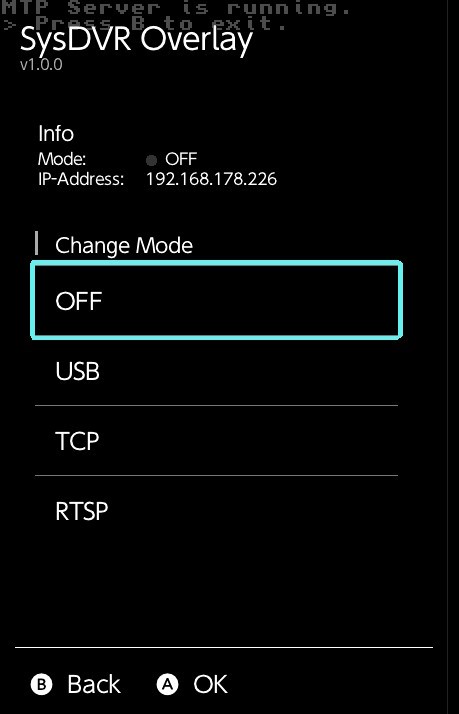
SysDVR Overlay is a simple Tesla overlay to check and change the current mode of the SysDVR system module.
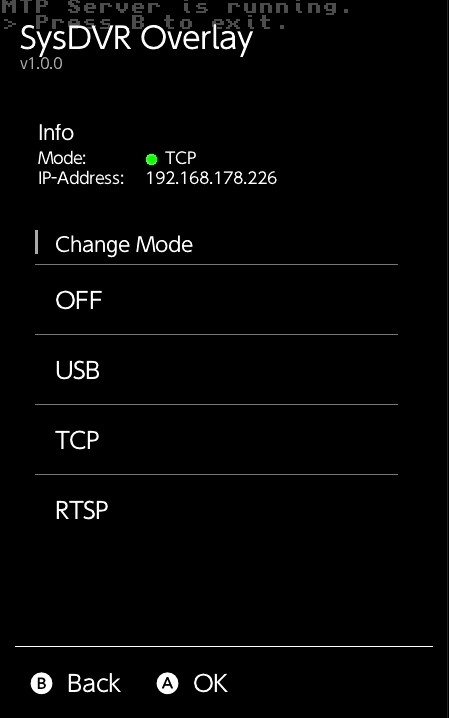
preview_tcp.jpg

preview_off.jpg

Requirements:
* A Tesla compatible CFW
* A working Tesla installation
* A working SysDVR installation

Where to get it:
* Latest Release
* Source Code
 
Last edited by RednaxelaNnamtra,
I'd definitely use this if my PC wasn't the infamous case of sysdvr not working no matter what usb I use for it!
I mostly use it via network in tcp mode, maybe thats a good alternative for you, but I have my pc and switch connected via Lan, so its mostly a stable connection. (Its also the main reason I included the IP in the overlay).
About using it via usb, I noticed that in the switch os, the switch is a bit more picky about the cable and port used, than it is in e.g. hekate.
I have had the most success in the past with USB-A to c cables, while only my 2.0 usb-c to c cable works without a problem.
 
i just updated to 6.2 on both ends, switch and laptop, but for the life of me i cannot get the sysdvr on my switch to open to change the settings anymore.

i also cannot get it to find my switch when i open up sysdvr on my laptop either, no matter if i use usb mode or tcp mode it cant detect my switch anymore
 
i just updated to 6.2 on both ends, switch and laptop, but for the life of me i cannot get the sysdvr on my switch to open to change the settings anymore.

i also cannot get it to find my switch when i open up sysdvr on my laptop either, no matter if i use usb mode or tcp mode it cant detect my switch anymore
What exactly do you mean with you can't get it to open on the switch anymore? Does the Sys-dvr config homebrew that comes with the sysmodule just blackscreen? Does it not apply save the selected option?
Did you maybe forget to update the PC Client with the system module and overlay?

Does my overlay show and change the mode properly? If not, what does it show as mode?

Don't really use the usb mode, so I'm not really sure if there is anything that needs to be done for it to work, but tcp normally works for me.
 
sorry its not the overlay so im probably in the wrong thread. its the actual sysdvr settings homebrew itself. when i open it in the homebrew menu, it gives me the qr code screen and tells me "couldnt connect to sysdvr"

i have the the pc client and everything on the most recent update and im just stumped.
 
sorry its not the overlay so im probably in the wrong thread. its the actual sysdvr settings homebrew itself. when i open it in the homebrew menu, it gives me the qr code screen and tells me "couldnt connect to sysdvr"

i have the the pc client and everything on the most recent update and im just stumped.
Did you maybe download the usb only version?
You could try to just download the SysDVR.zip again and extract it into the switch sd.
Did you copy it over via homebrew, sd reader or hekate ums? if you did it via homebrew, you could try to copy it over via Hekate ums or with a sd reader.
 

Site & Scene News

Popular threads in this forum