Hacking My Acekard 2i has stopped functioning correctly.

  • Thread starter Thread starter DTGS
  • Start date Start date
  • Views Views 1,746
  • Replies Replies 16

DTGS

Well-Known Member
Newcomer
Joined
Nov 29, 2008
Messages
89
Reaction score
1
Trophies
1
Location
Varrock
XP
410
Country
United States
I checked the help thing to check the ID thing and it's literally states it's HW:81 so it's not fake. (I think)

It's worked perfectly when I first got it... the 4 months or so I've had it, but now it's acting like crap. Does anyone know what I should do? Should I just get a new one or what?

 
Acting like crap? what does this mean?

Back-up you microSd card and format you microSD card with the panasonic SDformatter.
 
I've formatted it twice... still nothing. Should I use that panasonic formatter? Does it make a difference from the Windows formatting thing?
 
DTGS said:
I've formatted it twice... still nothing. Should I use that panasonic formatter? Does it make a difference from the Windows formatting thing?

Yes, it is the best to use.
 
I had one AK2i that failed just like that.
Acekard products have a one year warranty.
Contact your seller for a replacement unit.
If that doesn't work out, you can contact Acekard directlly.

However, with the lower prices now common, (and with the opportunity to support this site through ShopTamp) I would consider simply purchasing a new one and be done with it.

A reputable dealer will honor the one year warranty, and this is a good opportity to see how well the service and support side of your shop actually handles a claim.

Whipple
 
My seller was.. realhotdeals? Something like that. I'll probably buy a new acekard since it's 14 dollars on the Tempshop. And I'll check out that guide.
 
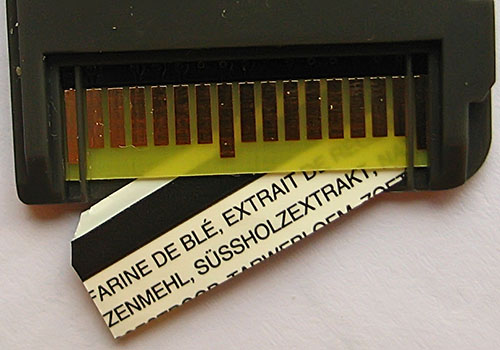
Stick a piece of thin cardboard/thick paper between the acekard sticker and the DS when you put it in and your issues should go away.
 
Nope. Nothing. Did the formatting, the guide, and the paper inbetween the cart and ds... nothing. I'll just buy a new one. It works... just it takes forever to get it, and most likely freeze.
 
Yeah, good way to not actually receive any worthwhile assistance.
I know one thing, you'd hate to be his doctor
rofl.gif
 
God I am sick of typing this!! The paper or cardboard goes under the PCB! Not Between the DS and the card! That won't work!! This is what you have to do:

IMG_3220.JPG
 
You can use you finger nail or just leave in. If you cannot get it out just put more in. Thats what'd id do. I just wouldn't give up if it didn't work the first time. Once I got credit card under there and that didn't work, I'd say buy a new one or look elsewhere for the area of the issue. but these threads with this white screen stuff is rather new, I'd try new micro sds, putting new firmware on it. Then my final option would be trying to unbrick. but i have 2 acekards. Then if all that didn't work, I'd research it until I got sick of it then ask on the boards and if that didn't pull through, I'd buy a new one.
 

Site & Scene News

Popular threads in this forum