Homebrew Minecraft DS (in 3D !)

  • Thread starter Thread starter smealum
  • Start date Start date
  • Views Views 625,296
  • Replies Replies 2,508
  • Likes Likes 28
I have some good news. A developer called Eloreda has done us all a huge favour and written a DScraft to Minecraft converter. I can't provide any real advice on how to use it , but I've been given permission to share it, and I hope this helps out others. It has made my year! So now we can take our maps off the DS and play them in Minecraft proper! :)

http://www.4shared.com/zip/KQklTr9T/dscraft2mc.html?

Thanks to Smealum for developing DScraft. And thanks to Eloreda for getting my map off my DS! :)
 
I have some good news. A developer called Eloreda has done us all a huge favour and written a DScraft to Minecraft converter. I can't provide any real advice on how to use it , but I've been given permission to share it, and I hope this helps out others. It has made my year! So now we can take our maps off the DS and play them in Minecraft proper! :)

http://www.4shared.com/zip/KQklTr9T/dscraft2mc.html?

Thanks to Smealum for developing DScraft. And thanks to Eloreda for getting my map off my DS! :)
Wow, I can't try it right now but if this does work then that's fantastic news ! :D
I'm really sorry that I couldn't be arsed to get it done myself, but at least now you (and everyone else) can continue work on their worlds in a more appropriate way. :)
 
No problem Smealum. TBH I am now learning that a) minecraft runs extremely slowly on all my computers (and nowhere near as fast as dscraft) and b) pocket edition maps are tiny in comparison to dscraft. Seems like I'm going to be waiting a bit longer yet to access my map in the pocket edition. Half way there though.
 
Help! I'm totally unfamiliar with MC but my daughter was telling me that she could play it on her dsi so my search brought me here. I downloaded this and it saved as a .rar file, not .nds. Am I doing something wrong? And what card do I drag it to? Sorry for the techtardedness...
 
Help! I'm totally unfamiliar with MC but my daughter was telling me that she could play it on her dsi so my search brought me here. I downloaded this and it saved as a .rar file, not .nds. Am I doing something wrong? And what card do I drag it to? Sorry for the techtardedness...
No, you aren't doing anything wrong. Use a program like 7zip or Winzip to extract the files from the .rar file.

EDIT: If I remember correctly, there should be a document that explains how to properly place it on the card.
 
So, I never could figure out how to put it on the SD card and make it work. It's not recognizing anything in the DSi that I put on the SD card. Do you know where it says how to do it?
There should be a document called "Readme" which is probably a good indication that you should read it. If you still can't get it to work after following those instructions, post your problem here and wait for someone else to respond as I won't be able to help you anymore.
 
Those links aren't "advertised" as much but the game is also available as a zip file if you don't have winrar/7zip : http://smealum.net/dscraft/downloads/DScraft_fat_310811.zip
As stated above, installation instructions are in the included readme.txt file. If you still can't get it to work, I can probably help you but you'll have to be a bit more specific about your problems !
 
So, I never could figure out how to put it on the SD card and make it work. It's not recognizing anything in the DSi that I put on the SD card. Do you know where it says how to do it?
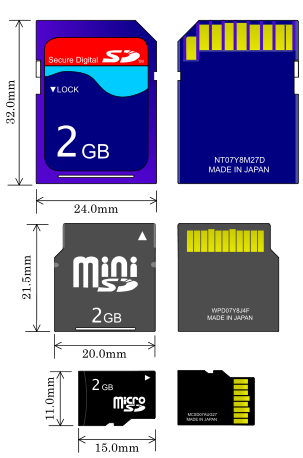
Which SD Card do you mean? Do you use the SD card in for the SD slot of the DSi or do you use the MicroSD Slot of your flashcard?

comparision-of-sd-mini-sd-microsd-ca.png
Do you use the SD card at the top or the SD at the bottom (I'm not interested in the color but in the form)?
 
So, I never could figure out how to put it on the SD card and make it work. It's not recognizing anything in the DSi that I put on the SD card. Do you know where it says how to do it?
this may have already been said, but it cannot be launched from the SD card slot in the DSi. You need to have a card capable of running DS and/or DSi homebrew (DSTwo, R4, etc) - which has it's own storage (usually micro-sd) and does not access the builtin DSi SD card slot.
 
So, I never could figure out how to put it on the SD card and make it work. It's not recognizing anything in the DSi that I put on the SD card. Do you know where it says how to do it?
Why ever you don't answer...
I found this nice graphic in the net:
1-08.jpg

You need to use a flashcard with a microSD card.
Don't use the SD card from the DSi:
dsi-w-sd-card.jpg
 

Site & Scene News

Popular threads in this forum