
Maxtor HDD can't lock

E:

--------------------- MERGED ---------------------------

Also you can set your own dashboard paths with the EVTool
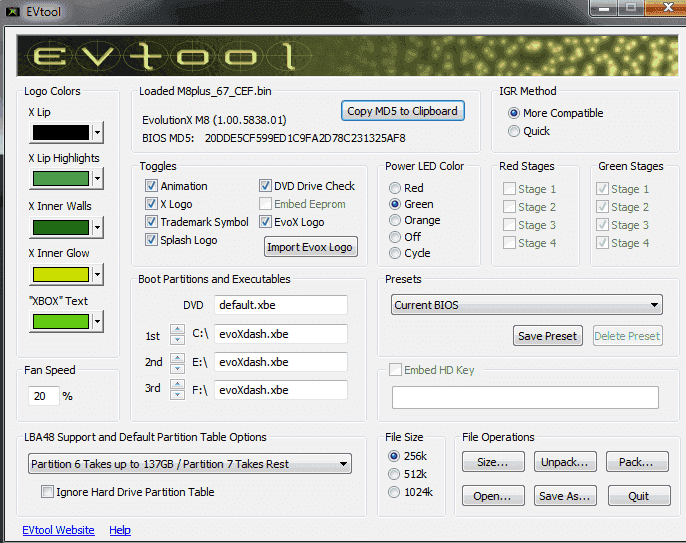
upload_2017-6-17_18-16-42.png
 
Just FTP over the default.xbe to C and rename it to evoxdash.xbe

You don't need anything else, as UX will create a new config.xml when it's loaded.
 
My brother has the IND-Bios and wants to have the dashboard back to default as well (instead of XBMC being at the very top of the list above Launch Disc) Would we be able to use the same method to revert to stock? Just FTP, rename and load? Also, is the config.xml just a folder tree file? So, if I edit it, can I manually put folders where I would like them?
 
the Maxtor drive i am using is really loud when reading file, i put coinops 8 massive on it, and everytime a video gameplay loaded it would make a noise. It's really loud, anyways i was going to put another hard drive inside my chipped xbox, what is the process to do this? do i have to clone to this new hdd?
 
the Maxtor drive i am using is really loud when reading file, i put coinops 8 massive on it, and everytime a video gameplay loaded it would make a noise. It's really loud, anyways i was going to put another hard drive inside my chipped xbox, what is the process to do this? do i have to clone to this new hdd?
If you want all your files from the maxtor hdd on your new hdd you need to clone it if not you just can put it and use HeXen to copy the dashboard files on it.
 
If you want all your files from the maxtor hdd on your new hdd you need to clone it if not you just can put it and use HeXen to copy the dashboard files on it.

You are awesome dude, thank you. Did you have problem with your Maxtor and your Xbox, mine hdd is loud when using with coinops 8 massive, when trying to show video gameplay.
 

Site & Scene News

Popular threads in this forum