Homebrew HzMod - old3DS screen streaming

  • Thread starter Thread starter Sono
  • Start date Start date
  • Views Views 290,440
  • Replies Replies 576
  • Likes Likes 102

What should be HorizonModule renamed to?

  • HzMod

    Votes: 11 50.0%
  • HzModule

    Votes: 8 36.4%
  • HzProc

    Votes: 2 9.1%
  • HzDbg

    Votes: 1 4.5%
  • HzDebug

    Votes: 0 0.0%

  • Total voters
    22
  • Poll closed .
Did you read the manual? Or the two posts above yours?

I have problems to open program with cmd. I put folder called horizonscreen (inide this folder the 4 files) in deskpot but I dont have idea to put comands in cmd
 
I have problems to open program with cmd. I put folder called horizonscreen (inide this folder the 4 files) in deskpot but I dont have idea to put comands in cmd

What OS are you using? Windows? If yes, which version? XP? 7? 8? 10?
 
I use Windows 8.1

Ok, so it must have support for this.

Did you try holding SHIFT and right clicking INSIDE the open folder for HorizonScreen? There should be some option to "Open command prompt here".

Can you please show me your HorizonScreen folder and the command prompt you open? If you want you can censor your username if you want.
 
Ok, so it must have support for this.

Did you try holding SHIFT and right clicking INSIDE the open folder for HorizonScreen? There should be some option to "Open command prompt here".

Can you please show me your HorizonScreen folder and the command prompt you open? If you want you can censor your username if you want.

I try this:

cd C:\Users\****\Desktop\HorizonScreen-PC

sencond line my IP

program open

I put this:

C:\Users\****\Desktop\HorizonScreen-PC and not open
 
I try this:

cd C:\Users\****\Desktop\HorizonScreen-PC

sencond line my IP

program open

I put this:

C:\Users\****\Desktop\HorizonScreen-PC and not open

It has to be an exe at the end, like this:

HorizonScreen\HorizonScreen-PC.exe 192.168.1.64
 
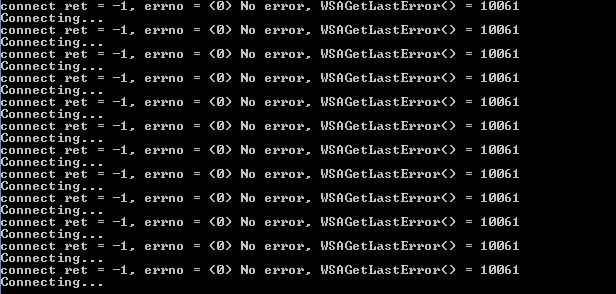
I get this error try conect but dont work

Captura.PNG
 
How do i install it tho?After installing the .cias,i dont know what i have to do on pc
I'll quote the first post, from step 4:
  1. open the HzLoad of your choice
  2. open a console (SHIFT-RIGHTCLICK in the directory where HorizonScreen is extracted)
  3. .\HorizonScreen-PC <ipaddress>
    • on my home network I run HorizonScreen-PC 192.168.1.65
  4. set JPEG quality with UP/DOWN keyboard buttons in HorizonScreen (if you can even see it change)
  5. press L on the keyboard to connect (or START if you have a PS2 controller plugged into the system)
 
Alright,im pretty dumb,sorry,but i got another problem.
After i installed everything and opened the himem on o3ds and the screen turned black,and no led showed up,and i was just sent back to the home menu.
And in the pc app it just stays Connecting,and gives an error,and tries again

 
Last edited by Caofre,

Site & Scene News

Popular threads in this forum