Android How do I sideload Trusted Face properly?

  • Thread starter Thread starter smileyhead
  • Start date Start date
  • Views Views 2,449
  • Replies Replies 7

smileyhead

I like cute stuff.
Member
Deer 🦌
Joined
Aug 31, 2015
Messages
4,922
Solutions
2
Reaction score
17,303
Trophies
6
Age
26
Location
Budakeszi, Hungary
Website
szija.hu
XP
12,090
Country
Hungary
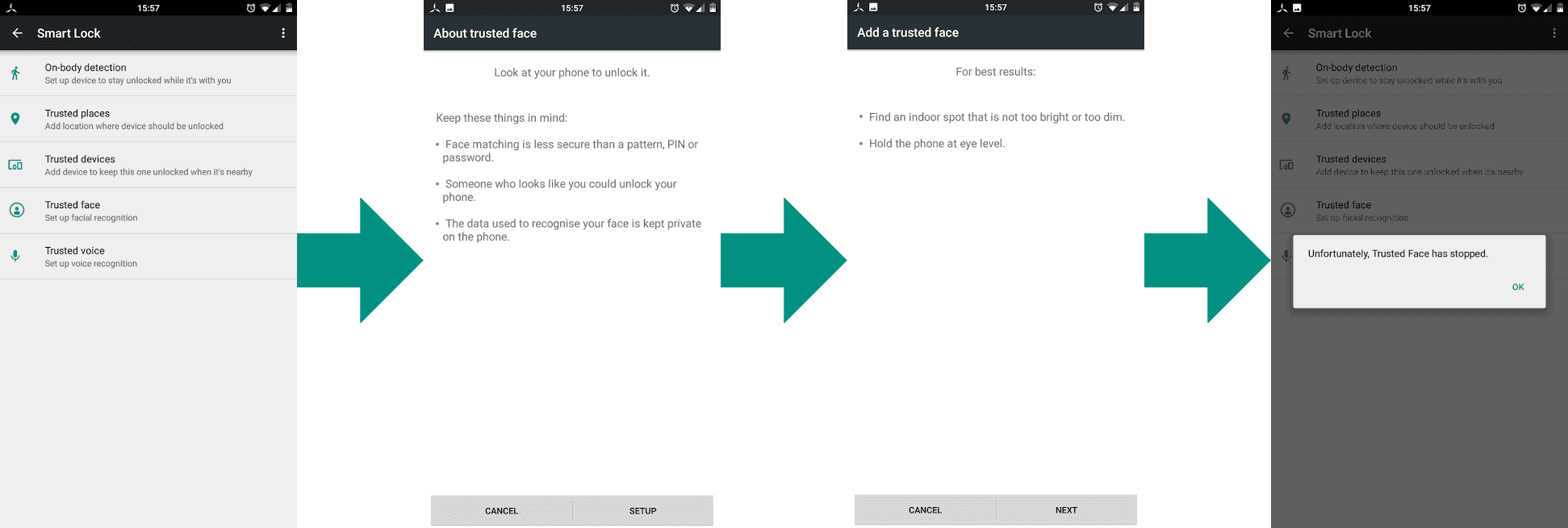
My CyanogenMod ROM doesn't have the Trusted Face option in Smart Lock for some reason, so I tried to sideload it, but it doesn't work:
Untitled.png

As you can see, just when the camera feed is supposed to appear, Trusted Face crashes, for an unknown reason. Can anyone recommend a solution?

Information about the Trusted Face APK:
Code:
Version: 5.1.1-1914015
Size: 921.42 KB
Permissions: rwx rwx rwx
Owner: root
Group: root
Path (first attempt)*: /system/app
Path (second attempt)*: /system/app/FaceLock

*: Both attempts has had the same result; the one above. The FaceLock folder was present by default,
but the APK was missing.

Information about my phone:
Code:
Device: ASUS Zenfone 2 ZE500CL
Model: Z00D
Android version: 5.1.1
CyanogenMod version: 12.1-20160527-UNOFFICIAL-Z00D
 
Last edited by smileyhead,

Maybe the Trusted Face apk is made for another Android?

It seems to crash when the Camera opens...so it may be cause of the location of the apk of the Camera App?

I really have no idea since i dont use Trusted Face :P

but at least i tried :D
 
Maybe the Trusted Face apk is made for another Android?

It seems to crash when the Camera opens...so it may be cause of the location of the apk of the Camera App?

I really have no idea since i dont use Trusted Face :P

but at least i tried :D
The Camera app is at it's default place, and it shouldn't be a matter anyway, since things like this aren't hardcoded in Android apps.

I think.
 
My CyanogenMod ROM doesn't have the Trusted Face option in Smart Lock for some reason, so I tried to sideload it, but it doesn't work:
View attachment 65608
As you can see, just when the camera feed is supposed to appear, Trusted Face crashes, for an unknown reason. Can anyone recommend a solution?

Information about the Trusted Face APK:
Code:
Version: 5.1.1-1914015
Size: 921.42 KB
Permissions: rwx rwx rwx
Owner: root
Group: root
Path (first attempt)*: /system/app
Path (second attempt)*: /system/app/FaceLock

*: Both attempts has had the same result; the one above. The FaceLock folder was present by default,
but the APK was missing.

Information about my phone:
Code:
Device: ASUS Zenfone 2 ZE500CL
Model: Z00D
Android version: 5.1.1
CyanogenMod version: 12.1-20160527-UNOFFICIAL-Z00D
Your phone is 64 bit Intel, while the APK is probably 32 bit ARM, that's probably why it won't work.
 

Site & Scene News