Hardware GBA Backlight! (AGB-001)

  • Thread starter Thread starter zazilu
  • Start date Start date
  • Views Views 684,201
  • Replies Replies 1,367
Uh...
2-way switch is the one that changes between two brightness settings, right?
Or the one that turns the light on/off?
 
2 settings, not on/off. The front lit screens have an on/off switch, but the backlit screens are 100% unusable without the light. The backlit screen don't have the reflective material on the underside of the LCD because light needs to pass through the back instead of boncing off it.
 
hi wiggatron. congratulations for the great work. any chance of a video with that swich? when the switch is on, is it brighter than the one Zerey has in the youtube video?

in the youtube video, the brightness level was below the lower setting of an original AGS-101. how does yours compare to it, with the brightness switch on and off?
 
The switch just cycles between the two brightness settings that the kit offers. It's still not as bright as the original SP, but trust me, it's plenty bright enough. In fact, I actually prefer the toned down brightness. I sometimes found the original SP too bright for indoor use and my eyes would get pretty tired.

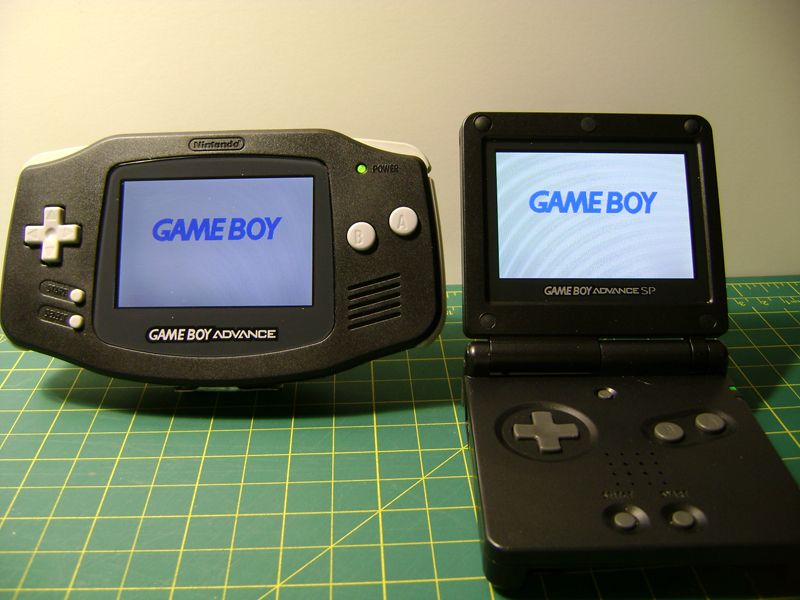
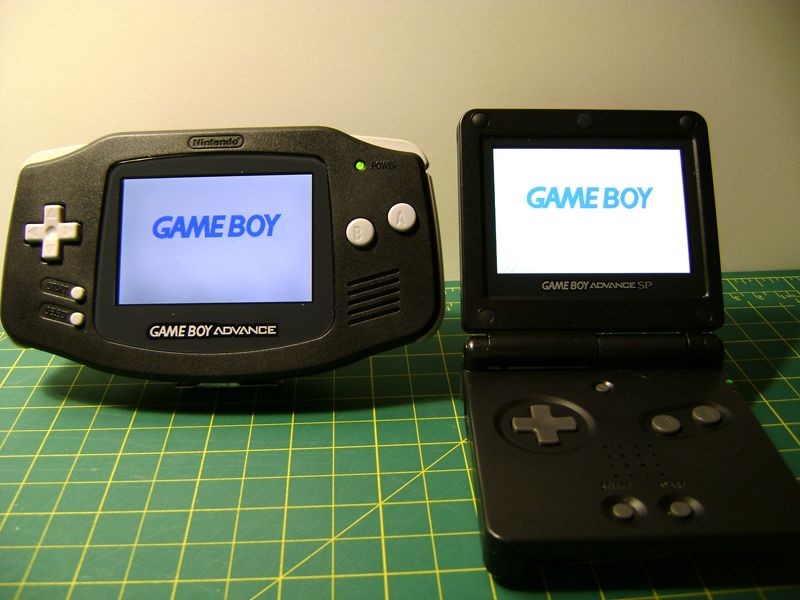
Anywho, here's a vid and pics ;)


Lower setting on both
DSC02996.jpg


Higher setting
DSC02998.jpg
 
thanks for the video.

no offence but is the switch really necessary? from what i've seen, the brightness difference is minimal. so wouldn't it be much better just to solder to the brightest point as you described in your pdf?

of course i might be wrong, as videos and pictures can deceive eyes.
 
A lot of folks really like having the 2 settings since it mimics the original backlit SP as closely as possible, but for my own personal unit I just have it wired up to the brighter setting. I often find the brightness of the original backlit SP to be a bit much, so the toned down brightness is perfect for me. I don't really need the 2nd setting, but I can totally understand why some folks do. It definitely knocks a ton of work off of the installation LOL! The switch is probably the most pain in the butt part of the whole install.

The difference is fairly significant. It's not a huge difference, but it's pretty noticeable. It as pretty hard to capture in photo and video though :/

 
A lot of folks really like having the 2 settings since it mimics the original backlit SP as closely as possible, but for my own personal unit I just have it wired up to the brighter setting. I often find the brightness of the original backlit SP to be a bit much, so the toned down brightness is perfect for me. I don't really need the 2nd setting, but I can totally understand why some folks do. It definitely knocks a ton of work off of the installation LOL! The switch is probably the most pain in the butt part of the whole install.

The difference is fairly significant. It's not a huge difference, but it's pretty noticeable. It as pretty hard to capture in photo and video though :/

Original SP was frontlit. I found it to still have bad gamma in the darker colors, still being hard to see them apart from black. I don't need any more brightness if I can differentiate between the different brightness of colors. For example, the micro's lowest setting is just fine for me. Better to save power than to turn up brightness if I don't need it.
 
Original SP was frontlit. I found it to still have bad gamma in the darker colors, still being hard to see them apart from black. I don't need any more brightness if I can differentiate between the different brightness of colors. For example, the micro's lowest setting is just fine for me. Better to save power than to turn up brightness if I don't need it.

I know it was. I meant original as in "original backlit GBA SP" versus this mod ;)

Are you saying the frontlit model has the contrast issues or the backlit?
 
I know it was. I meant original as in "original backlit GBA SP" versus this mod ;)

Are you saying the frontlit model has the contrast issues or the backlit?

Frontlit has contrast issues. Was just saying, when the first lit GBA came out, it definitely helped see, but it was poor in contrasting dark colors from eachother/pure black.
 
So when ordering the cable from Zerey, do we have to tell him what model the GBA is and what type of SP screen we are connecting to?

I'm guessing the 32 pin and 40 pin are two separate cables and you only get the one you request?
 
So when ordering the cable from Zerey, do we have to tell him what model the GBA is and what type of SP screen we are connecting to?

I'm guessing the 32 pin and 40 pin are two separate cables and you only get the one you request?

Just let him know the board model located behind the battery door and he'll set you up.
 
I have joined the ranks of the modded! The color in the photo is a bit off, and I hadn't adjusted the image switch yet when this pic was taken, but yeah... it works! And it was pretty easy to do!
 
This is amazing! I have so many carts that I wanted to play on my old GBA, but well, couldn't, because I don't have the patience for a non-backlit screen. I turned to emulation on my PSP to circumvent this problem, but well, I still miss all my retail saves on my 20 something physical carts that I still have...
 
I have joined the ranks of the modded! The color in the photo is a bit off, and I hadn't adjusted the image switch yet when this pic was taken, but yeah... it works! And it was pretty easy to do!

May I ask (or anyone else for that matter) what tool they used to remove the plastic to allow the screen to fit in? The guides don't go into detail other than stating "use a knife or rotary tool"?

Also while the switch is a cool idea, if you use the GBA to GCN lead, it won't be able to connect since the switch would block the hole. Unless you buy an unofficial one, which I did had but modded to work on the Gameboy Micro.
 
May I ask (or anyone else for that matter) what tool they used to remove the plastic to allow the screen to fit in? The guides don't go into detail other than stating "use a knife or rotary tool"?

Also while the switch is a cool idea, if you use the GBA to GCN lead, it won't be able to connect since the switch would block the hole. Unless you buy an unofficial one, which I did had but modded to work on the Gameboy Micro.


A dremel will do the trick just fine. But if you don't happen to have one (you should though... very handy for other stuff), then a cheap hobby knife like a x-acto knife should do the trick.
 

Site & Scene News

Popular threads in this forum