FBI error installing CIA files

  • Thread starter Thread starter Loque
  • Start date Start date
  • Views Views 6,996
  • Replies Replies 7
  • Likes Likes 1

Loque

Well-Known Member
Newcomer
Joined
Sep 22, 2014
Messages
96
Reaction score
3
Trophies
0
Age
36
XP
216
Country
Italy
I have just installed correctly luma etc.
I open FBI from the Download Play application and i go to cias folder and select install cia file.
At the end of the installation i get this error:
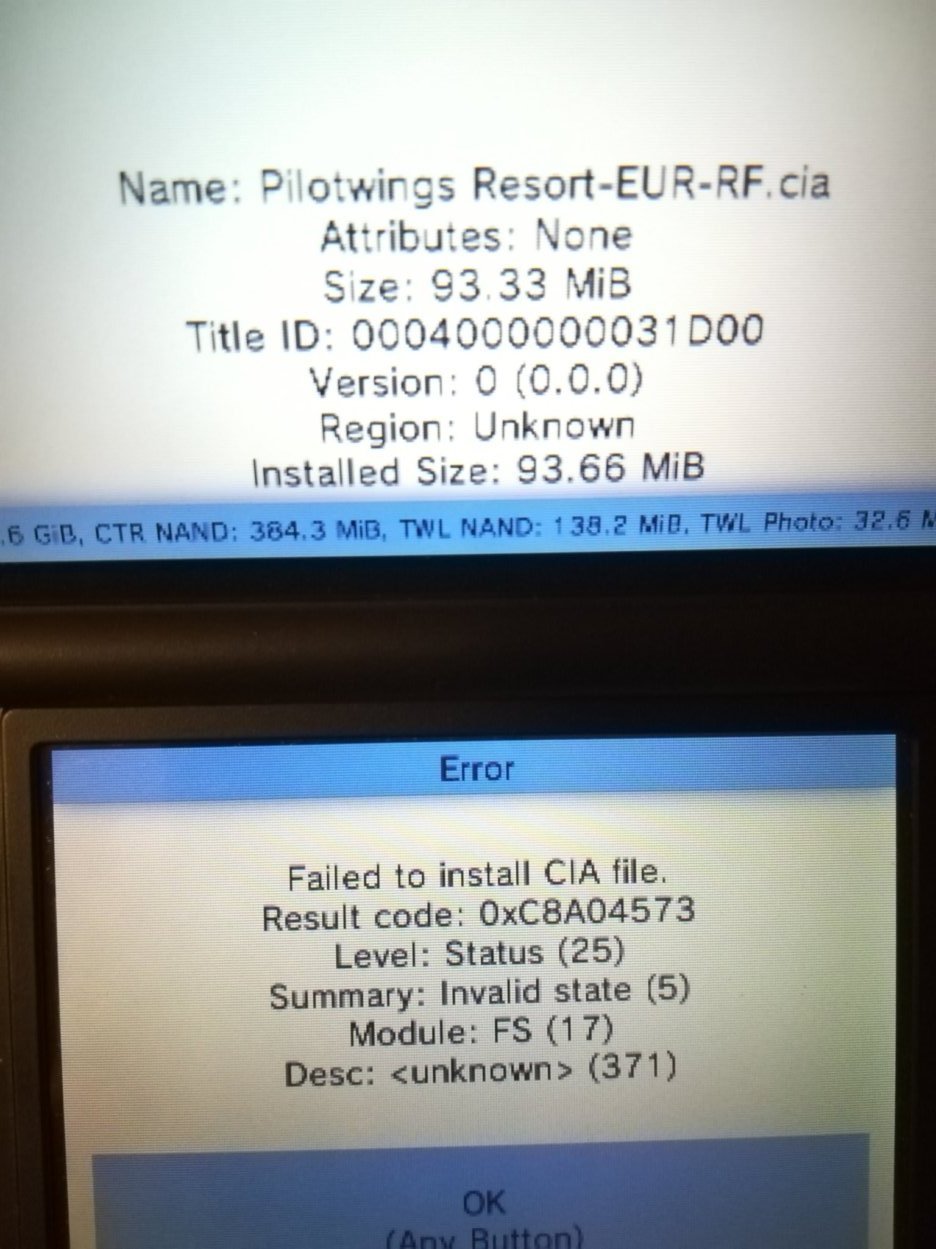
XXYGNk3qTM2ZQlMA29-mUA.jpg


I tried searching on internet and I found that could be useful to delete all unused tickets, i did that but i did not solve.
Card is formatted in fat32 32kb.
Also I lost every icons and running faketik is not giving me icons back.
 
Last edited by Loque,
  • Haha
Reactions: AncientBoi
I open FBI from the Download Play application and i go to cias folder and select install cia file.
You mean you don't have it (fbi) installed on the home menu?
About the error, do you have enough space on the sd card? Can you install other games?
Also I lost every icons and running faketik is not giving me icons back.
You mean all your games disappeared? If so, the culprit is most likely the sd card..
To know for sure, you need to check it for errors with h2testw. backup your data somewhere safe on your pc beforehand, format the sdcard as Fat32 32kb cluster then run the test with the "read and verify" setting. It should tell you if it's failing.
 
You mean you don't have it (fbi) installed on the home menu?
Exactly, to open it I have to launch first download center and to the trick with rosalina.
About the error, do you have enough space on the sd card? Can you install other games?
I have space with the sd card but with every cia i got the same error.
I don't know if it can be the cause, but to remove a stupid demo icon on the "3ds home menu" i deleted a blank file voice in the memory sd from the 3ds file management. Then every custom icon gone, so also the fbi and the other icons.
It then caused the problem i'm having installing cia files?

@zekro94 thanks I try.
 
Reflash nand. If tou corrupted something and don't have a nand backup, a ctrnand transfer may fix it, but only do that as a last resort.
 
I restored a backup (230219_SUH10496398_sysnand_00.bin) done some days ago after I installed luma but the problem persist. Icons are not back after restoring the backup.
I runned cthulhu and cleared activity logs and shared icon cache but when i try to delete home menu cache i get these errors!!
 

Attachments

  • gdhWRxLVR16LuLqcFizvtw.jpg
    gdhWRxLVR16LuLqcFizvtw.jpg
    107.9 KB · Views: 91
Last edited by Loque,
I restored a backup (230219_SUH10496398_sysnand_00.bin) done some days ago after I installed luma but the problem persist. Icons are not back after restoring the backup.
Did you have any titles installed when you made the nand backup? If not, makes sense there's none. Or if you did have some titles installed, run faketik and see if they pop up.
 
I solved formatting the 3ds. Then cias installed without errors. But I didn't put back icons in the home. Atleast restore FBI to access quickly instead of going to download manager first :(
 

Site & Scene News

Popular threads in this forum