Homebrew DSi4DS...

  • Thread starter Thread starter spinal_cord
  • Start date Start date
  • Views Views 23,175
  • Replies Replies 69
  • Likes Likes 3

spinal_cord

Multitask? I have enough trouble single-tasking!
Member
Joined
Jul 21, 2007
Messages
3,388
Solutions
4
Reaction score
1,072
Trophies
2
Location
somewhere
Website
www.google.com
XP
4,581
Country
Antarctica
Just for fun, I made an imitation DSi menu for the DS/Lite, it looks very authentic, and feels quite authentic too.

Currently it supports stylus and button controls, shows battery status, charging status, time, date, your name and the gui even uses your colour settings from your firmware.
It loads homebrew only at the moment, although I might implement the same (or similar) loading method I used in DSision2, depending if there is any demand for it.
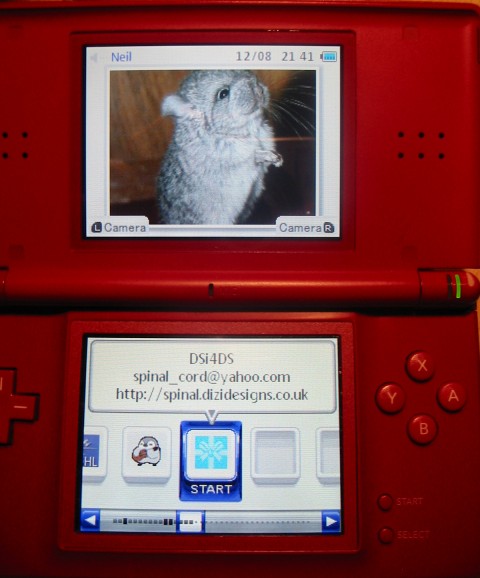
DSi4DS.jpg


Source + Download.
 
Very nice! ... now if you can manage to make it boot roms on my kids AK2 cards then it will be great will stop them stealing my DSi
nyanya.gif
 
It doesn't look too bad...but it doesn't work anything like the DSi's actual menu. I know it's just homebrew somebody made in their free time, but it really needs some touching up before it's really even usable.
 
Nice device
smile.gif

Edit: I believe if there was the right tweeking, this could replace a firmware and load Roms,Homebrew, Music etc straight from the root of the SD Card
smile.gif
 
Looks like DSision2, but better! Does it actually DLDI patch homebrew? DSision never did for me. I'll wait until it loads commercial .nds games though...
 
Da-Bomb1 said:
It doesn't look too bad...but it doesn't work anything like the DSi's actual menu. I know it's just homebrew somebody made in their free time, but it really needs some touching up before it's really even usable.

In what way?

+ You scroll left + right with the D-pad
+ You drag the icons left + right with the stylus
+ You 'fling' the icons left + right with the stylus
+ You drag the handle of the scrollbar and the icons scroll
+ You tap the scrollbar buttons and the icons scroll
+ You launch a homebrew by pressing A

Tell me what in that list "doesn't work anything like the DSi's actual menu". Hell it even has empty slots.
 
Well, you can't move the icons around by sliding them up and out of their slot and you can't actually boot stuff by just tapping on it, which is frustrating...and the way it scrolls isn't quite right, and that bugs me.
tongue.gif


Not flaming or anything, just saying it still needs some work. And should be done with libnds instead of palib.
tongue.gif
 
Da-Bomb1 said:
Well, you can't move the icons around by sliding them up and out of their slot and you can't actually boot stuff by just tapping on it, which is frustrating...and the way it scrolls isn't quite right, and that bugs me.
tongue.gif


So what you meant was "It doesn't work EXACTLY like the DSi menu". Saying it works nothing like it, suggest that doesn't even resemble it in any way.


QUOTE(Da-Bomb1 @ Aug 13 2009, 06:18 AM) And should be done with libnds instead of palib.
tongue.gif

Oh, You're one of those people. Now you're gunna have to tell me why.
 
  • Like
Reactions: slaphappygamer
I think it looks nice! Good work, Spinal! I haven't tried it yet though, so I can't give you feedback at the moment, but keep up the good work anyway.
 
Oh. My. Freaking. God.

Awesome.

But, few problems:

* The battery thing blinks a plug icon with a red background - I'm not charging it.
* Uhh, there's no camera on the DS?
* Scrolling off the edge has a very jerky bounce-back effect
* Snapping to an icon is also slightly jerky, and seems like you're rounding upwards, even when the icon to the left is closer
* I once tried a DSi. You can scroll from one end to the other by swiping the finger across very, VERY quickly. I tried on this... not really possible. Minor thing, but just saying
tongue.gif
 
Does it only find the .nds files in the root? I don't keep my homebrew in the root, and when I load, it just shows the 4 apps I do keep there.
 
Nice. Takes a while to load, is that normal? Oh, and I had an idea - a Shop Channel. Kinda like the Homebrew Database in DSOrganise, but prettier.

EDIT: Couple of issues. Some of my homebrew doesn't have icons or text, they're just blank boxes, with a blank box above them. But I can launch them. And in the middle there is a random black one that looks like a game cart. What's that one?
 
Great App. Hopefully you'll be able to improve it so I can use it as my permanent firmware for my SCDSOne.
Same complaitns as others:
Menu is always rounding up so makes touch screen navigation awkward
No tap to start make Jamstruth go something something
Games with no icons just appear blank without even their file name on the bubble (horrible since I have Quake and Quake 2 in my root)
A file explorer would be nice as I like to have my stuff organised under different folders.
 

Site & Scene News

Popular threads in this forum