Hacking Cover Flow USB ISO Loader by Beardface

  • Thread starter Thread starter Nullkill
  • Start date Start date
  • Views Views 860,684
  • Replies Replies 3,029
Status
Not open for further replies.
Very good looking loader but unfortunately I get random graphic errors. Cover and disk-images that are displayed correctly all of a sudden can't be found or produce graphic glitches when using the loader the next time. Besides this I randomly get codedumps or other crashes (latest official prebuilt-release).

I really love the looks of this loader, the graphics are very nice and the reflection of the covers looks great. The only thing I think would make it look better is if the images were full 3d game-boxes instead of flat covers but that would probably be a major pain to create.

I hope the problems with the graphics can be fixed, this is one stunning loader.

 
bryandir said:
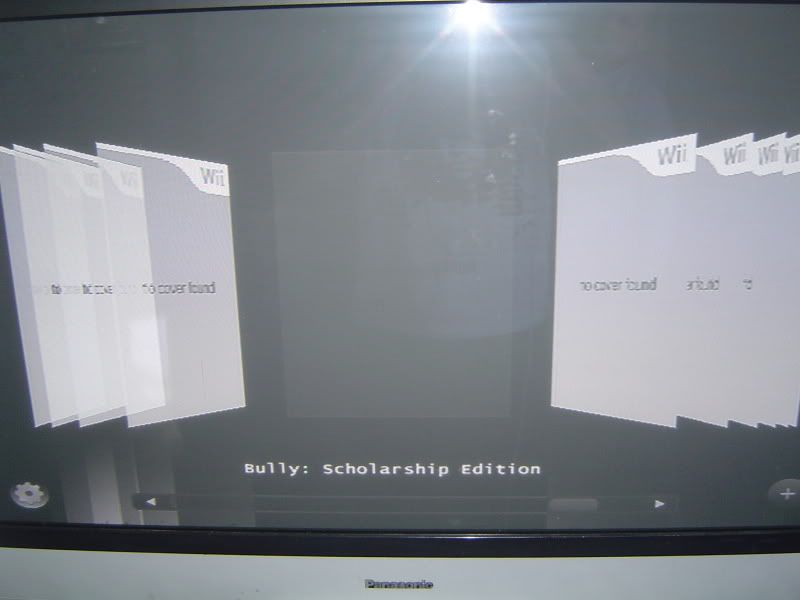
DSC00185.jpg


anyone any ideas whats happening here?

i have the covers in the correct folder,correct size etc...but all i get is this when i put a cover in the folder for the coverflow.

thanks in advance!

How do you get it to render so well? Whichever version I use, binary releas or svn pull and build the entire screen seems pixalated and the text is almost impossible to read, like 360 games on SDTV.
 
cwstjdenobs said:
bryandir said:
DSC00185.jpg


anyone any ideas whats happening here?

i have the covers in the correct folder,correct size etc...but all i get is this when i put a cover in the folder for the coverflow.

thanks in advance!

How do you get it to render so well? Whichever version I use, binary releas or svn pull and build the entire screen seems pixalated and the text is almost impossible to read, like 360 games on SDTV.


i havent a clue mate,im using DHTV leads,not the standard ones you get with the wii,maybe its this at 480p output or somthing...but im STILL getting the above pictures when i load the images into the coverflow,i know a few others have the problem,could one of the guys who created the loader have a look and direct me and all the other fellows on here on what to do?

my loader works perfect,just the graphics image sthat do not want to work....thanks in advance!!
 
bryandir said:
anyone any ideas whats happening here?

i have the covers in the correct folder,correct size etc...but all i get is this when i put a cover in the folder for the coverflow.

thanks in advance!

Make sure you have cIOS rev10 installed, not rev9.
 
fogbank said:
bryandir said:
anyone any ideas whats happening here?

i have the covers in the correct folder,correct size etc...but all i get is this when i put a cover in the folder for the coverflow.

thanks in advance!

Make sure you have cIOS rev10 installed, not rev9.


i have rev10 installed mate,does anyone else get this problem?does anyone lese get this problem with rev 10 installed?whats the difference with those who have it working and those who dont?is there somthing we are all missing?

cheers guys!
 
bryandir said:
fogbank said:
bryandir said:
anyone any ideas whats happening here?

i have the covers in the correct folder,correct size etc...but all i get is this when i put a cover in the folder for the coverflow.

thanks in advance!

Make sure you have cIOS rev10 installed, not rev9.


i have rev10 installed mate,does anyone else get this problem?does anyone lese get this problem with rev 10 installed?whats the difference with those who have it working and those who dont?is there somthing we are all missing?

cheers guys!

Are you guys using the included cover download option? Or are you manually downloading and setting up the covers?
 
Its the only revision we currently test with; and the majority of problems seem to come from cIOS 9.

Not sure what was new in v10 though.
 
Nullkill said:
G2K said:
Question about the source - Are the covers actually being modified in 3D, or are they just 2D covers whose coordinates are being stretched and compressed?

rendered in perspective view (3d)

So there actually IS a Z axis, and not just an imitation?
 
G2K said:
Nullkill said:
G2K said:
Question about the source - Are the covers actually being modified in 3D, or are they just 2D covers whose coordinates are being stretched and compressed?

rendered in perspective view (3d)

So there actually IS a Z axis, and not just an imitation?

yes indeed
 
Hi

i'm testing new version and when booting with loading bar get 2 thirds across and reboots back to homebrew, tried through usb forwarder and preloader and still does the same, any help, all other previous versions work??

please help, luv this loader better than others

sys 3.2E
preloader 2.8
rev 10
 
ulysse57 said:
bryandir said:
DSC00185.jpg


anyone any ideas whats happening here?

i have the covers in the correct folder,correct size etc...but all i get is this when i put a cover in the folder for the coverflow.

thanks in advance!
I have exactly the same thing.


...me t00
frown.gif
 
Very nice loader. There is one thing I noticed that isn't a big deal but wondered why the covers don't always go to the top of the stack on both sides? The only one that seems to do that is the middle cover of the entire set.

I love the ability to resize and adjust spacing and number of covers. Please don't remove that on final versions.
As of now I have only tried 4.1 with issues only from my own covers. The downloaded covers work fine.

Awesome work keep it up!
 
Hi

Sorry to be pain, still waiting for reply on me issue

anyone any idea's??

thanks
 
hey there chaps,

just tryed your BOOTLOADER implementation (rev149) with the latest revision of your coverflow (rev157).

Worked like a charm!

First time its loaded all the covers for me, & as hard as i tryed i couldnt make it code dump, & trust me i tryed.

my wii

Pal-UK (firmware 4.0) wanis cios rev10 [component] 16:9 480p 36 of 36 covers loading everytime!

Obviously i still suffered from the outside covers being on top, but you already know about that.

Anyways just wanted to say well done, its certainly come on leaps and bounds in the last week
 
Nothing new?
I can t wait like a kid to see what s comming next.
I m sad when i see this 4.1 version on first page,(not working version)
@Nullkill
Thank s for all the time you expend to make us a great loader,and all guy s working on this project.
I hope we get something new soon,good night guy s.
 
bryandir said:
fogbank said:
bryandir said:
anyone any ideas whats happening here?

i have the covers in the correct folder,correct size etc...but all i get is this when i put a cover in the folder for the coverflow.

thanks in advance!

Make sure you have cIOS rev10 installed, not rev9.


i have rev10 installed mate,does anyone else get this problem?does anyone lese get this problem with rev 10 installed?whats the difference with those who have it working and those who dont?is there somthing we are all missing?

cheers guys!
I have rev10, and I get the same results as you. I put the covers and discs of correct size in the proper places, but no images show up in the loader. I can tell this loader has potential, but one thing does make me wonder. I've been using the GUI USB loader (dimok), and when there aren't any cover images, you can breeze through the game list while the "no cover" is still displayed, and everything loads fast. When cover images are present, it takes a while for each image to load when you move through the list. I get the feeling that this coverflow loader might suffer great lag when the covers are showing. I hope not, because the speed is great with no images.
 
using 4.2 LOVE it no probs what so ever... thou when on the disc load screen for a title... i wish there was a way to click the cover and the cover flips to the side to show the disc.... maybe the back side of the disc says some info on the game?

Posts merged

anyone made a launcher channel that looks coverflowish?
 
Status
Not open for further replies.

Site & Scene News

Popular threads in this forum