
Hacking Corrupted/Not Working USER Folder

MyLittlePorri

Member
Newcomer
Joined
Oct 27, 2022
Messages
6
Reaction score
1
Trophies
0
Age
25
XP
59
Country
Spain
Hello!

Is it possible to rebuild/restore the USER folder on Emmc? I have prod.keys and also an old rawnand.bin, boot0 and boot1 files, but this backup also has the USER folder not working, so just importing it does nothing but change firmware from 15.0.0 to 13.2.1

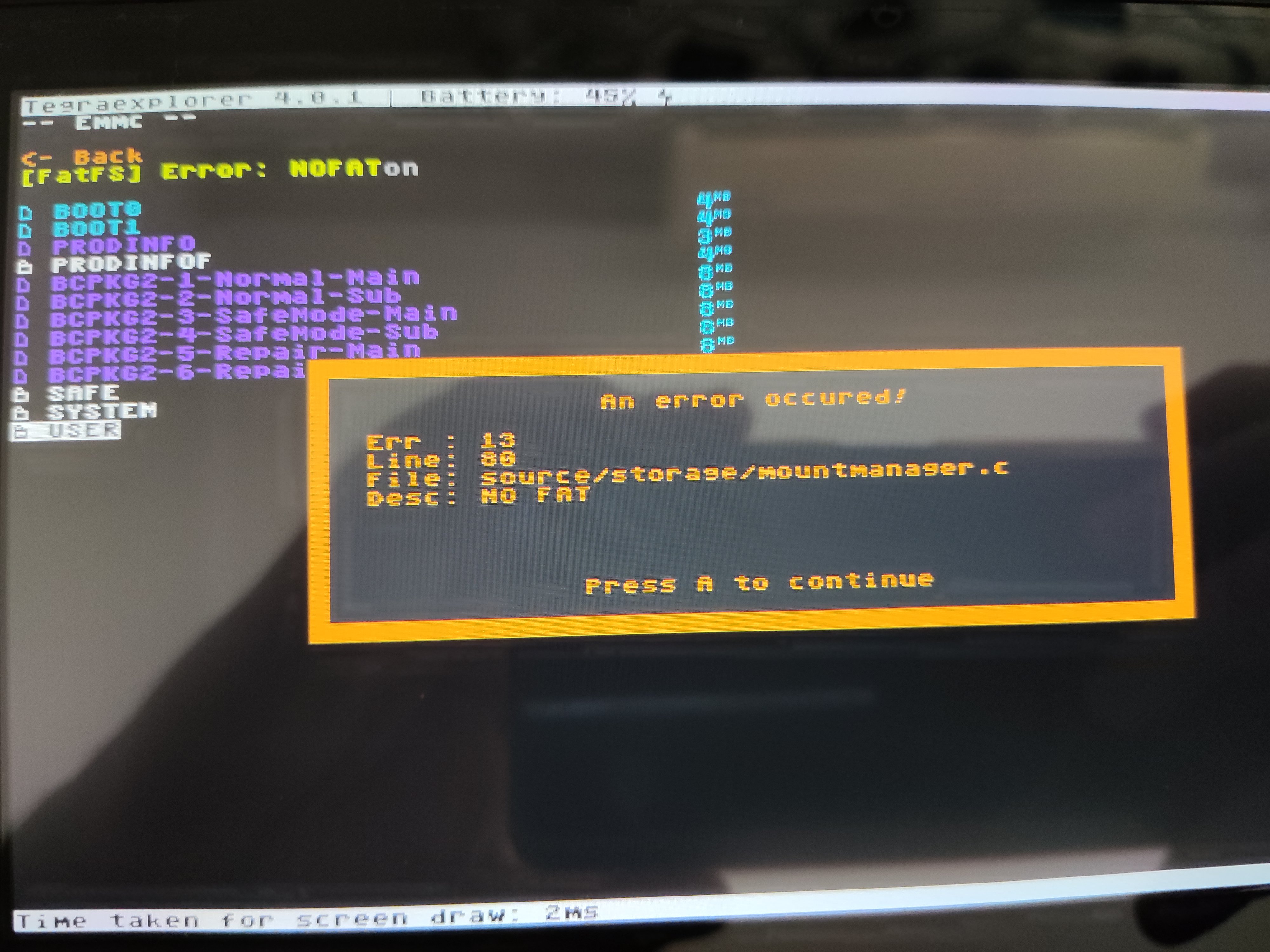
I cannot do a system wipe via TegraExplorer or Switch maintenance mode because it sends a NO FAT error during the process, so I decided to check Emmc folders and found this when trying to access USER. I guess this is not how it should work right?
IMG_20221027_140625.jpg


I have also tried following suchmememanyskills unbrick guide, but it did nothing because the USER folder that EmmcHaccGen creates is empty.

Thanks in advance and If someone needs any information to help me, let me know!

(This is my first post, so If I messed something with tags and/or format let me know and I will fix it)
 
Hello!

Is it possible to rebuild/restore the USER folder on Emmc? I have prod.keys and also an old rawnand.bin, boot0 and boot1 files, but this backup also has the USER folder not working, so just importing it does nothing but change firmware from 15.0.0 to 13.2.1

I cannot do a system wipe via TegraExplorer or Switch maintenance mode because it sends a NO FAT error during the process, so I decided to check Emmc folders and found this when trying to access USER. I guess this is not how it should work right?

View attachment 334224

I have also tried following suchmememanyskills unbrick guide, but it did nothing because the USER folder that EmmcHaccGen creates is empty.

Thanks in advance and If someone needs any information to help me, let me know!

(This is my first post, so If I messed something with tags and/or format let me know and I will fix it)
Why aren't you using Hekate to restore it?
 
Why aren't you using Hekate to restore it?

Hey, sorry for the late response, i have been out for some days.

Sadly that was the first thing I tried, but it does nothing but downgrading the firmware, the error is still there.

I have tried many things, like following some unbrick guides and stuff, but it does nothing. I will try to test some more things once i get home.

Thanks for trying to help me!
 
Okey, after trying a lot of things, I managed to fix the USER partition and restore my switch.

If someone who's reading this thinks that we have the same problem, I will explain the steps I did.

First, this was the errors I was getting:

When trying to boot Atmosphere, I was getting the error 2002-2686
When trying to boot on Stock, I was getting a different error (will update later specifying it)
Trying to reset switch to factory via maintenance mode didn't worked (crashed)
Trying to use Systemwipe.te (TegraExplorer) did nothing, script stops when reaching USER partition.
Trying to access USER partition via TegraExplorer returns a NOFAT FS error (image listed on the first message on this thread)
Connecting Switch EMMC to PC via Hekate freezes the console.

If you're experiencing the same, you could try doing the following:

DISCLAIMER, DO IT ON YOUR OWN RISK, THIS IS WHAT WORKED FOR ME AND IM NOT AN EXPERT. EVERY GAME/APP SAVES WILL BE LOST. IF YOU HAVE SOMETHING IMPORTANT, DO NOT FOLLOW THIS.

Follow this Choidujour upgrading/downgrading guide.

Once you reach the step where you need to insert BISKeys to the USER partition, do it has stated on the guide.

If you can do it succesfully, keep doing has stated on that guide / look for another solution methods, I can't help u anymore because that was not my problem.

If it returns an error after introducing your BISKeys, please check that those keys are correct. If u check it and those are the correct ones but it keeps returning the error, double click USER partition, uncheck read-only, check passthrought zeros and mount the partition.

Once mounted, use a FAT32 Formatter of your choice and format the partition. Then, follow this guide step by step. Once you do every step, paste the content of the USER folder generated when following the guide into your switch USER partition. This must be done to avoid getting errors when doing the last step.

Lastly, inject TegraExplorer in your switch and try to do a SystemWipe.

After doing this, my switch boots again, hope it works for someone else.

IF YOUR SWITCH BOOTS AGAIN PLEASE BACKUP BOTH BOOT + RAWNAND + KEYS BEFORE DOING ANYTHING ELSE AND KEEP IT SAFE.
 
  • Like
Reactions: ciaomao
Hi MyLittlePorri, the link to " upgrading/downgrading guide." is dead. do you know what's the major step there? I have a similar issue where it seems a few files/folders are corrupted.
 

Site & Scene News

Popular threads in this forum