Hacking Configurable USB Loader

  • Thread starter Thread starter oggzee
  • Start date Start date
  • Views Views 7,865,874
  • Replies Replies 18,482
  • Likes Likes 22
I'm having a strange problem with USBLoader_CFG (I have tried Versions 33,34,40 and now 41). Everything was working fine, until I tried a few new games (via Disc), and also installed the new HBB update. After that, each time I go into Usbloader_CFG I see the default coverflow look fine, and the title for each cover I hover over displays fine too.

When I go to start a game by pressing 'A' though, there is no text. It shows the cover and a blank white box, where usually the text for 'Press A to start, Press 1 for Options, etc..' should be. If I press A though to load the game, it works fine, i just cant see the text telling me to do so.

Likewise, if I press B from the coverflow menu, to go to the Text menu (with covers at the side) the covers show fine by the Text for title list is not there. I have tried adding a conflicting colour in the config, but with no luck, and have also tried a few different themes as default with no luck, as well as the 4 different versions of USBLoader_CFG mentioned at the start of this topic.

Any help would be greatly appreciated. Is there a specific Font bank on the Wii somewhere that I can check is still ok, or something? Its the only explanation I can think of.

:

 
Hello to all
well i need to ask where is the config.txt file located? Because I can't seam to be able to find it.
Thanks
Rem
 
rem300wm said:
Hello to all
well i need to ask where is the config.txt file located? Because I can't seam to be able to find it.
Thanks
Rem
One should be in sd:/usb-loader, if you installed that directory. You can also place it in the same directory as your .dol file. It should NOT be in the SD card's root directory. However, I'm not sure exactly which directory will be chosen if you only installed the hybrid. Maybe in that case it will use the SD card root. zektor probably needs to answer that one.

It certainly can go in whatever directory your covers subdirectory is in. Hence, if your covers are installing to sd:/covers, your config.txt would best go in sd:/. If you don't have any files on the SD card currently, just install it to sd:/USB-Loader as then your defaults will match up properly with my Configurator.
 
oggzee said:
And for the interested: cfg v41 with 222-mload as the default ios:

SDUSB-Loader_cfg41-222.dol
http://sharebee.com/2cc83434

Since you make a special dol could you make one with only cios 222 v2 and not v3?

Ever since you added support for both v2 and v3 it has slowed down the loader for me and I keep going back to cfg39c.

So basically I want a 39c with the other improvements like overlay etc...

or maybe we could try a v3 only and drop support for v2 I think having support for both is what makes it load slower for me with usb microphones also attached
 
i think i may have found a bug rev 40 and 41 when scrolling my games in any mode but list
it will just restart on me the only thing i can think of is the mp3s i have running come off the hdd
cause every so often when i download covers it skips the music and the covers are stored on the hdd also
has any one else seen this? is there a fix?
 
riddle43 said:
i think i may have found a bug rev 40 and 41 when scrolling my games in any mode but list
it will just restart on me the only thing i can think of is the mp3s i have running come off the hdd
cause every so often when i download covers it skips the music and the covers are stored on the hdd also
has any one else seen this? is there a fix?

It could be a corrupted cover image. Try temporarily moving all your cover images to a different directory where the loader can't see them and see if the problem still occurs.
 
riddle43 said:
ive had the prob with no covers befor as in i had the cover dir empty so i guess i tried that befor hmmm
It's worth trying again. Perhaps also try turning music off and see if the probelm still occurs. Also try reverting to earlier versions and finding exactly where the problem started occurring. That will help oggzee and usptactical know where the bug might be, if there is one.
 
riddle43 said:
ok with no mp3s it works fine with mp3s it acts up
Interesting. Now, to finalise the testing for usptactical (he handled the new music playing IIRC), what happens if you select only one mp3 to play (Set music=filename)?
 
riddle43 said:
i think i may have found a bug rev 40 and 41 when scrolling my games in any mode but list
it will just restart on me the only thing i can think of is the mp3s i have running come off the hdd
cause every so often when i download covers it skips the music and the covers are stored on the hdd also
has any one else seen this? is there a fix?


Regarding MP3 skipping, this same thing happens when downloading covers from SD, but I think it has more to do with the Wii's resources getting taxed more than anything. The skipping occurs for a second or two when saving a cover to the card, but returns to normal immediately after the saving is complete.
 
Dr. Clipper said:
riddle43 said:
ok with no mp3s it works fine with mp3s it acts up
Interesting. Now, to finalise the testing for usptactical (he handled the new music playing IIRC), what happens if you select only one mp3 to play (Set music=filename)?


sorry took so long to get back it still resets me even with one mp3
 
This is a pretty big release, so I'm cross-posting it:
v41v3 of Configurator is out

download here

Changes:
  • All new overlay wizard for creation of overlay images!
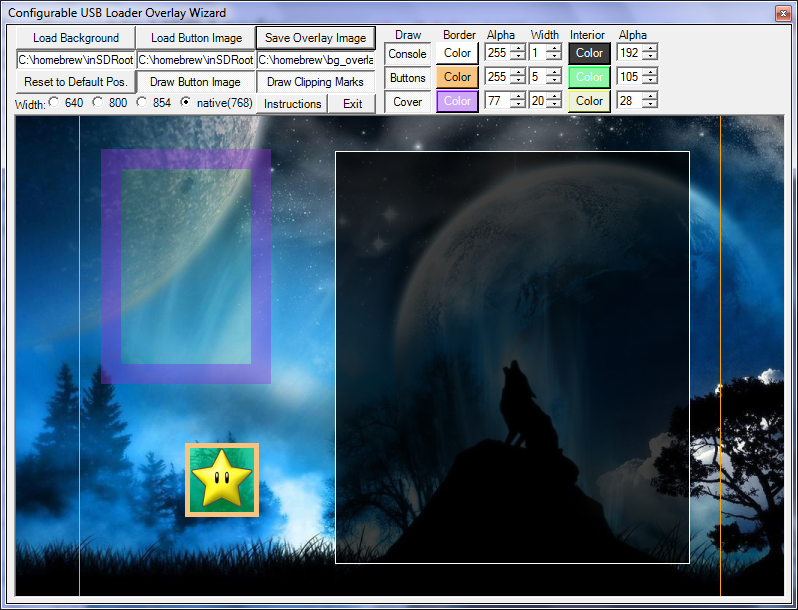
The overlay wizard allows you to turn any desktop image into a theme for Configurable in only a few minutes. The tool will resize your background image to the size Configurable needs and then lets you change the colours and move overlay elements to match your theme and save straight to an overlay file. Here's a look at the new wizard interface:

olwiz.png


Simple instructions are available via the Instructions button, but I hope most of it is intuitive. If you have questions, ask away in the Configurator thread.

As always, if there are any bugs, please let me know.
 
riddle43 said:
Dr. Clipper said:
riddle43 said:
ok with no mp3s it works fine with mp3s it acts up
Interesting. Now, to finalise the testing for usptactical (he handled the new music playing IIRC), what happens if you select only one mp3 to play (Set music=filename)?


sorry took so long to get back it still resets me even with one mp3

Hmm. Does it happen with all your mp3s or only one or two? Were these mp3s you encoded or you downloaded? Could you right-click on the mp3 and go into properties and tell me the bitrate? Also, if you encoded these what program did you use?
 
Hey guys. I don't seem to ever have any success with downloading boxart anymore. Does anyone know of any URLs we can add to the config.txt that work?
 

Site & Scene News

Popular threads in this forum