Got the notification about iOS 5.1 being available to install; still no untethered jailbreak as far as I know, so is there something to take away the bubble on Settings?
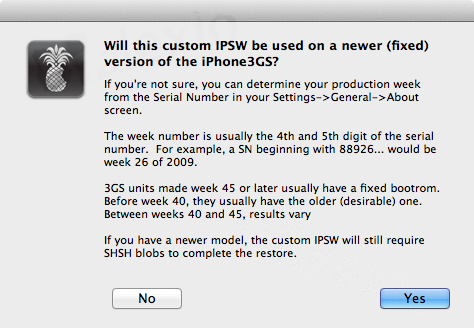
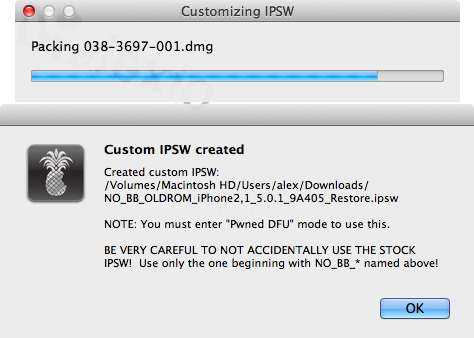
I have a jailbroken iphone3gs and unlocked with the ipad baseband. I want to update it to the lastest ios version but I heard I cant use the stock version of apple. How should I do it.?
I updated the guide to include a working table of contents and the iOS-based Apple TVs, but I somehow neglected the iPad 3. I'll add it to the guide later. Thanks!
Thanks for the info and offer! I need to know the model number that all iPad 3s report, though. (i.e. The CDMA/Verizon model, the global LTE model, and the Wi-Fi models probably have different model numbers. The model number doesn't change with capacity.)
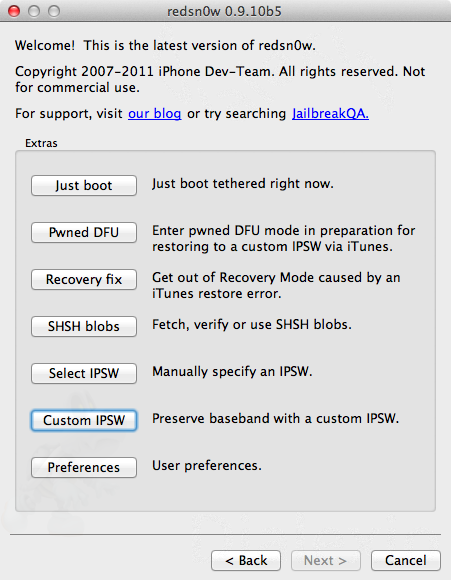
I'm trying to jailbreak my iPod touch 4g 5.0.1 (unteathered) with redsnow_win_0.9.10b3. I can get as far as DFU mode, the screen remains black and does nothing, the redsnow program does not recognize my iPod anymore. I've tried running the redsnow program as is, as admin, as compatibility for XP sp2, and compatibility for XP sp2 as admin, what gives. Every time the screen goes black and I must hold in both buttons to get it out of DFU mode so I can retry. Any help with this? I would try the latest redsnow but don't know if it works with my device since this update was for iPad2 and iPhone 4s.
Thanks for the info and offer! I need to know the model number that all iPad 3s report, though. (i.e. The CDMA/Verizon model, the global LTE model, and the Wi-Fi models probably have different model numbers. The model number doesn't change with capacity.)
Not a chance. iFish and I have come to a mutual decision to drop iOS support in favor of Android, since iFish is a newfound(?) Google fanboy, and I've grown sick of Apple's new direction.
I'm super cereal about this. I'm through with supporting Apple.
As soon as I add more Android phones to the guide. I'm working on the Motorola (Droid) RAZR, Samsung Galaxy S II, and HTC Rezound sections as we speak!
I hope everybody enjoyed the "Android Rooting/Unlocking Guide!" (I know I certainly enjoyed writing it up!)
Although there were a lot of facts (iFish's newfound Google fanboyism, my dislike for Mac OS X Lion, my shoddy attempt at making a legit Galaxy Nexus rooting/unlocking tutorial) and a lot of b/s (being angry at Apple's "lack of innovation," my praises for Samsung's Galaxy Note), we certainly have no plans to stop helping people break out of Apple's walled garden. iFish and I still like Apple. (Sorry Android users, I don't have plans for writing a tutorial!)
I don't know how many people caught this (if anyone), but the iOS guide was always available during this prank! You just had to scroll down ~6000 pixels(!!!), click where the Easter egg normally is, or click on the Al Gore caricature.
I'll take down the joke in a little bit. If you missed out on the joke and want to see it, I wrapped it up in this nice spoiler for you:
Complete iOS Jailbreaking
Android Rooting/Unlocking Guide "The beat goes on" "DRROOOOOOOIIIDD!!!!" Edition
This guide was last significantly updated on March 31, 2012 at 9:33 PM EST.
This guide is maintained by [m]Dialexio[/m], with help from [m]iFish[/m], because Dialexio is too cheap to get an Android device, even though he has a boatload of Apple crap (that he will discard in the next week or so).
Rooting/Unlocking the Galaxy Nexus (both versions)
Being a Nexus smartphone, the Galaxy Nexus is extremely easy to unlock and root. We're gonna use a program called "Galaxy Nexus Root Toolkit" by WugFresh.
DO NOT PLUG IN YOUR GALAXY NEXUS UNTIL THE PROGRAM TELLS YOU TO.
Install and run the Galaxy Nexus Root Toolkit.
Select which Galaxy Nexus model you have (GSM or CDMA), and then click "Drivers."
If you want to back up your data before rooting/unlocking, now is the time to do so, with "Backup Apps + Data."
Click on "Unlock" to unlock the bootloader, and "Root" to root your phone.
That's it! Should you need to go back to factory conditions, click on "Flash Stock + Unroot," then "OEM Lock."
FAQ
Why the sudden switch?
- [RANT MODE] I hate the dead-end road Apple's going down. Have you seen the devices Apple sold since Steve Jobs's resigning? Not one new design has left Cupertino since then. The Apple TV remained the same, the iPad retained the same design, the iPhone retained the same design, and the iPod touch stayed the same. Even iOS has (mostly) the same home screen design as it did when it first launched. (With the wallpaper being pretty much the only exception.)
Now compare that to Android handsets. With devices like Samsung's Galaxy Note being introduced, it's clear that Android device manufacturers are the ones innovating in the right direction.
On a side note, you probably noticed the lack of Mac OS X support. Don't even get me started on the atrocious mess that is Mac OS X Lion. It stumbles on calculating file sizes, half of its built-in apps don't support the new back/forward gestures, Replacing "Save As" with the very inefficient "Duplicate…" The list goes on and on.
[/RANT MODE]
Will the guide be even more cluttered than before?
- Yes. There's only so many ways I can include all of those Android handsets.
When do you expect to complete this Android guide?
- Hopefully before the fall semester begins.
I wanna jailbreak iOS, where can I find the last version of your iOS guide?
- Don't bother, and just get an Android device. They can do more and they're not artificially handicapped like iOS devices.
Why aren't there any screenshots?
- I was too lazy to boot up Windows just to take measly screenshots. Deal with it, I'm doing a favor by sharing this you know!
Why do you only have the Galaxy Nexus?
- It was the most convenient to write up, since iFish has one.
Is this an April Fools joke?
-
[anchor="aprilfools"][anchor="supercereal"]
CompleteiOS Jailbreak Guide
"APRIL FOOLS! Hope you enjoyed that! " Edition
This guide was last significantly updated on March 31, 2012 at 9:33 PM EST.
I hope everybody enjoyed the "Android Rooting/Unlocking Guide!" (I know I certainly enjoyed writing it up!) Although there were a lot of facts (iFish's newfound Google fanboyism, my dislike for Mac OS X Lion, my shoddy attempt at making a legit Galaxy Nexus rooting/unlocking tutorial) and a lot of b/s (being angry at Apple's "lack of innovation," my praises for Samsung's Galaxy Note), we certainly have no plans to stop helping people break out of Apple's walled garden. iFish and I still like Apple. (Sorry Android users, I don't have plans for writing a tutorial!)
I don't know how many people caught this (if anyone), but the iOS guide was always available during this prank! You just had to scroll down ~6000 pixels(!!!), click where the Easter egg normally is, or click on the Al Gore caricature.
I'll take down the joke a little bit. If you missed out on the joke and want to see it, I wrapped it up in this nice spoiler for you:
Complete iOS Jailbreaking
Android Rooting/Unlocking Guide "The beat goes on" "DRROOOOOOOIIIDD!!!!" Edition
This guide was last significantly updated on March 31, 2012 at 9:33 PM EST.
This guide is maintained by [m]Dialexio[/m], with help from [m]iFish[/m], because Dialexio is too cheap to get an Android device, even though he has a boatload of Apple crap (that he will discard in the next week or so).
Rooting/Unlocking the Galaxy Nexus (both versions)
Being a Nexus smartphone, the Galaxy Nexus is extremely easy to unlock and root. We're gonna use a program called "Galaxy Nexus Root Toolkit" by WugFresh.
DO NOT PLUG IN YOUR GALAXY NEXUS UNTIL THE PROGRAM TELLS YOU TO.
Install and run the Galaxy Nexus Root Toolkit.
Select which Galaxy Nexus model you have (GSM or CDMA), and then click "Drivers."
If you want to back up your data before rooting/unlocking, now is the time to do so, with "Backup Apps + Data."
Click on "Unlock" to unlock the bootloader, and "Root" to root your phone.
That's it! Should you need to go back to factory conditions, click on "Flash Stock + Unroot," then "OEM Lock."
FAQ
Why the sudden switch?
- [RANT MODE] I hate the dead-end road Apple's going down. Have you seen the devices Apple sold since Steve Jobs's resigning? Not one new design has left Cupertino since then. The Apple TV remained the same, the iPad retained the same design, the iPhone retained the same design, and the iPod touch stayed the same. Even iOS has (mostly) the same home screen design as it did when it first launched. (With the wallpaper being pretty much the only exception.)
Now compare that to Android handsets. With devices like Samsung's Galaxy Note being introduced, it's clear that Android device manufacturers are the ones innovating in the right direction.
On a side note, you probably noticed the lack of Mac OS X support. Don't even get me started on the atrocious mess that is Mac OS X Lion. It stumbles on calculating file sizes, half of its built-in apps don't support the new back/forward gestures, Replacing "Save As" with the very inefficient "Duplicate…" The list goes on and on.
[/RANT MODE]
Will the guide be even more cluttered than before?
- Yes. There's only so many ways I can include all of those Android handsets.
When do you expect to complete this Android guide?
- Hopefully before the fall semester begins.
I wanna jailbreak iOS, where can I find the last version of your iOS guide?
- Don't bother, and just get an Android device. They can do more and they're not artificially handicapped like iOS devices.
Why aren't there any screenshots?
- I was too lazy to boot up Windows just to take measly screenshots. Deal with it, I'm doing a favor by sharing this you know!
Why do you only have the Galaxy Nexus?
- It was the most convenient to write up, since iFish has one.
Is this an April Fools joke?
-
[anchor="aprilfools"][anchor="supercereal"]
CompleteiOS Jailbreak Guide
"APRIL FOOLS! Hope you enjoyed that! " Edition
This guide was last significantly updated on March 31, 2012 at 9:33 PM EST.
It’s about that time of year again where I check in with the community to see if we can get the front page aligned with what people are interested in knowing and what...
WiiCompiled is a new project that lets PC gamers play Mario Kart Wii natively on PC without emulation. Using static recompliation to convert the code into native PC...
The long awaited Grand Theft Auto VI Extended Look gameplay trailer has finally dropped on YouTube. As you all know, it had dropped 6 hours earlier on Netflix, and...
After being announced last week, the first of two broadcasts is set to go live later today with a stark focus on The Legend of Zelda and its 40th anniversary...
Thanks to the recent decomplication efforts; The Minish Cap 3DS brings the Game Boy Advance classic Zelda title to your 3DS.
The port takes full advantage of the 3DS...
In the wake of Sony's shift to a digital-only ecosystem within the next year, Xbox have today announced a surprising scheme. Aiming to offer physical buyers the same...
It is with a heavy heart that I announce the departure of our beloved Chary from the position of Chief Editor. Chary took over early 2021 and has done a wonderful job...
It's that time again folks, an update for the Switch and Switch 2, and a surprisingly big one at that! At lease for folks on the Switch 2. The most notable feature...
The second of a two-part special, a more traditional Nintendo Direct is set to air today. Unlike the Zelda Direct the contents of this one is still relatively up in...
To celebrate its 25th anniversary, XBOX has launched pre-orders for the XBOX 25th Anniversary Collection. For the occasion, the trailer below was aired.
This...
It’s about that time of year again where I check in with the community to see if we can get the front page aligned with what people are interested in knowing and what...
After being announced last week, the first of two broadcasts is set to go live later today with a stark focus on The Legend of Zelda and its 40th anniversary...
It's been something of a quiet week in the gaming space, with the deluge of big hitters trying to find their place before GTA 6 launches really kicking off next week...
In the wake of Sony's shift to a digital-only ecosystem within the next year, Xbox have today announced a surprising scheme. Aiming to offer physical buyers the same...
The long awaited Grand Theft Auto VI Extended Look gameplay trailer has finally dropped on YouTube. As you all know, it had dropped 6 hours earlier on Netflix, and...
It is with a heavy heart that I announce the departure of our beloved Chary from the position of Chief Editor. Chary took over early 2021 and has done a wonderful job...
The second of a two-part special, a more traditional Nintendo Direct is set to air today. Unlike the Zelda Direct the contents of this one is still relatively up in...
After an accidental leaking of their review video from Linus Tech Tips last week, we somewhat knew that news on Steam's latest VR venture was imminent. Today the...
Announced a few days ago, Nintendo of America have today launched their Customer Appreciation Sale. Featuring 30% discounts across a wide range of popular first-party...
A few days ago Chary stepped down as Chief Editor after 5 wonderful years, and everyone guessed the seat wouldn't stay empty for very long. Back in 2021 I proudly...








 I'll add it to the guide later. Thanks!