- Joined
- Dec 7, 2015
- Messages
- 357
- Reaction score
- 448
- Trophies
- 0
- Age
- 29
- Location
- Giant Chasm
- XP
- 894
- Country

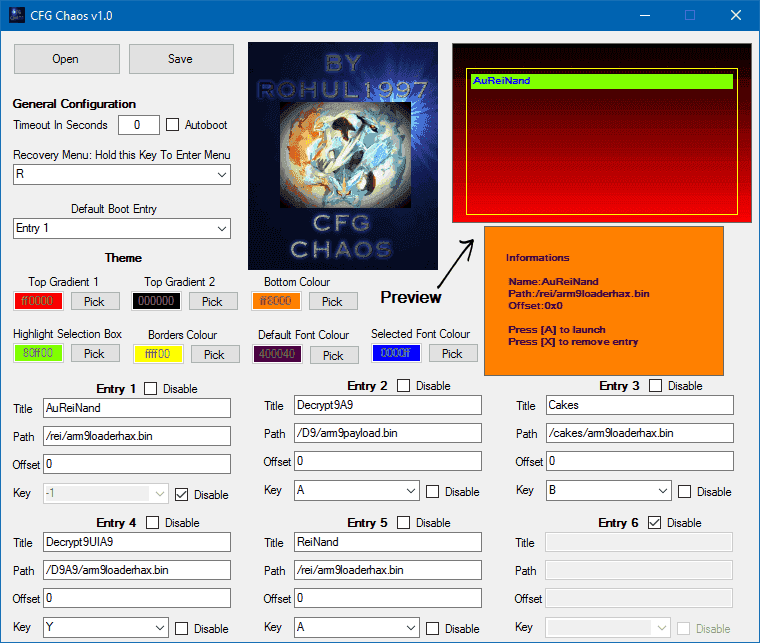
Hi all, this is a tool that I created for @cpasjuste CTRBootManager CFG file. CFG Chaos basically makes it a lot easier to edit your CFG file.
Thank you @Columbo2811 for the amazing icon/logo.
Features:
· Makes it a lot easier to edit everything on the CFG file
· You can easily set the default boot entry
· It displays the button keys instead of numbers so it’s much easier to assign them
· Makes it a lot easier to edit the theme. Instead of typing RGB hex colours you can visually see and select the colours and also you can look at a preview of how it will look like on your 3DS.
· You can set/disable entries, the path and it’s keys
Usage is simple you’ll get it once you try it.
Note: you must use the CFG file that is provided with the program or else it won’t work. Also do not manually modify the CFG or it may not work properly with my program.
To use Theme images just put Top.bin for the top image and Bot.bin for the bottom image on the root of your SD card.
I Hope you find this tool very useful.
Thank you @Columbo2811 for the amazing icon/logo.
Features:
· Makes it a lot easier to edit everything on the CFG file
· You can easily set the default boot entry
· It displays the button keys instead of numbers so it’s much easier to assign them
· Makes it a lot easier to edit the theme. Instead of typing RGB hex colours you can visually see and select the colours and also you can look at a preview of how it will look like on your 3DS.
· You can set/disable entries, the path and it’s keys
Usage is simple you’ll get it once you try it.
Note: you must use the CFG file that is provided with the program or else it won’t work. Also do not manually modify the CFG or it may not work properly with my program.
To use Theme images just put Top.bin for the top image and Bot.bin for the bottom image on the root of your SD card.
I Hope you find this tool very useful.
Attachments
Last edited by Rohul1997,