





What is Il2CppDumper.exe?
It is a dumper for unity games, so that you have function names and I think also structures and variable names in cleartext. So you know when an instructions name is getPlayerHealth you know what the function is doing



No, function up is scroll up to the nearest smaller address that has a function label.Sounds very impressive... Can you show an example how this will look in Breeze?
Function Up and Function Down is like the call hierarchy of the functions instead of Branch to and something like return back?
Post automatically merged:
Members-only download
Post automatically merged:
Members-only download

To know if a game in unity you can try dumping and see if you get two files or just one. You can also look at this last line in the game information menu. Here you can clearly tell this game is Unread Engine. Most of the time Unity game has the word somewhere too.
Last edited by TomSwitch,


Thanks. Auto-merge shouldn’t be applied to our posts.just post to avoid auto merge
I looked into porting IL2CPP to the Switch, but the effort would be significant. @NeoGranzon contrary to you perception I think you have friends or fans who are willing to make those file for you if you want them.
Post automatically merged:
Usage walk through with beta99t_pr6 on
BlazBlue Entropy Effect X ~ion20250819.48 TID: 01003DA0254A4000 BID: C35D9FD083B9A746


By the name of the nss we can guess it is a unity game.

After dumptool runs you will get main and global-metadata.dat in breeze's game directory
Copy these two files to a PC and use il2cpp to generate index1.bin, index2.bit and dump.cs. Copy them back to breeze's game directory

hp full is a cheat already made. Let take a look at it with dump.cs information

We go to ASM explorer from the first line of the cheat which is the hook. Now let's look at what this function might be.
We use Function up.

Looks like we hooked the function that test if you died.
Use the Detail button will bring you to dump.cs line that match this.

We want to see where this method belongs to. Us "Goto Namespace"


This offset match what we hooked for the hp cheat. We get to see what the memory near HP might be.
 I have confirm that offset D0 and D4 is what the name implied.
There is much more to explore.

Scroll down to methods for this class. If you want to examine what the method actually do yo can use the Goto RVA button

Here you can confirm get_HP just read it directly without other computation and return the Fp type.
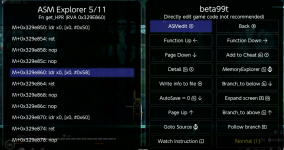
Move cursor to M+329e860 and you see on the status line showing this is the start of function get_HPR.
Last edited by TomSwitch,
Thanks for a more detailed explanation.
I think I have 2 questions after reading slowly.
What exactly is "Goto Namespace"? You show in the screenshot all Functions/Methods and I see these are all Getter Functions... So the namespace is the class object where all the functions are in? Object oriented class/object ActorAttrMgr has all this functions for all his attributes right?
And the second question where I am hanging is this where you wrote:
We get to see what the memory near HP might be.

I have confirm that offset D0 and D4 is what the name implied.
You come from 0x50 which is the offset for the HP and now you scroll page down but what is D0 and D4? You mean with "name implied" the m_HealthFlask? This step confuses me
I think I have 2 questions after reading slowly.
What exactly is "Goto Namespace"? You show in the screenshot all Functions/Methods and I see these are all Getter Functions... So the namespace is the class object where all the functions are in? Object oriented class/object ActorAttrMgr has all this functions for all his attributes right?
And the second question where I am hanging is this where you wrote:
We get to see what the memory near HP might be.
I have confirm that offset D0 and D4 is what the name implied.
You come from 0x50 which is the offset for the HP and now you scroll page down but what is D0 and D4? You mean with "name implied" the m_HealthFlask? This step confuses me
Assuming you watch asm for HP, and press X to go to memory explorer.Thanks for a more detailed explanation.
I think I have 2 questions after reading slowly.
What exactly is "Goto Namespace"? You show in the screenshot all Functions/Methods and I see these are all Getter Functions... So the namespace is the class object where all the functions are in? Object oriented class/object ActorAttrMgr has all this functions for all his attributes right?
And the second question where I am hanging is this where you wrote:
We get to see what the memory near HP might be.
I have confirm that offset D0 and D4 is what the name implied.
You come from 0x50 which is the offset for the HP and now you scroll page down but what is D0 and D4? You mean with "name implied" the m_HealthFlask? This step confuses me

You press this button the offset will be set to 50 or 54 depend on which line you watch.

See the 50? Move until you are at D4 and hack it to see what happens.
Alternatively, you can calculate D4 − 50 if you start from 00. For example, if you start from the candidate view. If you start from a bookmark with a pointer, you will probably see the bookmark view showing 50 at the start, and it will change as you move.
Go to Namespace is just a convenience feature. You can always page up until you see it. What you really need is to catch an ASM instruction that actually accesses the class properties. This isn’t always easy—you may have to spend some time working at it.
Another thing to keep in mind is that not all defined properties are actually used. Don't be too happy until you validate it by hacking.
Dump.cs would be very much more useful if everything you see is actually used. It is littered with lots and lots of rubbish. Quite often brute force hacking is faster. You want to hack everything it helps a lot, if you just want to hack a few items like HP, MP. etc brute force is often faster. Then there are those very difficult one, those you may find dump.cs helpful even for HP, MP.
Freebies you already can get my looking around. Having a name to it does make it easier to understand what they are.
Health flask you have 3 then you add the extra, then you minus the used. 0 0 means you have 3. 3, 0 means you have none.
Last edited by TomSwitch,
Assuming you watch asm for HP, and press X to go to memory explorer.View attachment 557992
You press this button the offset will be set to 50 or 54 depend on which line you watch.
View attachment 557993
See the 50? Move until you are at D4 and hack it to see what happens.
Alternatively, you can calculate D4 − 50 if you start from 00. For example, if you start from the candidate view. If you start from a bookmark with a pointer, you will probably see the bookmark view showing 50 at the start, and it will change as you move.
Go to Namespace is just a convenience feature. You can always page up until you see it. What you really need is to catch an ASM instruction that actually accesses the class properties. This isn’t always easy—you may have to spend some time working at it.
Another thing to keep in mind is that not all defined properties are actually used. Don't be too happy until you validate it by hacking.
Dump.cs would be very much more useful if everything you see is actually used. It is littered with lots and lots of rubbish. Quite often brute force hacking is faster. You want to hack everything it helps a lot, if you just want to hack a few items like HP, MP. etc brute force is often faster. Then there are those very difficult one, those you may find dump.cs helpful even for HP, MP.
Freebies you already can get my looking around. Having a name to it does make it easier to understand what they are.
Health flask you have 3 then you add the extra, then you minus the used. 0 0 means you have 3. 3, 0 means you have none.
Yes I see the 50... So the X ButtonPress from ASM instruction for going to the Memory Explorer is to see where the structure of the base address is lying and therefore the offset of 50 is the health (Didn't knew that and thought when you go to Memory Explorer you see where the game code logic for the ASM instruction is lying in memory - so good to know) then the rest makes sense...
I think the name of HealthFlask was not cleat to me what flask means but it is like a HP potion or something like that (and as you wrote you have 3 plus the extra and minus the used to get the total) so when you scroll through the attributes or the dump.cs file you scan for such things because they are important and as you said... Not each is used from the developers... get it.
And I suppose most of the properties are not used by enemy. HP is. Health flask unlikely.Yes I see the 50... So the X ButtonPress from ASM instruction for going to the Memory Explorer is to see where the structure of the base address is lying and therefore the offset of 50 is the health (Didn't knew that and thought when you go to Memory Explorer you see where the game code logic for the ASM instruction is lying in memory - so good to know) then the rest makes sense...
I think the name of HealthFlask was not cleat to me what flask means but it is like a HP potion or something like that (and as you wrote you have 3 plus the extra and minus the used to get the total) so when you scroll through the attributes or the dump.cs file you scan for such things because they are important and as you said... Not each is used from the developers... get it.

This is health flask. Developers can use any strange name they like—as long as it makes sense to themselves.

this very handy to check in breeze, im using Il2CppDumper GUI which didnt give me these 2 files index1.bin, index2.bit, can you point me to GitHub which download that app?Thanks. Auto-merge shouldn’t be applied to our posts.
I looked into porting IL2CPP to the Switch, but the effort would be significant. @NeoGranzon contrary to you perception I think you have friends or fans who are willing to make those file for you if you want them.
Post automatically merged:
Usage walk through with beta99t_pr6 on
BlazBlue Entropy Effect X ~ion20250819.48 TID: 01003DA0254A4000 BID: C35D9FD083B9A746
View attachment 557927
View attachment 557928
By the name of the nss we can guess it is a unity game.
View attachment 557929
After dumptool runs you will get main and global-metadata.dat in breeze's game directory
Copy these two files to a PC and use il2cpp to generate index1.bin, index2.bit and dump.cs. Copy them back to breeze's game directory
View attachment 557930
hp full is a cheat already made. Let take a look at it with dump.cs information
View attachment 557931
We go to ASM explorer from the first line of the cheat which is the hook. Now let's look at what this function might be.
We use Function up.
View attachment 557933
Looks like we hooked the function that test if you died.
Use the Detail button will bring you to dump.cs line that match this.
View attachment 557935
We want to see where this method belongs to. Us "Goto Namespace"
View attachment 557938
View attachment 557939
This offset match what we hooked for the hp cheat. We get to see what the memory near HP might be.
View attachment 557940I have confirm that offset D0 and D4 is what the name implied.
There is much more to explore.
View attachment 557941
Scroll down to methods for this class. If you want to examine what the method actually do yo can use the Goto RVA button
View attachment 557942
Here you can confirm get_HP just read it directly without other computation and return the Fp type.
View attachment 557943
Move cursor to M+329e860 and you see on the status line showing this is the start of function get_HPR.
thanks
it's on the Breeze download page?this very handy to check in breeze, im using Il2CppDumper GUI which didnt give me these 2 files index1.bin, index2.bit, can you point me to GitHub which download that app?
thanks
im using cmd not success, is it something else to use that command with "Il2CppDumper.exe main global-metadata.dat"?it's on the Breeze download page?
this is what i got and it said missing the .dll

Last edited by ranma99vn,
I haven't try it yet,im using cmd not success, is it something else to use that command with "Il2CppDumper.exe main global-metadata.dat"?
this is what i got and it said missing the .dll
View attachment 558068
try using the gui, except replace Il2CppDumper with the one from Tom
did try that but it still give me the Il2CppDumper.dll like photo above, ill wait for Tom thenI haven't try it yet,
try using the gui, except replace Il2CppDumper with the one from Tom
thnks
My il2cppdumper is a fork of the original, if the original works then my fork should work too.im using cmd not success, is it something else to use that command with "Il2CppDumper.exe main global-metadata.dat"?
this is what i got and it said missing the .dll
View attachment 558068
Members-only download
Source
Members-only download
Some game need to convert to elf as the il2cpp internal converter not able to do the conversion properly but this game is not one of them.
Last edited by TomSwitch,
i download new ll2cpp try it with elf aslo main it still give me this im using cmd, the ll2cppdumper.dll jut keep pop upMy il2cppdumper is a fork of the original, if the original works then my fork should work too.
use this members onlyMembers-only download
Source source is updated, release is old, only made the first release then decided that it is easier to just put it with Breeze.

i download new ll2cpp try it with elf aslo main it still give me this im using cmd, the ll2cppdumper.dll jut keep pop up
View attachment 558075

I see now there is a dll. There are dependencies, I have to look into it.
Last edited by TomSwitch,
what is original?Does the original work?
Im using Gui dumper normally to get dump.cs and others
i was search on ll2cpp then come across a gidhub download from there and it extract out the same as gui dumper

and these i got with gui dumper just need some how to get that 2 files index1.bin, index2.bin will be sweet

Last edited by ranma99vn,

Now these two are zip up and place in the release. Try them. I suppose they require the corresponding .net being installed on your PC and I have these two version on this computer.
Thanks Tom it works try with net6.0 and net8.0View attachment 558079
Now these two are zip up and place in the release. Try them. I suppose they require the corresponding .net being installed on your PC and I have these two version on this computer.
Similar threads

- Replies
- 1
- Views
- 253


- Replies
- 3
- Views
- 317
- Replies
- 8
- Views
- 574
- Replies
- 2
- Views
- 246


