Hacking Black screen after loading cfw

  • Thread starter Thread starter gi5431
  • Start date Start date
  • Views Views 31,502
  • Replies Replies 33

gi5431

Well-Known Member
Member
Joined
Dec 27, 2012
Messages
212
Reaction score
4
Trophies
0
Age
41
XP
498
Country
United States
Hi guys,
I followed this guide "Switch Hacking 101: How to launch the Homebrew menu on all FW" in the tutorials section of gbatemp. I got to the stage where I launch the cfw, and the system should reboot into the OS (pretty much the last step). The system reboots and the Nintendo screen flashes, but then I just get a black screen. The switch is not bricked, cause I can turn it off and it returns to it's normal state. I'm on firmware 4.1, and am trying to use a 128gb sd card. I mention the SD size cause I get a message saying I must update to use a large capacity SD card, and thought it might be causing the issue. Any ideas?
Thanks Guys
 
The black screen is a result of trying to boot CFW using an exFAT formatted SD card on a console which does not support exFAT hence the message saying you must update to use a large capacity SD card. You can burn fuses, update your firmware to 6.0, and obtain the exFAT update that way or you can reformat your SD card to FAT32 and use the homebrew application ChoiDujourNX to add the exFAT patch to your firmware of choosing.

I also recommend not following that tutorial as it hasn't been updated in a long time. There are much better guides for the other CFW available, however not found on this site. I will link them down below for you.
ReiNX: https://reinx.guide/
Atmosphere: https://www.sdsetup.com/
 
The black screen is a result of trying to boot CFW using an exFAT formatted SD card on a console which does not support exFAT hence the message saying you must update to use a large capacity SD card. You can burn fuses, update your firmware to 6.0, and obtain the exFAT update that way or you can reformat your SD card to FAT32 and use the homebrew application ChoiDujourNX to add the exFAT patch to your firmware of choosing.

I also recommend not following that tutorial as it hasn't been updated in a long time. There are much better guides for the other CFW available, however not found on this site. I will link them down below for you.
ReiNX: https://reinx.guide/
Atmosphere: https://www.sdsetup.com/

Thanks so much. Is 6.0 the most up to date firmware? Everywhere says not to update, will i lose functionality if i update?
 
Thanks so much. Is 6.0 the most up to date firmware? Everywhere says not to update, will i lose functionality if i update?
I gave you 2 options on how to get the exFAT patch.
The black screen is a result of trying to boot CFW using an exFAT formatted SD card on a console which does not support exFAT hence the message saying you must update to use a large capacity SD card. You can burn fuses, update your firmware to 6.0, and obtain the exFAT update that way or you can reformat your SD card to FAT32 and use the homebrew application ChoiDujourNX to add the exFAT patch to your firmware of choosing.

I also recommend not following that tutorial as it hasn't been updated in a long time. There are much better guides for the other CFW available, however not found on this site. I will link them down below for you.
ReiNX: https://reinx.guide/
Atmosphere: https://www.sdsetup.com/
 
  • Like
Reactions: -----a
Hey, Do I need to DL the 6.0 update xci file, or will choiDujourNX DL it? If I do, where do I get it from?
 
Hey, Do I need to DL the 6.0 update xci file, or will choiDujourNX DL it? If I do, where do I get it from?
They must be downloaded separately and because they are copyrighted material, we cannot share where to obtain those files. Please review the hints from the ChoiDujourNX thread on where to obtain such files (each bullet point refers to a different place on how to obtain them)
You still need to acquire the folders containing firmware content somehow, some of the options are:
  • Extract the UPDATE partition from an XCI image of the cartridge that contains the update you want into a folder
These are common cartridges and firmware versions they contain:
Puyo Puyo Tetris/ 1-2 Switch (1.0.0) - would never recommend installing this one as no Switch made with 1.0.0 actually runs it (its a slightly different 1.0.0 with exFAT that bricks you)
Dragon Ball Xenoverse 2/ Mario plus Rabbids Kingdom Battle/Cars 3 Driven to Win (2.1.0)
Splatoon 2/ Sonic Forces (2.3.0)
Pokemon Tournament DX (3.0)
Batman The Telltale Series/ Syberia 2/ The Elder Scrolls V. Skyrim (3.0.1)
Attack on Titans 2/ Xenoblade Chronicles 2 (3.0.2)
Bayonetta 2/ Gal Gun 2 (4.0.1)
Kirby Star Allies (4.1.0)
Octopath Traveler (5.0.2)
Taiko no Tatsujin Nintendo Switch Version JPN (5.1.0)
  • Copy the SYSTEM:/Contents/registered folder from another Switch that is running the firmware version you want
  • Copy the SYSTEM:/Contents folder from a Switch that has a "System update is pending" notification. This will let you pick either the currently running firmware, or the pending firmware to install.
  • *cough* xbins *cough*
 
  • Like
Reactions: -----a
They must be downloaded separately and because they are copyrighted material, we cannot share where to obtain those files. Please review the hints from the ChoiDujourNX thread on where to obtain such files (each bullet point refers to a different place on how to obtain them)

--------------------- MERGED ---------------------------

Dude, I hate to do this to u, but I can't find this ChoiDujourNX thread
 
--------------------- MERGED ---------------------------

Dude, I hate to do this to u, but I can't find this ChoiDujourNX thread
I linked it in my first post within this thread. I also quoted the sources of the firmware files directly from the thread in my most recent post here.
 
  • Like
Reactions: -----a
They are all weird file names. Which one is the exfat part of the update?

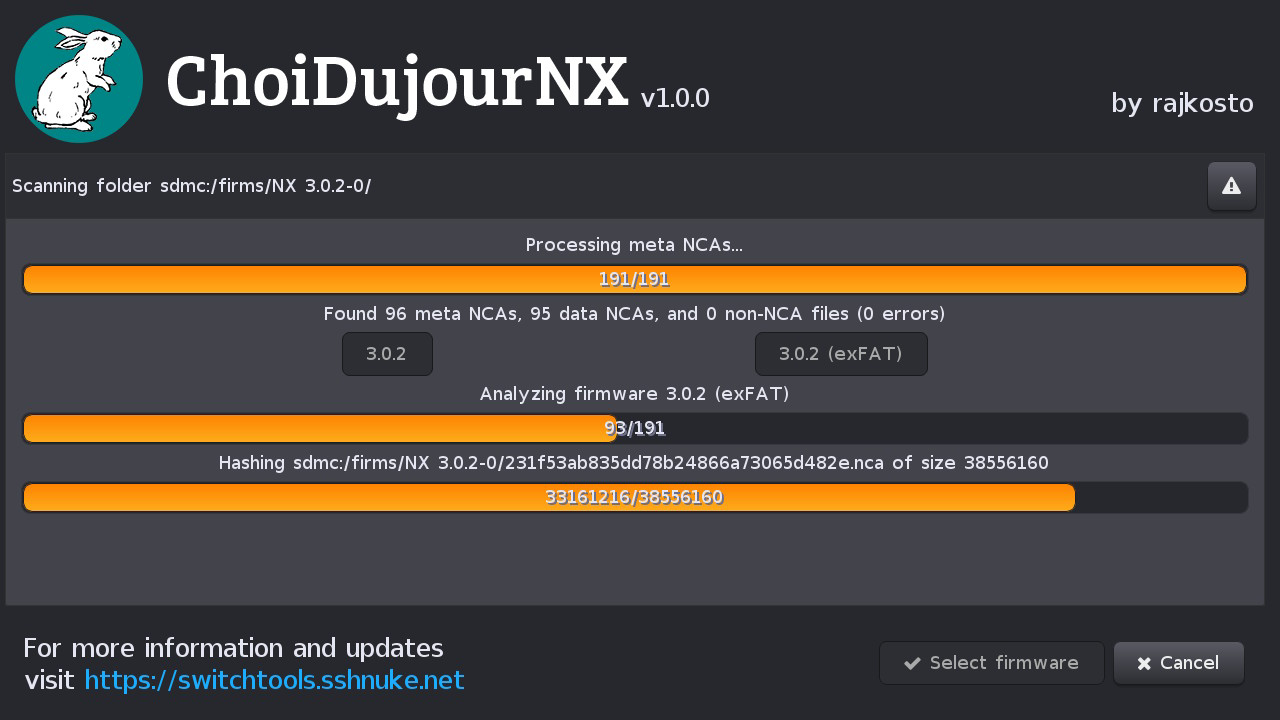
When you are running ChoiDujourNX and you navigate to the firmware folder containing the .NCA files, you press Choose in the bottom-right corner of the screen to select that firmware.
After you press Choose, you should be shown something that looks like this screen:
2018-08-01_08-37-58_IoDdukSBc.png
[/SPOILER}
 
I'm sry dude, but before I hit install, is this gona put me on firmware 6.0? or will I remain on 4.1 with ex-fat support? can u check out the photo? i just really don't wanna mess this up. thx
 

Attachments

  • 43248275_502261910177322_9002955221462155264_n.jpg
    43248275_502261910177322_9002955221462155264_n.jpg
    136.8 KB · Views: 442
Morning, So I've got 2 problems. It keeps on asking me to update for controller support when I switch it on, and where do I put the xci rom files on the SD card? thanks man
 
Morning, So I've got 2 problems. It keeps on asking me to update for controller support when I switch it on, and where do I put the xci rom files on the SD card? thanks man
As long as you didn't mod your Joy-Con (because that would involve shorting pins 9 & 10), you can update your controllers. As for .XCI files, it depends on the tool you are using to load them. I think all of them support putting them on the root.
 
  • Like
Reactions: loler55

Site & Scene News

Popular threads in this forum