Hacking AR Games Issues

  • Thread starter Thread starter nuttyuu
  • Start date Start date
  • Views Views 4,133
  • Replies Replies 18

nuttyuu

Member
Newcomer
Joined
Dec 4, 2007
Messages
5
Reaction score
0
Trophies
1
XP
194
Country
United States
so today my friend was checkin out my 3ds and he decided to put all the cards infront of the camera during star snap or whatever that ar game is, so he place all but the AR cube card and i decided to mess with him so i put it down and took it away.. the cube dude still appeared and the 3ds started spazzing out and lagging.. we were able to take a pic clearly showin theres no cube card. also the 3ds was in 3D mode when this all happened.. not sure if it could be a possible buffer overflow just thought i would post.
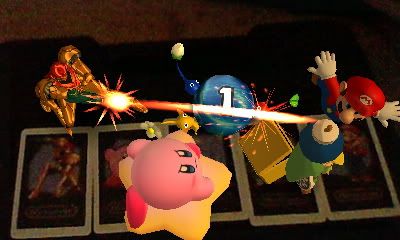
HNI_0005.jpg


MPO for 3D http://www.megaupload.com/?d=7IYJQ5EW

 
Never had the problem.
Taking the AR card away should just make Mr. AR (the box) disappear.
Also.... why use 3D when you move all over the place with your 3DS?
 
Based on the picture, you may not have had proper lighting. I believe the 3Ds interprets the cards based on the box color, and those colors, under non-optimal lighting, might make the 3DS read them differently for every frame, forcing some to appear when they shouldn't, or place them in a spot where their card isn't.
 
Yeah, in poor lighting I've had the 3DS mistake Kirby's card for the ? card sometimes and ended up with both Kirby and Mr AR appearing at once.
 
All the cards were placed, the ? Card was placed and removed yet it still stayed but was freaking out the 3DS
 
I'm assuming you need fantastic lighting. The 3DS seems like it still has a few bugs to iron out. The next few updates should improve on this.
 
spiritofcat said:
Yeah, in poor lighting I've had the 3DS mistake Kirby's card for the ? card sometimes and ended up with both Kirby and Mr AR appearing at once.

Yeah, same. My room isn't too bright, so when I try AR in there, it mixes up the cards.

Works perfectly in my kitchen.
 
I can't seem to get any AR cards to work other than the A-1 card.. I've tried having only a card other than A-1, I've tried having the A-1 and another card, I've even tried focusing the viewpoint on a different card. Does anyone know what the issue is?
Here's a pic of the issue:
hni0007v.jpg


Also, is it normal for my camera be so tinted?

Edit: Oh, and to give a little more info, I'm not sure but I might have caused this by using all 6 cards at once.
 
Sheith said:
I can't seem to get any AR cards to work other than the A-1 card.. I've tried having only a card other than A-1, I've tried having the A-1 and another card, I've even tried focusing the viewpoint on a different card. Does anyone know what the issue is?
Here's a pic of the issue:
hni0007v.jpg


Also, is it normal for my camera be so tinted?

Edit: Oh, and to give a little more info, I'm not sure but I might have caused this by using all 6 cards at once.

you need to unlock the other cards by playing the "?" card
 
Sheith said:
I can't seem to get any AR cards to work other than the A-1 card.. I've tried having only a card other than A-1, I've tried having the A-1 and another card, I've even tried focusing the viewpoint on a different card. Does anyone know what the issue is?
Here's a pic of the issue:
hni0007v.jpg


Also, is it normal for my camera be so tinted?

Edit: Oh, and to give a little more info, I'm not sure but I might have caused this by using all 6 cards at once.
You should use the ? card to choose the star picture app thing so that the character cards would show up. The star picture app thing is just above the archery app.
 
Thanks guys, it seems even while using the 3DS directly under the light it was indeed too dark! I tried it earlier today iutside and it worked perfectly. That also seems to have been the cause of the issue with the camera's tint as well.
It's officially my 3r'd day with the 3DS so I'm still a bit green behind the ears with it.
 
Sorry but you are wrong, the 3DS does not recognise card colour at all (even though it says it does in the manual)
I know this because I have played on a black and white printed set.

The cameras look for the 3d cube shadow, and then what part of the shadow is blocked by the image drawn on the card. MR AR needs a solid shadow so any bad lighting conditions can affect what it can 'see' on the card.
to test this look where kirbys foot extrudes from the card and put your thumb in this position on the ? card, look at it with your 3DS set to star pics and kirby will appear instead of MR AR.

*biggest applause in the world*
thank you, thank you.
 
Sorry but you are wrong, lostdwarf.

Check your facts before you make such smug posts. There have already been numerous posts and discussion on this subject. The shape can be important to the character placed on the card, resulting in high-contrast black and white cards to also display the images, but color plays an equally, if not even more so, important role. If you find the base color that a character card uses and then create an AR card using just the shape of the box, but filling it with the majority color from the character card, you can have the 3DS display that character. For example a box card featuring just kirby's base shade of pink will display kirby, despite there being no indication that it is kirby's card in silhouette. repeat this for the other base character colors and you find that color plays just as important a factor in the reading of AR cards as silhouette.

Proof: http://gbatemp.net/t286869-ar-cards-is-thi...-work?&st=0

So yeah.. thank you ;p
 

Site & Scene News

Popular threads in this forum