- Joined
- Apr 15, 2009
- Messages
- 67
- Reaction score
- 0
- Trophies
- 1
- Age
- 32
- Location
- Searching...
- XP
- 170
- Country

Hey guys,
Since my Smart Cartridge arrived today, I've been getting copies of games i have, but are damaged. (basically downloading copies of games i already own, but are too damaged to be backed up directly)
However, i've hit a small snag, any game with a .cue and .bin file, doesnt appear to run properly on my PS1. It runs fine on the emulator ePSXe, yet on my PS1, it'll run but with problems.
Heres an example:
Kurushi (Also known as Intelligent Qube) - Included a .bin and .cue. Ran fine in emulator, when burned and placed in PS1, game ran but with NO audio except sound effects (Running, moving cubes, etc.).
Im assuming, that because the game runs fine in the emulator that its me burning the disk wrong, so heres what i've been doing with backups that are .bin and include a .cue:
Uncompress backup (most i get are in .ecm format)
Open .cue file in UltraISO
Select to burn the image at 8x (Lowest my macs SuperDrive will go )
Disk is burnt, and ejected.
Boot up PS1 with *Mod
Wait for original disk to stop spinning, and remove.
Insert backup
Game boots, with the problems mentioned above, the same problems occur with most games i got with a .bin and .cue, the game runs but no background audio/music
I am aware i can use Alcohol 120%, but most tutorials i found mentioned "Select RAW-DAO" but my version of Alcohol 120% doesnt have this? Regardless if i select the "Play Station" protection or not.
I have also tried IMGBurn, opening the .cue file and then burning, but no dice. If it helps, the contents of the .cue are as follows:
If im honest, that cue file looks incorrect, it mentions 1 track, when i believe the game has more than this (different background musics/etc.)
Any help/info would be most appreciated.
I believe you also need these details:
PS1 Console (Phat and Gray )
BIOS: SCPH-7502
PAL Region
*Mod: External hardware modification via the I/O Port. (Check below for more information)
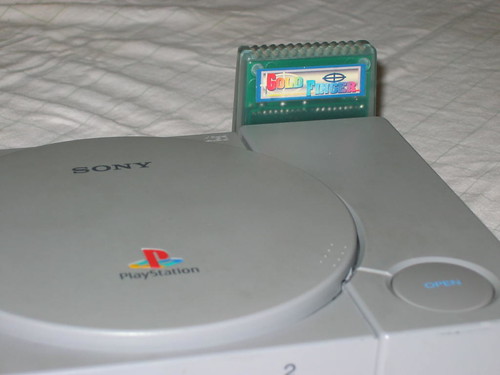
Mod: The mod im using is a cartridge that plugs into the I/O port of this PS1 Console, its actually a cheat cartridge, but because when the cartridge is booted, the disk stops spinning, im able to swap out an original disk for a backup game. (Like the swap trick, only this time the disk isnt spinning while swapping) Works great on the backups I've done thus far (except the ones with the issue mentioned above). The Cartridge is called "Smart Cartridge."
Since my Smart Cartridge arrived today, I've been getting copies of games i have, but are damaged. (basically downloading copies of games i already own, but are too damaged to be backed up directly)
However, i've hit a small snag, any game with a .cue and .bin file, doesnt appear to run properly on my PS1. It runs fine on the emulator ePSXe, yet on my PS1, it'll run but with problems.
Heres an example:
Kurushi (Also known as Intelligent Qube) - Included a .bin and .cue. Ran fine in emulator, when burned and placed in PS1, game ran but with NO audio except sound effects (Running, moving cubes, etc.).
Im assuming, that because the game runs fine in the emulator that its me burning the disk wrong, so heres what i've been doing with backups that are .bin and include a .cue:
Uncompress backup (most i get are in .ecm format)
Open .cue file in UltraISO
Select to burn the image at 8x (Lowest my macs SuperDrive will go )
Disk is burnt, and ejected.
Boot up PS1 with *Mod
Wait for original disk to stop spinning, and remove.
Insert backup
Game boots, with the problems mentioned above, the same problems occur with most games i got with a .bin and .cue, the game runs but no background audio/music
I am aware i can use Alcohol 120%, but most tutorials i found mentioned "Select RAW-DAO" but my version of Alcohol 120% doesnt have this? Regardless if i select the "Play Station" protection or not.
I have also tried IMGBurn, opening the .cue file and then burning, but no dice. If it helps, the contents of the .cue are as follows:
QUOTE said:FILE "SCES_00866.BIN" BINARY
TRACK 01 MODE2/2352
INDEX 01 00:00:00
If im honest, that cue file looks incorrect, it mentions 1 track, when i believe the game has more than this (different background musics/etc.)
Any help/info would be most appreciated.
I believe you also need these details:
PS1 Console (Phat and Gray )
BIOS: SCPH-7502
PAL Region
*Mod: External hardware modification via the I/O Port. (Check below for more information)
Mod: The mod im using is a cartridge that plugs into the I/O port of this PS1 Console, its actually a cheat cartridge, but because when the cartridge is booted, the disk stops spinning, im able to swap out an original disk for a backup game. (Like the swap trick, only this time the disk isnt spinning while swapping) Works great on the backups I've done thus far (except the ones with the issue mentioned above). The Cartridge is called "Smart Cartridge."