Hacking A9LH GATEWAY 3DS+LUMA

Well I just have an updated sysNAND, but I have no problems booting into GW classic mode, nor do I have problems when booting into GW sysNAND mode

Perhaps there's something wrong with your emuNAND.
 
I followed plailects guide and have sysNAND only. (I had an emuNAND before, but I think I don't need it cause I'm just playing games and not modding something (the homemenu e.g).

So when I want to cheat (or find cheats) I'll boot the GW payload, if not I just start "normal" (Luma3DS CFW). And since I have no emuNAND installed, GW boots into (the updated) sysNAND.
 
I followed plailects guide and have sysNAND only. (I had an emuNAND before, but I think I don't need it cause I'm just playing games and not modding something (the homemenu e.g).

So when I want to cheat (or find cheats) I'll boot the GW payload, if not I just start "normal" (Luma3DS CFW). And since I have no emuNAND installed, GW boots into (the updated) sysNAND.
you have gateway sysnand?
 
There are 3 "types" of NAND.

SysNAND = Chip on your 2/3DS mainboard
EmuNAND/RedNAND = just a copy of the sysnand (only difference between them is where the NAND Image starts on SD)


RedNAND
RedNAND places the full NAND image at byte offset 512 on the SD card. The modified firmware hence needs to offset all NAND reads and writes by 512 bytes.

EmuNAND
Calling the NAND image size N, EmuNAND places bytes [512:N-1] of the NAND image at byte offset 512 on the SD card, and bytes [0:511] at byte offset N. The modified firmware needs to make sure that NAND reads/writes to the first 512 bytes are redirected properly, but leaves all other accesses unmodified.

Source: http://3dbrew.org/wiki/NAND_Redirection

So whenever you copy an emunand or rednand back to your sysnand, it becomes sysnand. It doesn't matter if it was an emu- or a rednand before. It also doesn't matter if it was created with gateway or with emunand9.
AFAIK there is no difference between a emunand cretaed by the GW launcher.dat und the emunand created by emunand9! (emunand created by emunand9 also works with GW).

conclusion: a "GW sysnand" doesn't exist

Why do you want to start classic mode?

Tell us what you want to do.

 
There are 3 "types" of NAND.

SysNAND = Chip on your 2/3DS mainboard
EmuNAND/RedNAND = just a copy of the sysnand (only difference between them is where the NAND Image starts on SD)


RedNAND
RedNAND places the full NAND image at byte offset 512 on the SD card. The modified firmware hence needs to offset all NAND reads and writes by 512 bytes.

EmuNAND
Calling the NAND image size N, EmuNAND places bytes [512:N-1] of the NAND image at byte offset 512 on the SD card, and bytes [0:511] at byte offset N. The modified firmware needs to make sure that NAND reads/writes to the first 512 bytes are redirected properly, but leaves all other accesses unmodified.

Source: http://3dbrew.org/wiki/NAND_Redirection

So whenever you copy an emunand or rednand back to your sysnand, it becomes sysnand. It doesn't matter if it was an emu- or a rednand before. It also doesn't matter if it was created with gateway or with emunand9.
AFAIK there is no difference between a emunand cretaed by the GW launcher.dat und the emunand created by emunand9! (emunand created by emunand9 also works with GW).

conclusion: a "GW sysnand" doesn't exist

Why do you want to start classic mode?

Tell us what you want to do.
i know this...
Gw Sysnand I mean a9lh created with gw
 
Right, format/remove emunand via Decrypt 9 because there is no reason to have emunand with a a9lh setup imo. Once you have Luma sysnand on 11.0, it will more than suffice.

Black screens are caused because GW is looking for a Emunand and also because of V2 a9lh using their "arm9loaderhax.bin payload, so remove emunand and follow the advice in the other posts about setting up the payload with a boot manager, if you used V2 a9lh.
 
  • Like
Reactions: SilvioPagano11
Listen, do you or do you not have the _DSMENU.dat on your microSD card, and are you or are you not using Gateway's 4.1b launcher.dat?
Im using launcher.dat 4.0b... i havent red card and Im trying to start gateway classic mode
 
@SilvioPagano11

I have two questions that I need you to answer so I can try and figure out what is going on.

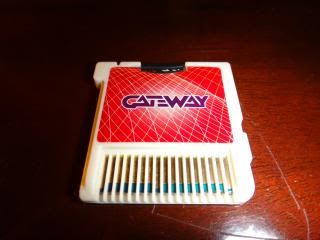
First, do you actually own a Gateway 3DS Flashcart? It looks like the image below:
DSC00461.jpg

Second, did you install A9LH using Plailect's guide, by following the guide 100%, all the way through the end of Part 5, or did you install it using the option in the Gateway Menu?
 
  • Like
Reactions: SilvioPagano11
@SilvioPagano11

I have two questions that I need you to answer so I can try and figure out what is going on.

First, do you actually own a Gateway 3DS Flashcart? It looks like the image below:
DSC00461.jpg

Second, did you install A9LH using Plailect's guide, by following the guide 100%, all the way through the end of Part 5, or did you install it using the option in the Gateway Menu?
Yes i know... Yes i use plailect guide

Inviato dal mio SM-G925F utilizzando Tapatalk
 
@SilvioPagano11

I have two questions that I need you to answer so I can try and figure out what is going on.

First, do you actually own a Gateway 3DS Flashcart? It looks like the image below:
DSC00461.jpg

Second, did you install A9LH using Plailect's guide, by following the guide 100%, all the way through the end of Part 5, or did you install it using the option in the Gateway Menu?
 
Yes i know... Yes i use plailect guide

Inviato dal mio SM-G925F utilizzando Tapatalk

Based on everything you have told us, one of three things is happening.

Your A9LH installation is not the problem, neither is Luma, nor the payload being used to launch GW. The fact you can see the GW menu tells me that everything is working up to and including the launcher.dat.

So that means either:
  1. You do not have a Gateway 3DS Red Card inserted into the 3DS cartridge slot in your 3DS.
  2. Your Gateway 3DS Red Card is damaged/defective and not reading properly (or potentially the slot itself is not reading cartridges right).
  3. You still have the remnant's of an EmuNAND on your sd card and Gateway is detecting and trying to boot said EmuNAND.

With your assistance, I can narrow this down through a process of elimination.

First, I need you to let the system load into Luma3DS and see if any normal retail cartridges work. Don't assume that it still works because it worked before. Try it right now before responding.

Second, attempt to load GW and tell me what it says after displaying the Gateway Dragon logo.
 
Based on everything you have told us, one of three things is happening.

Your A9LH installation is not the problem, neither is Luma, nor the payload being used to launch GW. The fact you can see the GW menu tells me that everything is working up to and including the launcher.dat.

So that means either:
  1. You do not have a Gateway 3DS Red Card inserted into the 3DS cartridge slot in your 3DS.
  2. Your Gateway 3DS Red Card is damaged/defective and not reading properly (or potentially the slot itself is not reading cartridges right).
  3. You still have the remnant's of an EmuNAND on your sd card and Gateway is detecting and trying to boot said EmuNAND.

With your assistance, I can narrow this down through a process of elimination.

First, I need you to let the system load into Luma3DS and see if any normal retail cartridges work. Don't assume that it still works because it worked before. Try it right now before responding.

Second, attempt to load GW and tell me what it says after displaying the Gateway Dragon logo.
ok thank you :)
 

Site & Scene News

Popular threads in this forum