Tutorial
Updated
5.5.2 Browser with 5.5.1 vulnerability [CFW required]
WARNING: DO NOT FOLLOW THIS GUIDE IF YOU DON'T HAVE HAXCHI OR CBHC INSTALLED!
You will lose all Homebrew entry points, the browser will not be usable anymore.
This guide has been written when there was no 5.5.2 exploit. CFW DOES NOT INCLUDE MOCHA, IF YOU LAUNCH MOCHA FROM THE BROWSER!
If you are on 5.5.2 you can use one of the new Homebrew entry points, such as https://stupiid.ovh, https://u.drg.li or https://sleepii.ovh.
This guide is NOT a 5.5.2 exploit, and will not get you Homebrew on 5.5.2, this is purely for those with CBHC or Haxchi who want the old browser exploit back for any reason.
Follow this guide only if you want both cfw and a relatively stable browserhax. (This is more stable than the 5.5.2 browser hax, but doesn't matter too much because it requires Haxchi or CBHC)
Downgraded browser's with NO CFW (Haxchi or CBHC) = no more Homebrew for you! (until a new update comes out, or a new exploit that doesn't require the browser comes out.)
Important note: BEFORE doing any permanent changes to your console's internal files, you should always make sure you have a backup (Seeprom and OTP is a my best option for this guide) (AppStore). if you don't make a full NAND backup, at least do a OTP/SEEPROM dump, that will save your console if you brick the browser, as you can install Haxchi with your Seeprom and OTP. Backing up your Seeprom and OTP will NOT fix full CBHC or FTPiiU bricks (Console not booting). Not necessarily only before following this guide, it's common advice for EVERY console's hacking projects. Always read and understand all the guide before starting it.
-Beginning-
Hello, this is a guide on how to downgrade your Internet Browser as to use the old browser vulnerability.
This means you will be able to use https://loadiine.ovh on 5.5.2, but first read the requirements, your Wii U might not be supported depending on what Homebrew you use.
-Requirements and warnings-
This requires CBHC, or Haxchi (you should have either Haxchi or CBHC if you're on 5.5.2, and if not you're out of luck) an FTP client, FTPiiU Everywhere, and an encrypted version of the Wii U Internet Browser, which can be gained through JNUSTool.
-Starting-
First off, you want to go to the directory where JNUSTool.jar is and open a Command Prompt window there by putting your mouse cursor in an open area, and holding shift and right clicking. You should see an option that says "Open command window here" and you want to click it. Then paste in this command to get the Internet Browser code folder.
"java -jar JNUSTool.jar 000500301001210A v241"
It should do a long string of things in the terminal and then a window should appear.
First, select the arrow that looks like this, next to code (make sure that you don't select the checkbox next to code)

Scroll down until you find mvplayer.rpl, and click the arrow next to it, and then hit download.
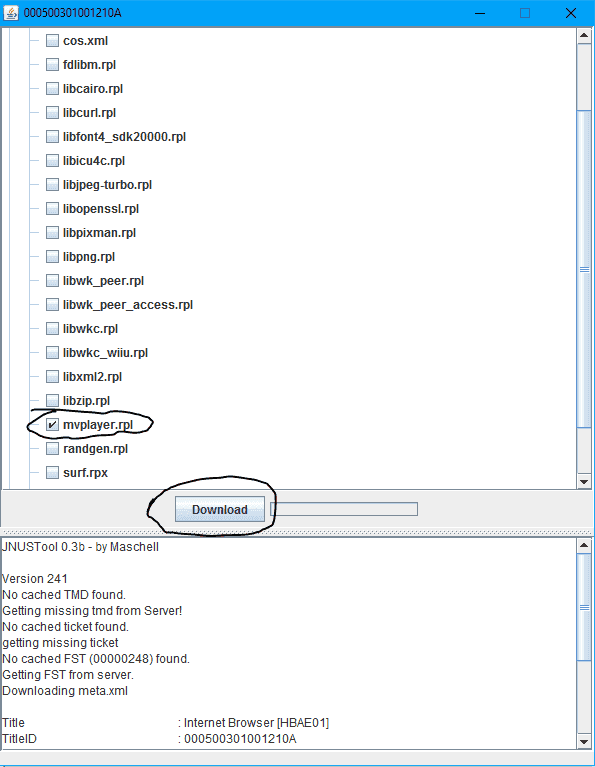 It should go through it's download process, and eventually finish. Once it's finished, find the output folder which should have the name "Internet Browser [HBAE01]" open the folder, and then open the "code" folder.
-Wii U Side-
Now, head over to your Wii U, and open the Homebrew Launcher with CFW on, otherwise known as signature patches. Load FTPiiU Everywhere, and open Filezilla or whatever FTP client you use.
-FTP and the Wii U-
In the box that says "host" type the IP address displayed on your gamepad screen and select "connect" on your FTP client.
If your console region is USA, go to /storage_mlc/sys/title/00050030/1001210a/code
If your console region is EUR, go to /storage_mlc/sys/title/00050030/1001220a/code
If your console region is JPN, go to /storage_mlc/sys/title/00050030/1001200a/code
Then, copy the mvplayer.rpl file from /Internet Browser [HBAE01]/code which you opened earlier to your FTP client that's open in the directory I told you to go to. It should prompt you to overwrite another file called mvplayer.rpl, and when it does, select yes. Once the file transfer is completed, press the home button on your gamepad, and do all the necessary steps to get to the home menu.
-Final steps!-
Once you're at the home menu, power down your console (TURNING OFF YOUR WII U IS REQUIRED, DO NOT SKIP THIS STEP OR THE DOWNGRADE WILL NOT WORK), then power it on, and navigate to the Internet Browser with CFW on. Go to https://loadiine.ovh on your Internet Browser, and if it redirects you to a page saying you're on 5.5.2, go to the URL that it redirects you to, and change the "l=552" to "l=551" and hit ok. Once you've done that, launch the browser exploit as you normally would and you should be good to go.
-Thanks-
I hope you enjoyed this tutorial! It's my first one on here, so I do understand it's not very helpful for a beginner, but I'll try my best, thanks.
You will lose all Homebrew entry points, the browser will not be usable anymore.
This guide has been written when there was no 5.5.2 exploit. CFW DOES NOT INCLUDE MOCHA, IF YOU LAUNCH MOCHA FROM THE BROWSER!
If you are on 5.5.2 you can use one of the new Homebrew entry points, such as https://stupiid.ovh, https://u.drg.li or https://sleepii.ovh.
This guide is NOT a 5.5.2 exploit, and will not get you Homebrew on 5.5.2, this is purely for those with CBHC or Haxchi who want the old browser exploit back for any reason.
Follow this guide only if you want both cfw and a relatively stable browserhax. (This is more stable than the 5.5.2 browser hax, but doesn't matter too much because it requires Haxchi or CBHC)
Downgraded browser's with NO CFW (Haxchi or CBHC) = no more Homebrew for you! (until a new update comes out, or a new exploit that doesn't require the browser comes out.)
Important note: BEFORE doing any permanent changes to your console's internal files, you should always make sure you have a backup (Seeprom and OTP is a my best option for this guide) (AppStore). if you don't make a full NAND backup, at least do a OTP/SEEPROM dump, that will save your console if you brick the browser, as you can install Haxchi with your Seeprom and OTP. Backing up your Seeprom and OTP will NOT fix full CBHC or FTPiiU bricks (Console not booting). Not necessarily only before following this guide, it's common advice for EVERY console's hacking projects. Always read and understand all the guide before starting it.
DISCLAIMER: This guide requires file transfers via FTPiiU Everywhere. If you mess up your Wii U, I am not liable for any damage. If you follow this properly and read everything, nothing harmful should happen.
-Beginning-
Hello, this is a guide on how to downgrade your Internet Browser as to use the old browser vulnerability.
This means you will be able to use https://loadiine.ovh on 5.5.2, but first read the requirements, your Wii U might not be supported depending on what Homebrew you use.
-Requirements and warnings-
This requires CBHC, or Haxchi (you should have either Haxchi or CBHC if you're on 5.5.2, and if not you're out of luck) an FTP client, FTPiiU Everywhere, and an encrypted version of the Wii U Internet Browser, which can be gained through JNUSTool.
(WARNING, IF YOU'RE USING JUST HAXCHI, TO ACCESS THE INTERNET BROWSER IT WILL REQUIRE SIGNATURE PATCHES, MEANING YOU HAVE TO LAUNCH HAXCHI, OR MOCHA OR ANY OTHER CFW / SIGNATURE PATCHING PROGRAM EACH TIME YOU WANT TO USE THE BROWSER!)
Also, if you want this as a backup method in case CBHC fails, don't bother, dump your Seeprom and OTP instead. Doing this will make your Internet Browser unusable if CBHC fails.
Also, if you want this as a backup method in case CBHC fails, don't bother, dump your Seeprom and OTP instead. Doing this will make your Internet Browser unusable if CBHC fails.
-Starting-
First off, you want to go to the directory where JNUSTool.jar is and open a Command Prompt window there by putting your mouse cursor in an open area, and holding shift and right clicking. You should see an option that says "Open command window here" and you want to click it. Then paste in this command to get the Internet Browser code folder.
"java -jar JNUSTool.jar 000500301001210A v241"
It should do a long string of things in the terminal and then a window should appear.
First, select the arrow that looks like this, next to code (make sure that you don't select the checkbox next to code)
Scroll down until you find mvplayer.rpl, and click the arrow next to it, and then hit download.
-Wii U Side-
Now, head over to your Wii U, and open the Homebrew Launcher with CFW on, otherwise known as signature patches. Load FTPiiU Everywhere, and open Filezilla or whatever FTP client you use.
-FTP and the Wii U-
In the box that says "host" type the IP address displayed on your gamepad screen and select "connect" on your FTP client.
If your console region is USA, go to /storage_mlc/sys/title/00050030/1001210a/code
If your console region is EUR, go to /storage_mlc/sys/title/00050030/1001220a/code
If your console region is JPN, go to /storage_mlc/sys/title/00050030/1001200a/code
Then, copy the mvplayer.rpl file from /Internet Browser [HBAE01]/code which you opened earlier to your FTP client that's open in the directory I told you to go to. It should prompt you to overwrite another file called mvplayer.rpl, and when it does, select yes. Once the file transfer is completed, press the home button on your gamepad, and do all the necessary steps to get to the home menu.
-Final steps!-
Once you're at the home menu, power down your console (TURNING OFF YOUR WII U IS REQUIRED, DO NOT SKIP THIS STEP OR THE DOWNGRADE WILL NOT WORK), then power it on, and navigate to the Internet Browser with CFW on. Go to https://loadiine.ovh on your Internet Browser, and if it redirects you to a page saying you're on 5.5.2, go to the URL that it redirects you to, and change the "l=552" to "l=551" and hit ok. Once you've done that, launch the browser exploit as you normally would and you should be good to go.
Now, to change your Internet Browser back to 5.5.2, for whatever reason, do the same steps, but when doing the JNUSTool section, do "java -jar JNUSTool.jar 000500301001210A v258" instead.
-Thanks-
I hope you enjoyed this tutorial! It's my first one on here, so I do understand it's not very helpful for a beginner, but I'll try my best, thanks.
Attachments


Last edited by Creatable,






 "IDK is is possible install a new browser and pam! do it"