

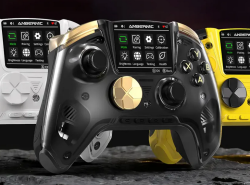
 Anbernic RG G01 Controller GBAtemp review
Hardware
Product Information:
- Official Store: https://anbernic.com/products/rg-g01
Review Approach:
Box (Plus Extras!)
Included in your semi-affordable $39.99 purchase of the RG G01, you'll find the controller itself, quick start guide, 2.4ghz wireless dongle, two taller joystick replacements, and a USB cable. Officially marked as a "free gift" is a spring loaded and padded phone holder that clips snugly on to the top of the controller and holds even a large S26 Ultra quite firmly.
Let's take a look at the specs as listed:
1. Ultra-Low Latency Connectivity
2. Smart Control Screen & Heart Rate Monitor
3. Anti-Drift Joysticks (Kirin electro-inductive joysticks) & Dual-Mode Triggers
4. Immersive Feedback & Gyro Controls (6-axis)

In testing, it does indeed have a ~1000Hz polling rate with fantastically low latency on the sticks. This, however, only applies to X-Input mode and while using the supplied dongle or a USB cable directly connected to your device. D-Input, even with a cable, is drastically lower, however I'm not sure there would be many situations where you would want D-Input mode over the more widely supported X-input, but it is something to be aware of.
The heartbeat sensor is a fun little gimmick, but it would have made more sense if it could report it to the PC via a bit of software captured by the dongle so you could add it in to OBS or otherwise share it via streaming/recording. It has options to measure dynamically or just your left/right hand, and a few options for having it always enabled or toggling it by hotkey. This feature is a little gimmicky, I could take it or leave it, but it doesn't seem to add any significant cost to have it.
Comfort and Style

Even my tiny baby hands can hold and reach the joysticks and rear programmable buttons comfortably. The Start/Select/Home/Capture being along the bottom and centered like older controllers works especially well for me because I have a hard time reaching the new positioning of modern controllers without moving my entire hand over to reach them.
The microswitch buttons and D-pad feel great-- amazing, even. Being able to adjust the triggers from analogue to digital mode is a nice touch, especially if you do a lot of emulation for systems that don't have analogue triggers and don't like using the bumpers for L and R.
The D-Pad and Joysticks pop off by lifting them straight up, but only the D-Pad needs to come off the remove the magnetic face plate so you can swap it (or paint it!) for another one. The two joysticks can then be replaced with their taller variants that come packed with the controller. I don't personally care for the taller joysticks as my thumbs can't reach them as well, but for those that enjoy a longer throw, they are a nice addition.
What Anbernic Does Best...


The first thing that came to mind as I tabbed through the onboard controls was how nice it would be to use for emulation. I had the wild idea to try plugging it in to my SNES Mini via an OTG splitter... and it worked! I immediately fired up Mega Man X, jumped into the Chill Penguin stage, and grabbed the leg powerup. Opening the controller menu, I remapped R to B, and the rest was history! No more awkward Dash-Jumping then having to quickly re-orient your hand to fire! All without touching an external app or program!
Next, I started up Contra III and switched on Turbo for the fire button. Adjusting the rate of turbo is sometimes necessary for older consoles that have a slower polling rate that can cause stutters and gaps in the bullet stream or odd jumping glitches in poorly programmed games. Unfortunately, the Turbo option acts as a toggle on and off, and not a hold-to-fire type of setup. For a game like Contra, a toggle mode may be preferable since you basically hold down a button for the entire game, but for other games, it's not so great. As of now, there is no option to switch between Hold and Toggle mode, and there are no firmware updates for the RG 01, but if there is any feature I would like to see added, this should be easy enough to implement and a welcome addition.
The programmable keys don't seem to be Macro keys, but rather can be re-mapped as a single or multi-input of other keys. I'm not sure if a Macro programmer will eventually be released, but for now, at least, is just an accessibility feature. I suppose for some games, like Marvel vs. Capcom, setting up double-punch or double-kick hotkeys could be advantageous.
Final Thoughts
I really wish they had done something more with the screen while it's in its default "connected" state. It seems a perfect waste for it not to show anything except the tiny heartbeat sensor in the top right corner (if enabled) and the connection status. I believe this is a white label product, so I'm not sure how much control Anbernic has over the firmware that goes into the product, but I would hope they could add maybe a custom image option or at least maybe an input logger or larger heart rate option.
As a travel controller, and for games that do not support remapping, being able to adjust the key configs directly on the controller without the need for software is a great boon. 4 different profiles for saving configs (+1 for Nintendo Switch) means you can have a bunch of customized setups for specific purposes without having to constantly go through the menus to configure or revert the many options available. It's the perfect accessory to take along to a LAN party or a friend's house.
Verdict
- On-board Settings Screen
- Microswitches All Around
- 5 Device Pairings
- 4 Profiles
- No Macros
- Turbo is Toggle Only
- Possibly White Label
- 1K Polling in X-Input Only


