

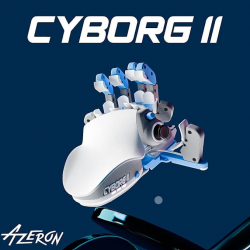
 Azeron Cyborg II GBAtemp review
Hardware
Product Information:
- Official Store: https://store.azeron.eu/azeron-keypads#keypad=cyborg_II
Latvia-based PC gaming peripheral manufacturer Azeron has made a name for itself with its innovative take on gaming keypads. The company did a radical rethinking of the accessory with the Azeron Classic which packed an uncommon, yet ergonomic design. They improved on the design further with the Azeron Cyborg.
Now the company is back again with a new keypad, the Azeron Cyborg II. I was sincerely wondering how much of an improvement this model could be as its predecessors were already excellent. It turns out the Cyborg II does bring some needed changes which we’ll look closer at in this review.
Azeron Cyborg II contents and specs
On the official website, the Azeron Cyborg II starts at €195, with further customisation and accessory options that can be purchased at an extra price. The base model comes with the following items:
- Azeron Cyborg II
- Azeron Screwdriver for adjustments
- 2 thumbstick replacement caps
- Restrictor ring
- Spare screws
- USB-C cable (2m / 6'7")
- Quick Guide


Specs of the Cyborg II can be found below:
Hardware of a unique and customisable gaming keypad
As with the company’s other keypads, the Azeron Cyborg II is a 3D-printed accessory that can be customised at the time of placing an order. You can tune the colour of the body, the individual keys and even customise the nameplate for a unique combination to make the accessory look and feel really personalised.
Even if it is 3D-printed, the device is sturdy, is of high quality and feels nice when in use. Furthermore, each order is manually put together after the components are printed out. This manual assembly likely adds to the device’s cost but the Cyborg II is significantly pricier than its counterparts when they launched. For example, the Azeron Classic and the Azeron Cyborg cost €150 and €165, respectively, at launch, while the Cyborg II is priced at €195. It’s a notable price hike that might not make the device as accessible as the previous models, even if it includes welcome improvements.
The general form factor is the same as the previous Azeron keypad models; and that’s for the better. This is because the “inverted hand” design is ergonomic and allows for intuitive use with minimal movements. The Cyborg II adds a new key around the thumb area, uses a Hall effect-based joystick and has redesigned top buttons that are more easily reached with your knuckles.
Azeron has also swapped the micro-USB connection for a USB-C one, which is a welcome change. There are also customisable LEDs for the individual profiles. The Cyborg II’s on-board memory can store up to 6 profiles which is a lot more than the 2 profiles on the original Cyborg. The Omron switches now have a lifespan of up to 50 million keypresses.


There is also the option to purchase a €30, 3D-printed adjustable magnetic stand to incline the keypad. This easily mounts on the underside of the Cyborg II and helps in keeping the user’s hand in a natural position. However, I wish this was included at the base of the device itself, in the form of a kickstand. This would make for a more seamless approach and classier look. But having a tenting option is still very welcome to further enhance ergonomics and comfort.


Azeron Cyborg II: an ergonomic keyboard replacement for gaming
Despite its unconventional looks, the Azeron Cyborg II essentially functions like a keyboard. It has 30 mappable input, and while these might not compete with the total number of keys on your current keyboard, their design and positioning on the keypad makes them more easily accessible and ergonomic to use.
With your hand resting in a natural position, only your fingers will be performing taps, flicks and clicks with minimal travel distance. Azeron designs its keypads in such a way that you can further adjust the positioning of the towers and thumbstick based on the user’s hand size.
The thumbstick and towers can be tilted, moved along the rails and have their distance tuned for individual comfort and needs. There are incredible levels of adjustments that are possible for a custom fit which is not common in most gaming peripherals. That said, it does take time to find that individual sweet spot by fiddling with screws and positioning.


Once you’ve adjusted the Cyborg II to fit your hand, you can set up the keybinds with the companion Azeron Software. Unfortunately, it is still a Windows-only software and having it on other OS might increase the user base of Azeron’s keypads. It’s an user-friendly software that easily lets you map the Cyborg II’s keys to your needs as well as calibrate the joystick, should you need to.
With up to 6 on-board profiles, you can have a number of keybinds for a range of game genres and even store one for productivity. I have mapped a profile for Dragon Ball: Sparking! Zero with some keys bound to combos which are accessible by a simple key press. I have another profile for simple point-and-click games like Phoenix Springs where I can just flick my left index to talk to NPCs or investigate an item. For productivity, I use a profile with functions that I regularly use when reviewing text (instead of writing) such as “CTRL+X” and “CTRL+Z”. The ergonomic design, further supported by the stand, makes using the Cyborg II comfortable, even for extended periods. Azeron also sells adhesive palm and key grips that I would really recommend getting.


The Azeron Cyborg II is a compelling keyboard replacement for gaming. The company has brought some quality-of-life improvements to its new model which makes it the one to consider if you don’t own an Azeron keypad already. There are still some features that I wish were present such as a wireless option and integrated tents; and I hope that the company considers this for their next model.
Verdict
- Improved ergonomics
- Up to 6 on-board profiles
- Hall effect-based stick
- Now uses USB-C connection
- Tenting option
- Physical adjustments take time
- No wireless option
- Price hike


