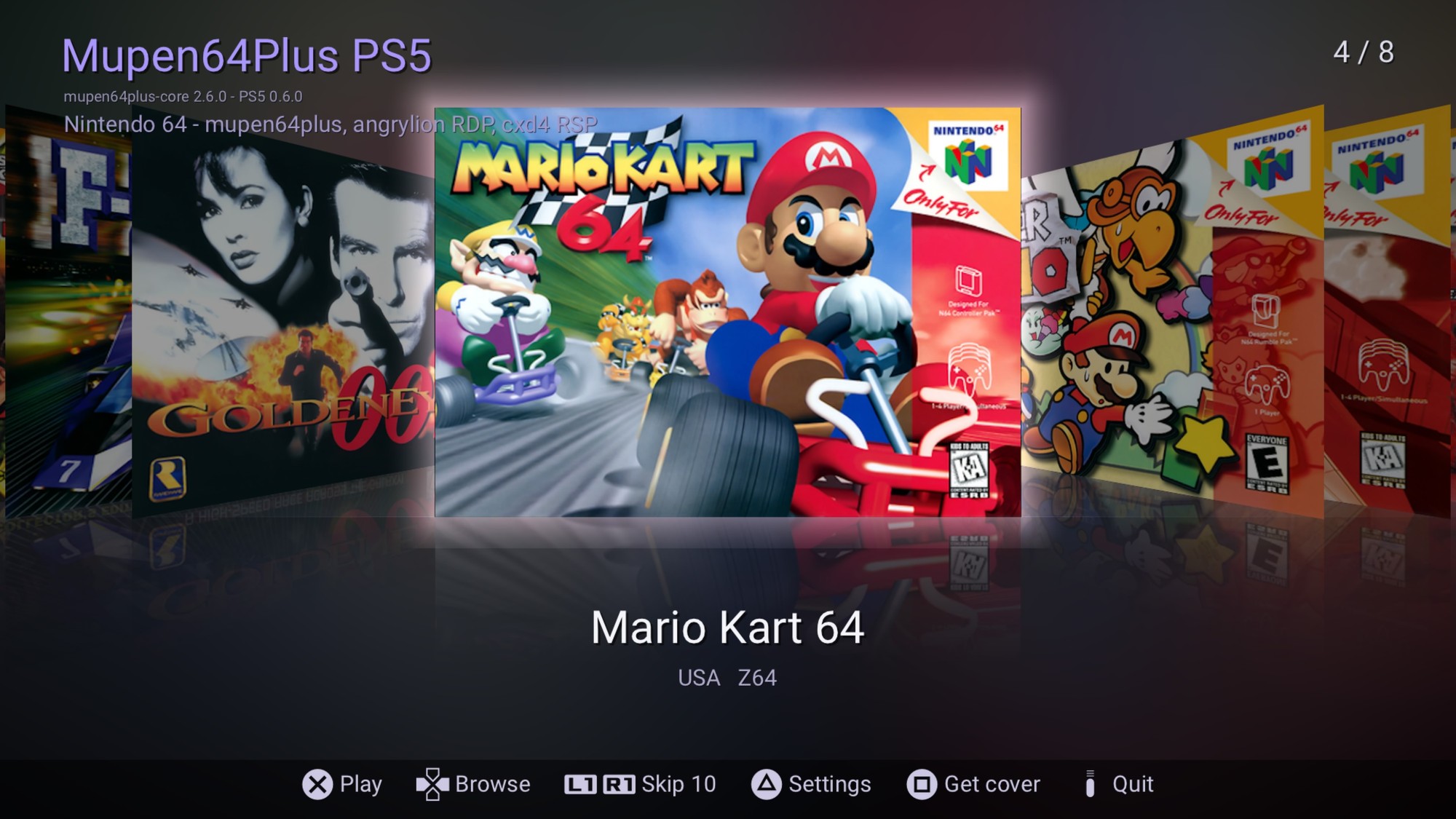
Mupen64Plus PS5 v0.6.1
A Nintendo 64 emulator as a native PS5 home-screen app
mupen64plus-core 2.6.0 ported to the PS5 - eboot.bin, no payload to send
What is it?
Mupen64Plus PS5 is a port of mupen64plus-core 2.6.0 to the PS5 as a real native app (title ID PPSA99064). It installs like any other homebrew title, sits on your home screen, and runs N64 games at full speed with the DualSense. It's just an app folder: copy it to the console and ShadowMountPlus lists it. The app unlocks itself when it starts and updates itself from GitHub.
Features
- x86-64 dynarec: GoldenEye, Rogue Squadron and Donkey Kong 64 hold 59-61 FPS
- Accurate graphics: angrylion-rdp-plus software renderer, up to 12 threads
- Low-level RSP (cxd4): games run their own microcode
- Low-latency audio (~67 ms), kept in step with the 60 Hz picture
- Game shelf with box art, downloaded automatically
- Save states (10 slots per game), plus EEPROM, SRAM, FlashRAM and Controller Pak saves
- Rumble Pak through the DualSense
- Fast forward, aspect ratio options (4:3, integer, 16:9), smooth or sharp scaling, the N64's own video filter, overscan cropping, adjustable dead zone
- Self-updating: when a new release is out, the app offers it at start-up (with the release notes) and installs it
Tested at full speed
- ✔ Super Mario 64
- ✔ GoldenEye 007
- ✔ Star Wars: Rogue Squadron
- ✔ Donkey Kong 64
- ✔ F-Zero X
- ✔ Mario Kart 64 (ghosts and records save)
- ✔ Star Fox 64 (with rumble)
- ✔ Paper Mario (FlashRAM saves)
Requirements
- A jailbroken PS5 with kstuff or kstuff-lite
- ShadowMountPlus
- An ELF loader running (elfldr, etaHEN or PS5 Payload Manager's). If you load kstuff and ShadowMountPlus, you already have one. You don't send anything to it yourself: the app uses it to unlock itself.
- Your own N64 ROMs, dumped from your cartridges. No games are included.
Installation
- Download PPSA99064.zip from the release page (link below) and extract it.
- Copy the whole PPSA99064 folder to
/data/homebrew/on the console, or tohomebrew/on an exFAT USB drive. - Within about 15 seconds, ShadowMountPlus adds Mupen64Plus PS5 to the home screen.
- Put your ROMs (
.z64 .n64 .v64 .rom, zipped or not) in/data/mupen64plus/roms, or inmupen64plus/romson a USB drive.
Updating: the app offers new versions by itself. To update by hand, close the app and copy the new folder over the old one. Saves, states, covers and settings in
/data/mupen64plus are kept.Controls
- Left stick: analog stick, D-pad: D-pad
- Cross / Square: A / B
- L2 or R2: Z, L1 / R1: L / R
- Right stick: C buttons (Triangle / Circle: C-up / C-down)
- OPTIONS: Start
- Touchpad click or L3 + R3: pause menu (save/load state, fast forward, settings, reset, back to the game list)
Known limitations
- No 64DD, Transfer Pak, cheats or netplay yet
- PAL games run slightly less smoothly than NTSC games
- If a game misbehaves, try Settings > CPU core > Interpreter
Download
Mupen64Plus PS5 - latest release (PPSA99064.zip)
Source code (GPL-3.0): github.com/TheRealRetro/mupen64plus-ps5
VirusTotal (v0.6.1 zip, 0/65): scan results
Source code (GPL-3.0): github.com/TheRealRetro/mupen64plus-ps5
VirusTotal (v0.6.1 zip, 0/65): scan results
v0.6.1
- The app's version is recorded correctly in the repository, so stores and the built-in update check agree
- Faster start-up when the console is offline
- Released as a native app folder: no more .elf to send
- Updates itself from GitHub releases
- Optional compressed .ffpfsc image
- DualSense rumble, fix for starting a second game in one session, audio latency down from ~120 ms to ~67 ms
- x86-64 dynamic recompiler: GoldenEye, Rogue Squadron and Donkey Kong 64 at full speed
Credits
- mupen64plus team: mupen64plus-core (GPL-2.0)
- angrylion and the angrylion-rdp-plus contributors: the software RDP renderer (MAME license)
- Iconoclast: mupen64plus-rsp-cxd4
- ps5-payload-dev: the PS5 payload SDK
- ps5-native-app-boilerplate: native app tooling
- drakmor: ShadowMountPlus
- EchoStretch: kstuff-lite
- libretro-thumbnails: box art
Bug reports and compatibility reports are welcome. If something doesn't work, please open an issue on GitHub and attach
/data/mupen64plus/logs/boot.log.Compatibility list: https://docs.google.com/spreadsheets/d/1pG4Q9ak2Dvk1NCPW6V4FWWfJlXUoo6Joa0t7vGNlw30/edit
Report a game: https://forms.gle/mTbQapQjTWB11xbT7
The form takes a minute and needs no account. Reports go straight into the list. Every game tested helps!
For homebrew use only. Please only use ROMs you dumped from cartridges you own.
Attachments
Last edited by TheRealRetro,