Homebrew app AnchorPS5 – Browse, download and update PS5 homebrew from your PC

Kuroge

Member
Newcomer
Joined
May 8, 2016
Messages
15
Reaction score
2
Trophies
1
Age
31
XP
94
Country
logo.png


AnchorPS5


The homebrew store for your PS5​


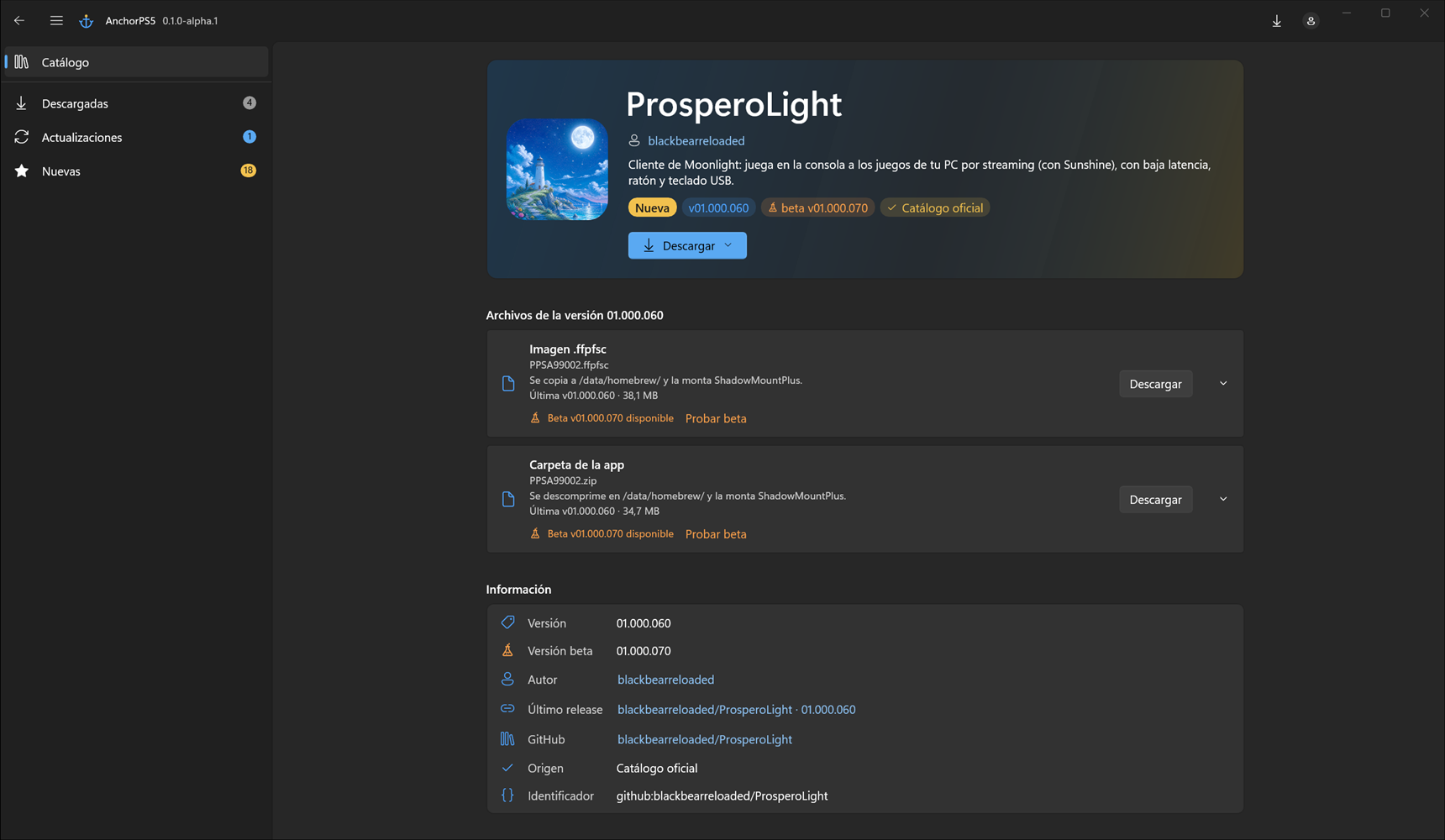
Hi everyone! I'd like to introduce AnchorPS5, a Windows desktop app I've been working on that gathers PS5 homebrew into a single catalog, downloads it already verified, and lets you know when a new version is out. Think F-Droid or the Wii Homebrew Browser: everything in one place, up to date, no more hunting for releases across GitHub.


⚠️ This is an alpha: it works, but it's still in development and things may change quite a bit. Bug reports and suggestions are very welcome.
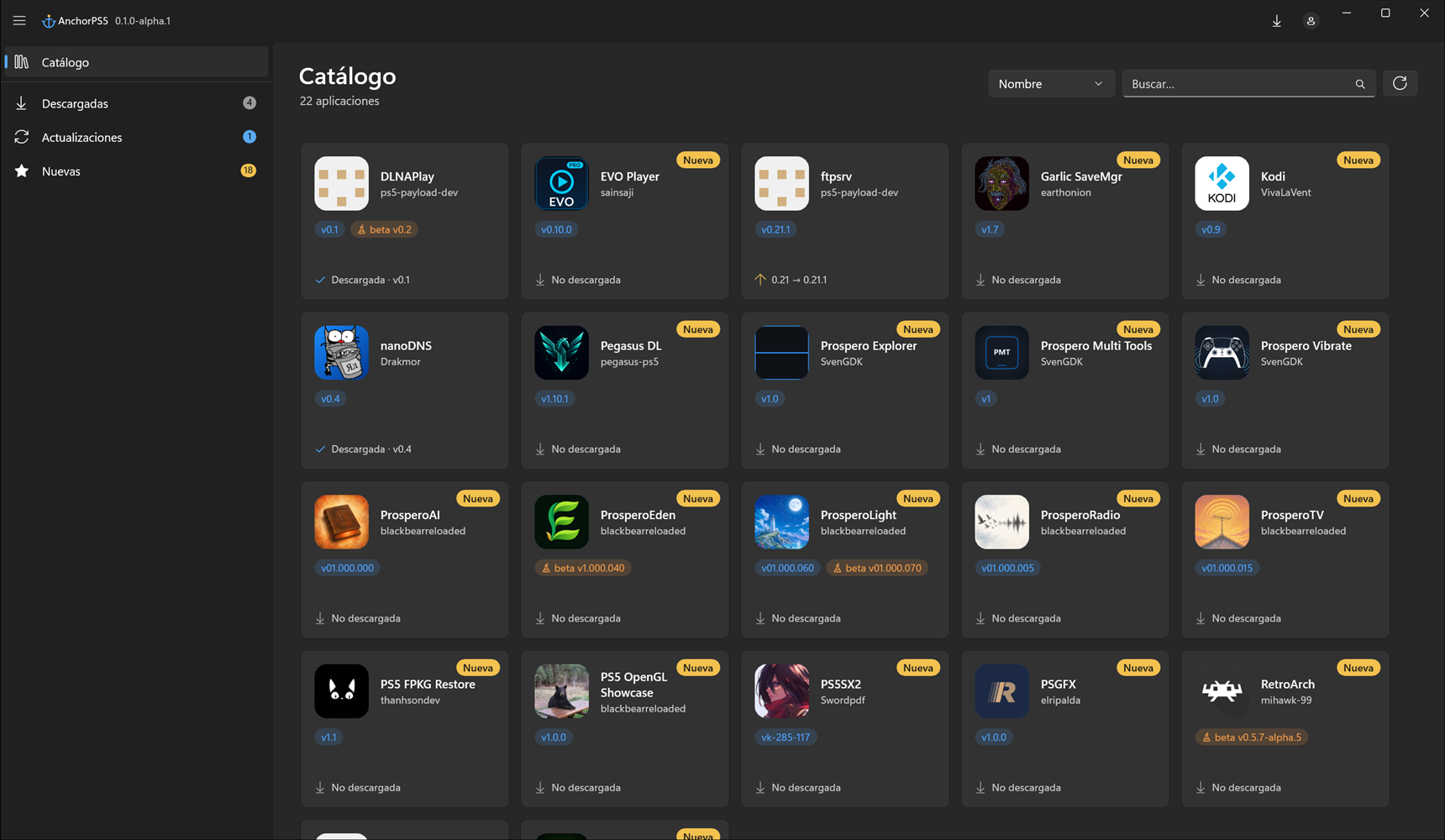


catalogo.png


Features


  • Homebrew catalog with search, sorting and sections: Downloaded, Updates and New. It keeps itself up to date.

  • Verified downloads: every file comes from its author's official GitHub release and is checked against its SHA-256. .zip, .7z and .rar files are extracted automatically (7-Zip bundled).

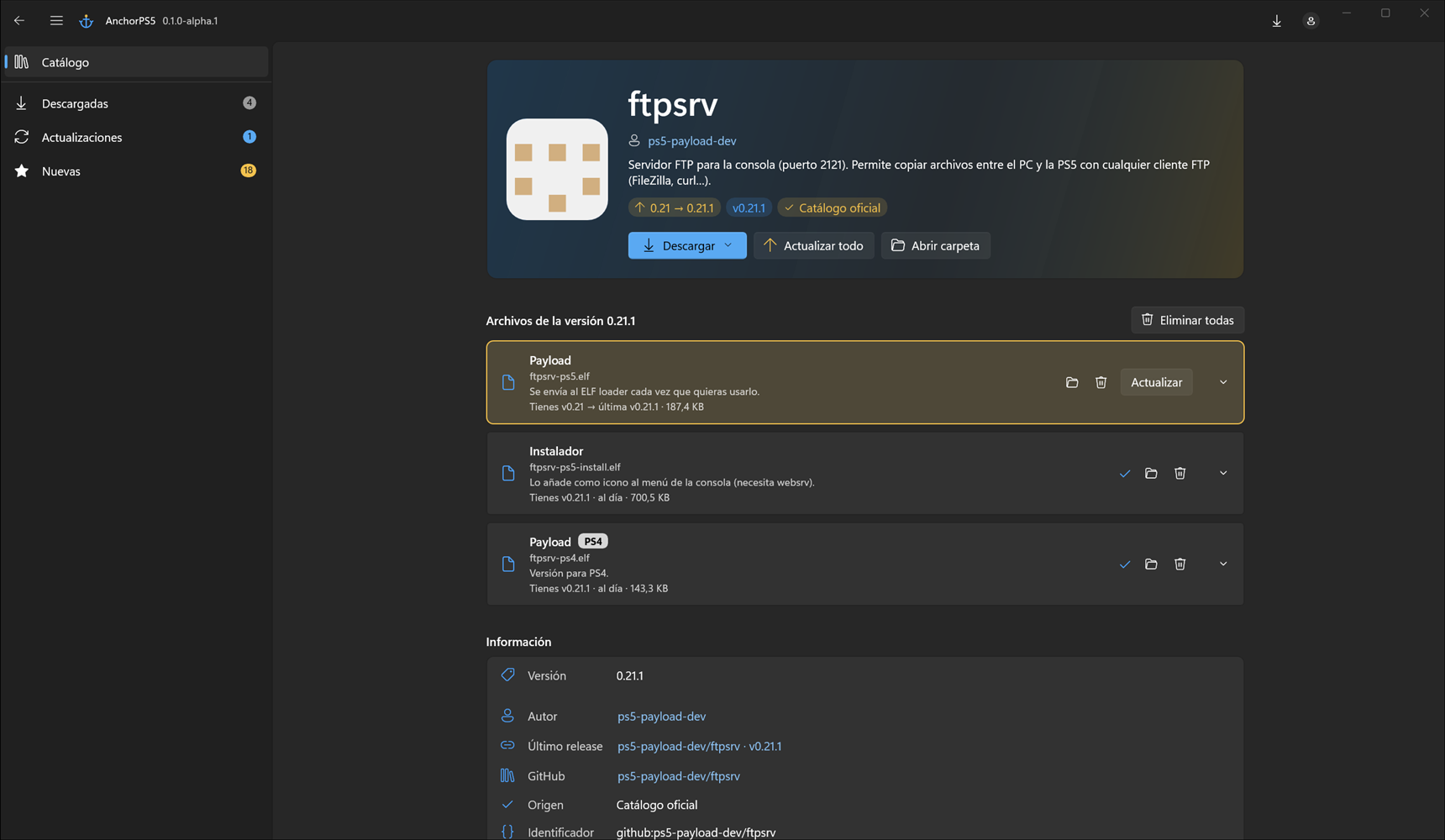
  • Per-file updates (0.1 → 0.2) and an Update all button.

  • Version history: previous versions are kept in case you want to roll back.

  • Optional betas: try a file's beta and go back to stable whenever you want.

  • PS4 tag on files that aren't meant for PS5.

  • Your own apps: add apps to your copy of the catalog; they're kept when the official catalog updates.

  • Self-updating: the app tells you about new versions and installs them in one click, without touching your settings.

  • Available in English and Spanish, and translatable to any language by editing a JSON file.


ficha.png


beta.png


Download


👉 https://github.com/Kuroge/AnchorPS5/releases


  • Windows 10 (1809 or later) or 11, 64-bit. Nothing else to install.

  • Download the .zip, extract it to a folder and run AnchorPS5.exe. It's portable: settings live in the config folder next to the exe.

  • The app isn't signed (certificates cost money), so Windows SmartScreen may warn you the first time: More info → Run anyway. Every release includes its SHA-256 if you want to verify the zip.

  • No GitHub account needed. Signing in is optional (it doesn't request any permissions on your account) and just lets data refresh more often.


Missing an app?


The catalog lives in a separate repo, and anyone can suggest apps straight from the GitHub website, no coding required. There's a step-by-step guide, and even a prompt so an AI can prepare the entry for you from the app's link:


👉 https://github.com/Kuroge/AnchorPS5-catalog


You can also drop the link of any app you'd like to see in this thread and I'll take a look.


Source code & credits


  • Source code (GPL v3): https://github.com/Kuroge/AnchorPS5

  • Thanks to Huertas34 (from elotrolado.net) for the original catalog idea.

  • And above all, to the authors of the homebrew in the catalog: AnchorPS5 only links their releases, all the credit is theirs.


If you run into a bug, the app's log is under About → Open logs; attaching it helps a lot. Feel free to post here or open an issue on GitHub.


Hope you find it useful!
 
AnchorPS5 0.1.1-alpha.1​

Hi everyone! A new version of AnchorPS5 is out. This one focuses on each app's page: it's now much clearer what you have, how old it is and what you're missing, and updating is easier.

If you already have the alpha installed, the app will let you know when you open it and update itself in one click, keeping your settings and your downloads.

What's new
  • Release date of every version: each version now shows when it was published (app page header, each file, the available beta, the version history and the Information card).
  • File details: a new ⓘ button on every downloaded file and on every version in its history, showing version, channel (stable or beta), release and download dates, size on disk, SHA-256, where it was downloaded from and where it's stored.
  • Download all: in apps with several files, the Download button gets everything you don't have yet in one go. Files you already have show disabled, so nothing is ever downloaded twice.
  • Update all, your way: each app's Update all button updates all its files at once, and its arrow lets you pick file by file (showing your version and the new one).
  • Delete previous versions when updating: when you update, the app asks whether to delete the old versions or keep them (with Don't ask again). They're only deleted once the new version has been downloaded and checked; if anything fails, nothing is touched.
  • In Information, the version now links straight to its GitHub release.

Download
👉 https://github.com/Kuroge/AnchorPS5/releases/tag/v0.1.1-alpha.1

It's still an alpha, so any bug report or suggestion is welcome. The app log is under About → Open logs; attaching it helps a lot. Feel free to post here or open an issue on GitHub.

And as always, if an app is missing from the catalog, drop the link here or suggest it in the catalog repo.

Thanks for trying it!
 
Hi everyone,

I've updated the AnchorPS5 homebrew catalog with 48 new entries, covering the wave of apps, emulators, utilities and tools that have appeared since the Relapse exploit (firmware 7.00–13.60) landed. Everything below is now part of the catalog, with its GitHub link, icon and asset rules.

Emulators (6)

  • PS5CEMU-HAR (Cemu + Azahar) — premohq/PS5CEMU-HAR
  • PS5LM (llama.cpp port) — cobanov/PS5LM
  • KytyPS5 (PS5 emulator for PC) — KytyPS5/KytyPS5
  • PS5PCEM (PS5 emulator for PC, Zig) — iStark/PS5PCEM
  • Prosperity (PS4/PS5 emulator for Linux/Android) — Force67/prosperity
  • Porpoise (GameCube/Wii, Dolphin-based) — elripalda/Porpoise-Dolphin-Emulator-for-PS5
Utilities (21)

  • etaHEN 2.5B Unified — GronedWaffel/etahen-11.00-13.60
  • Ruffle Flash PS5 — ZiZc3/Ruffle-Flash-PS5
  • BFpilot — ItsBlurf/BFpilot
  • PS5 File Explorer — juma-sayeh/PS5-File-Explorer
  • Playstation 5 Save Mounter — n0llptr/Playstation-5-Save-Mounter
  • PS5 Payload Manager — itsPLK/ps5-payload-manager
  • PlayStation Payload Center — Pharaoh2k/PlayStation-Payload-Center
  • OnionHEN — aydencharles/onionHEN
  • DPI v2 OnionHEN plugin — whoismob/onionhen-13x-research
  • PS5 Auto JB + Autorun Payload — KsAmJ/PS5-Auto-Jailbreak-and-Auto-Run-Payload-
  • ps5-payload-loader — cy33hc/ps5-payload-loader
  • Dump Installer — EchoStretch/dump_installer
  • PS5 Upload — phantomptr/ps5upload
  • AirPSX — barisyild/airpsx
  • Prospero Manager — notmaj0r/ProsperoMgr
  • Kylin Core — aydencharles/kylin-core-release
  • ps5-payload-elfldr (fork) — itsPLK/ps5-elfldr
  • ps5-payload-elfldr (upstream) — ps5-payload-dev/elfldr
  • ChronicLoader — ItsDeidara/ChronicLoader-PS5-Payload
  • Lapy JB Daemon — itsPLK/PS5-Lapy-JB-Daemon
  • Goldengames PS5 Jailbreak — robin2kk/Goldengames-PS5-Autoloader
Games & Ports (3)

  • OpenMW (Morrowind) — mshivam019/morrowind-ps5
  • Ship of Harkinian (Ocarina of Time) — mshivam019/oot64-ps5
  • Wolf4SDL (Wolfenstein 3D) — alex-free/wolf4sdl-ps5
Media Players (3)

  • BFplayer — ItsBlurf/BFplayer
  • dlnaplay — ps5-payload-dev/dlnaplay
  • PS-Play — pegasus-ps5/ps-play
PC Tools (3)

  • PS5 Homebrew Catalog — blackbearreloaded/ps5-homebrew-catalog
  • Homebrew UI Lab — blackbearreloaded/ps5-homebrew-ui
  • PS5-Repository-List — nexgen999/PS5-Repository-List
Stores & Launchers (6)

  • PKG Mutant Shop — XavyProd/pkg-mutant-shop
  • FPKGi — ItsJokerZz/FPKGi
  • PS5 PKG Virtual Shop — MestreTM/ps5_pkg_virtual_shop
  • Nativehbl — Rufidj/Nativehbl
  • Y2JB — MasterPS0/Y2JB
  • Omega — TheCriicom/omega-dashboard-ps5
Other Projects (6)

  • Prospero-win (Windows runtime) — mpereiraesaa/prospero-win
  • Tailscale for PS5 — holdmysocks/ps5-tailscale
  • LinkDev — ps5-payload-dev/linkdev
  • evoX-CoreOS (payload pack) — nexgen999/evoX-CoreOS
  • Relapse Exploit — ntfargo/Relapse-Exploit
  • PS5 Linux Loader — ps5-linux/ps5-linux-loader
The full JSON entries are already in the catalog. If you spot any wrong file name, icon or description, drop a comment and I'll fix it.
 

Site & Scene News

New Hot Discussed User Submitted