

Full disclosure: This app was built entirely with AI (Claude Code) and its open source. I understand there is alot of AI code pushback, and I get it .. feel free to call it AI slop. This was formerly TicoDL+, but given the recent increase in functional emulators, I broke it out it from being Tico specific to being a general downloader supporting 50+ consoles and thus greater emulator support.
HaulNX is a Nintendo Switch homebrew that browses and downloads game files from archive.org into one central library at sdmc:/roms/<console>/, decompressing archives along the way. Point your emulators at that folder once and everything you download from then on just appears. It doesn't play anything itself, it's the download manager that feeds Tico, RetroArch, DuckStation, PPSSPP, melonDS, etc.
Features
Emulator setup: The wiki has a page for emulator setup (let me know if I'm missing any). All you need to do is point your emulator to the installed folder for that console. If your emulator doesn't support setting a folder, set a custom path in HaulNX to that console's folder location, and the app puts games there.
Links:
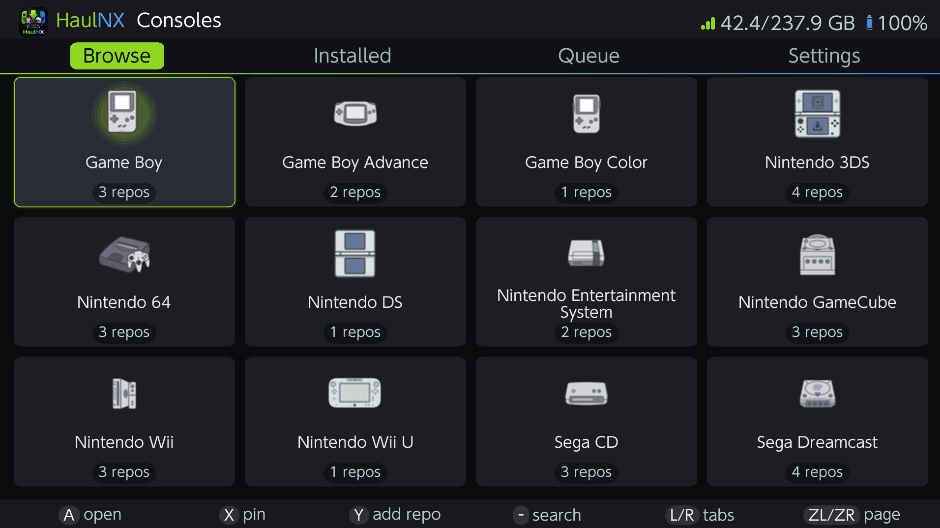
HaulNX is a Nintendo Switch homebrew that browses and downloads game files from archive.org into one central library at sdmc:/roms/<console>/, decompressing archives along the way. Point your emulators at that folder once and everything you download from then on just appears. It doesn't play anything itself, it's the download manager that feeds Tico, RetroArch, DuckStation, PPSSPP, melonDS, etc.
HaulNX ships with no ROMs, no collections, and no credentials, it's an empty downloader. You provide your own archive.org item IDs (and optionally your own archive.org keys for restricted items). Nothing is bundled or linked. This project doesn't condone piracy or copyright infringement, please don't post ROM sources or copyrighted content in the thread; keep it about the app. You're responsible for the laws that apply to you in your locale.
Features
- Bulk file downloader for archive.org, per console
- Smart queue, resumable, retries, survives Wi-Fi drops and restarts
- Auto-extract + MD5 verification (rar3 is a known limitation)
- One unified sd:/roms library, 53 systems
- Add console collections on-device or from your PC over Wi-Fi
- Full installed-library management (search, rename, delete)
- Custom install folders, per console
- Send a game straight from your PC over Wi-Fi (files you may need to decrypt on PC first)
- SD card Space-aware, shows totals + free space before you commit, waits for room instead of failing, skips games you already have
- Companion PC app allows you to build collections with a real keyboard, verify each source against archive.org before you commit, and push straight to the Switch over Wi-Fi
- 25 languages, touch + controller, light/dark themes (I welcome PR's on the language files)
Emulator setup: The wiki has a page for emulator setup (let me know if I'm missing any). All you need to do is point your emulator to the installed folder for that console. If your emulator doesn't support setting a folder, set a custom path in HaulNX to that console's folder location, and the app puts games there.
Links:
- Download: https://github.com/digdat0/HaulNX/releases/latest (grab HaulNX.nro)
- Setup guides / wiki: https://github.com/digdat0/HaulNX/wiki
- Issues & feedback: https://github.com/digdat0/HaulNX/issues