



I like to take screenshots of games when I am playing and being able to take them with Luma/Rosalina is a blessing. But having to transfer them to my computer to be able to see them, then convert to MPO to see them in 3D is too much of a hassle. I wanted something that would let me see them on the 3DS with no headaches.
So I vibecoded Comet, an all-in-one 3DS screenshot manager for Luma3DS/Rosalina captures. Browse everything in a grid, preview in real stereoscopic 3D, filter by type or date, and copy to 3D Album or delete individually or in batches.
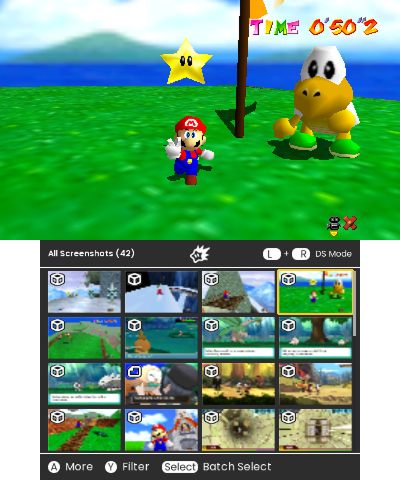
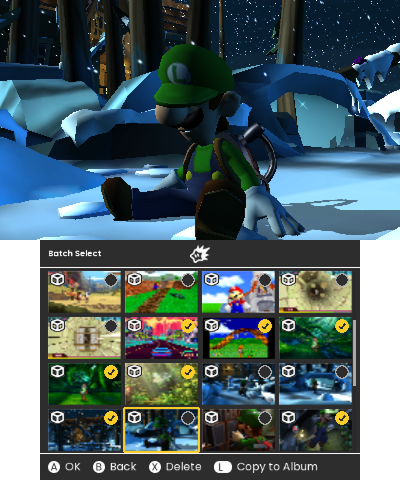
Features:
- Live stereo 3D preview
- Copy to the 3DS Camera album
- Delete, individually or in batch, always with a confirmation step
- Filter by All / 3D Only / 2D Only, or a specific Date
- Peek at Luma's bottom-screen capture alongside any screenshot
- A visual style inspired by the Switch's Album app
It's VERY vibecoded as I'm not a developer but an UI Designer, so please if this is useful or interesting to anyone else, feel free to pick it and clean it up.
Tested on the New 3DS and Old 3DS and everything seems to be working properly.
--
[EDIT]
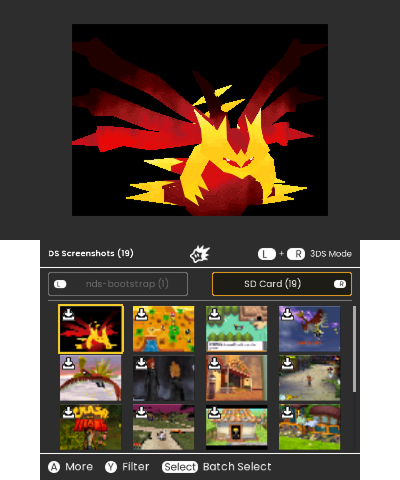
Comet now handles DS screenshots too!
If you use nds-bootstrap/TWiLightMenu++, Comet reads screenshots.tar directly, no manual extraction needed.
New stuff:
- Full DS screenshot support! Browse, filter, copy, delete, same as 3DS
- Reads screenshots.tar directly, split into "still in the tar" and "already extracted" tabs
- Extract one at a time or all at once
- Widescreen support for patched DS games
- Sharper icons/text and a bunch of small UX fixes across the board
This is probably the final release by me. Comet now fits all my needs as someone who likes to take lots of screenshots.
Thanks!
--
[EDIT2]
So that was a lie...
Comet now also supports Nexus3DS
List of changes and updates:
- Nexus3DS filename and date-folder support, alongside plain Luma
- Merge Top/Bottom Screens, from any 3DS screenshot's More screen
- File path shown on every screenshot's More screen
- Move between screenshots from the More screen with Left/Right
- New badges for tar/extracted DS screenshots and merged screenshots
- Redrawn badges, fixing stray white pixels on 3DS XL screens
- Copying, extracting, and merging now keep you where you were
- A handful of sound effect and touch-control fixes
DOWNLOAD:
https://github.com/verypedro/Comet
So I vibecoded Comet, an all-in-one 3DS screenshot manager for Luma3DS/Rosalina captures. Browse everything in a grid, preview in real stereoscopic 3D, filter by type or date, and copy to 3D Album or delete individually or in batches.
Features:
- Live stereo 3D preview
- Copy to the 3DS Camera album
- Delete, individually or in batch, always with a confirmation step
- Filter by All / 3D Only / 2D Only, or a specific Date
- Peek at Luma's bottom-screen capture alongside any screenshot
- A visual style inspired by the Switch's Album app
It's VERY vibecoded as I'm not a developer but an UI Designer, so please if this is useful or interesting to anyone else, feel free to pick it and clean it up.
Tested on the New 3DS and Old 3DS and everything seems to be working properly.
--
[EDIT]
Comet now handles DS screenshots too!
If you use nds-bootstrap/TWiLightMenu++, Comet reads screenshots.tar directly, no manual extraction needed.
New stuff:
- Full DS screenshot support! Browse, filter, copy, delete, same as 3DS
- Reads screenshots.tar directly, split into "still in the tar" and "already extracted" tabs
- Extract one at a time or all at once
- Widescreen support for patched DS games
- Sharper icons/text and a bunch of small UX fixes across the board
This is probably the final release by me. Comet now fits all my needs as someone who likes to take lots of screenshots.
Thanks!
--
[EDIT2]
So that was a lie...
Comet now also supports Nexus3DS
List of changes and updates:
- Nexus3DS filename and date-folder support, alongside plain Luma
- Merge Top/Bottom Screens, from any 3DS screenshot's More screen
- File path shown on every screenshot's More screen
- Move between screenshots from the More screen with Left/Right
- New badges for tar/extracted DS screenshots and merged screenshots
- Redrawn badges, fixing stray white pixels on 3DS XL screens
- Copying, extracting, and merging now keep you where you were
- A handful of sound effect and touch-control fixes
DOWNLOAD:
https://github.com/verypedro/Comet
Last edited by verypedro,





