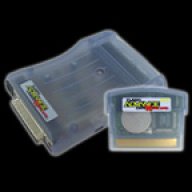

I recently made one of those dubious second hand market purchases for a broken Flash2Advance Ultra 1GB. It was already advertised as broken, but I bought it anyways since it was sold for a really good price and it came with the harder to find USB linker cable.


Anyways, I tried to reflash the cartridge since the seller said they didn't have the ability to try the old-school flashing process (understandable since it is Windows XP software). One of the photos of the listing showed a partially corrupted Nintendo logo so I thought it was normal corruption due to flash memory aging (the electrical charges that hold the bits fade away if the memory isn't powered on in a long time), I even tried to replicate that kind of corruption before buying it by manually modifying a GBA ROM header and flashing it into a modern flashcart (using the GBflash), I was able to replicate a similar kind of corruption so I bought it with hopes of fixing it.
Fast forward some days later and I receive the flashcart, the flashcart shell is a bit loose but still holds just enough to be usable, the first thing I tried is dumping the existing contents of the cart using the GBflash, this was succesful but it of course failed the header/logo check, as expected. Then I installed all the original software in a real Windows XP machine (a VM with shared USB also works fine), the version of the flasher being PowerWriter 2.61. I was able to link to the GBA using the software, so the cable was fine, however, after flashing a new (clean) ROM this happens:

So now it's even more corrupted? I tried the built-in diagnostics the linker software offers but I don't really understand if it's failing the checks since the UI is not the most intuitive, it doesn't strictly say "FAIL" or something like that when doing the checks. I also tried to do a full erase of the cartridge and writing to it again, same result.
So I wanted to know if anyone here has more experience with this type of flashcart to see if there is anything else I should try. At least I got a good deal for the cable and a cool historical item for the GBA, so I'm not bothered, I just like to tinker with this things. Thanks in advance!
Anyways, I tried to reflash the cartridge since the seller said they didn't have the ability to try the old-school flashing process (understandable since it is Windows XP software). One of the photos of the listing showed a partially corrupted Nintendo logo so I thought it was normal corruption due to flash memory aging (the electrical charges that hold the bits fade away if the memory isn't powered on in a long time), I even tried to replicate that kind of corruption before buying it by manually modifying a GBA ROM header and flashing it into a modern flashcart (using the GBflash), I was able to replicate a similar kind of corruption so I bought it with hopes of fixing it.
Fast forward some days later and I receive the flashcart, the flashcart shell is a bit loose but still holds just enough to be usable, the first thing I tried is dumping the existing contents of the cart using the GBflash, this was succesful but it of course failed the header/logo check, as expected. Then I installed all the original software in a real Windows XP machine (a VM with shared USB also works fine), the version of the flasher being PowerWriter 2.61. I was able to link to the GBA using the software, so the cable was fine, however, after flashing a new (clean) ROM this happens:
So now it's even more corrupted? I tried the built-in diagnostics the linker software offers but I don't really understand if it's failing the checks since the UI is not the most intuitive, it doesn't strictly say "FAIL" or something like that when doing the checks. I also tried to do a full erase of the cartridge and writing to it again, same result.
So I wanted to know if anyone here has more experience with this type of flashcart to see if there is anything else I should try. At least I got a good deal for the cable and a cool historical item for the GBA, so I'm not bothered, I just like to tinker with this things. Thanks in advance!