



NX Simple Downloader

A Nintendo Switch homebrew application that reads a download URL from a `.ini` configuration file, fetches the file over HTTP or HTTPS, and saves it to a predefined directory on the SD card — overwriting any existing file.
Features
- HTTP & HTTPS support via libnx BSD sockets and the native Switch SSL service
- Automatic redirects — follows up to 5 HTTP 3xx redirects
- Progress bar with KB counter and percentage (when Content-Length is known)
- Chunked transfer (Transfer-Encoding: chunked) support
- Self-signed certificate support via `ssl_verify = false`
- SD card enforcement — the app refuses to write anywhere other than `sdmc:/`, protecting the Switch NAND from accidental or malicious writes
- Path traversal protection — `..` sequences in `destination` and `filename` are rejected
Installation
Configuration
License
[PolyForm Noncommercial License 1.0.0](LICENSE) — © 2026 Mayo0x0
Source + downloads
https://github.com/Mayo0x0/NXSimpleDownloader
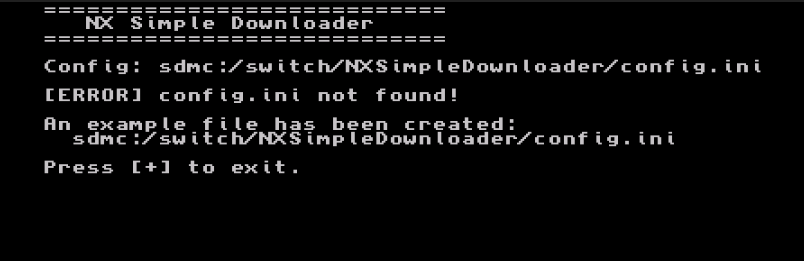
Screenshot (first launch without config file):
A Nintendo Switch homebrew application that reads a download URL from a `.ini` configuration file, fetches the file over HTTP or HTTPS, and saves it to a predefined directory on the SD card — overwriting any existing file.
Features
- HTTP & HTTPS support via libnx BSD sockets and the native Switch SSL service
- Automatic redirects — follows up to 5 HTTP 3xx redirects
- Progress bar with KB counter and percentage (when Content-Length is known)
- Chunked transfer (Transfer-Encoding: chunked) support
- Self-signed certificate support via `ssl_verify = false`
- SD card enforcement — the app refuses to write anywhere other than `sdmc:/`, protecting the Switch NAND from accidental or malicious writes
- Path traversal protection — `..` sequences in `destination` and `filename` are rejected
Installation
1. Copy `NXSimpleDownloader.nro` to your SD card:
- sdmc:/switch/NXSimpleDownloader/NXSimpleDownloader.nro
2. Create the configuration file at:
- sdmc:/switch/NXSimpleDownloader/config.ini
See [config.ini.example] for the full reference.
> If `config.ini` is missing, the app creates a template automatically on first launch.
Configuration
[downloader]
; Full URL of the file to downloadurl = https://example.com/myupdate.nro
; Target directory on the SD card (must start with sdmc:/ and end with /)destination = sdmc:/switch/MyApp/
; Filename to save as (overwrites any existing file)filename = myupdate.nro
; SSL certificate verification for HTTPS (default: true); true = verify against system CA store (recommended); false = skip verification, accepts self-signed certificates; ssl_verify = falseLicense
[PolyForm Noncommercial License 1.0.0](LICENSE) — © 2026 Mayo0x0
Source + downloads
https://github.com/Mayo0x0/NXSimpleDownloader
Screenshot (first launch without config file):
Last edited by Mayo0x0,







