- Joined
- May 29, 2026
- Messages
- 11
- Reaction score
- 14
- Trophies
- 0
- Age
- 18
- Location
- united states
- Website
- adabit.org
- XP
- 30
- Country

Hi guys!!
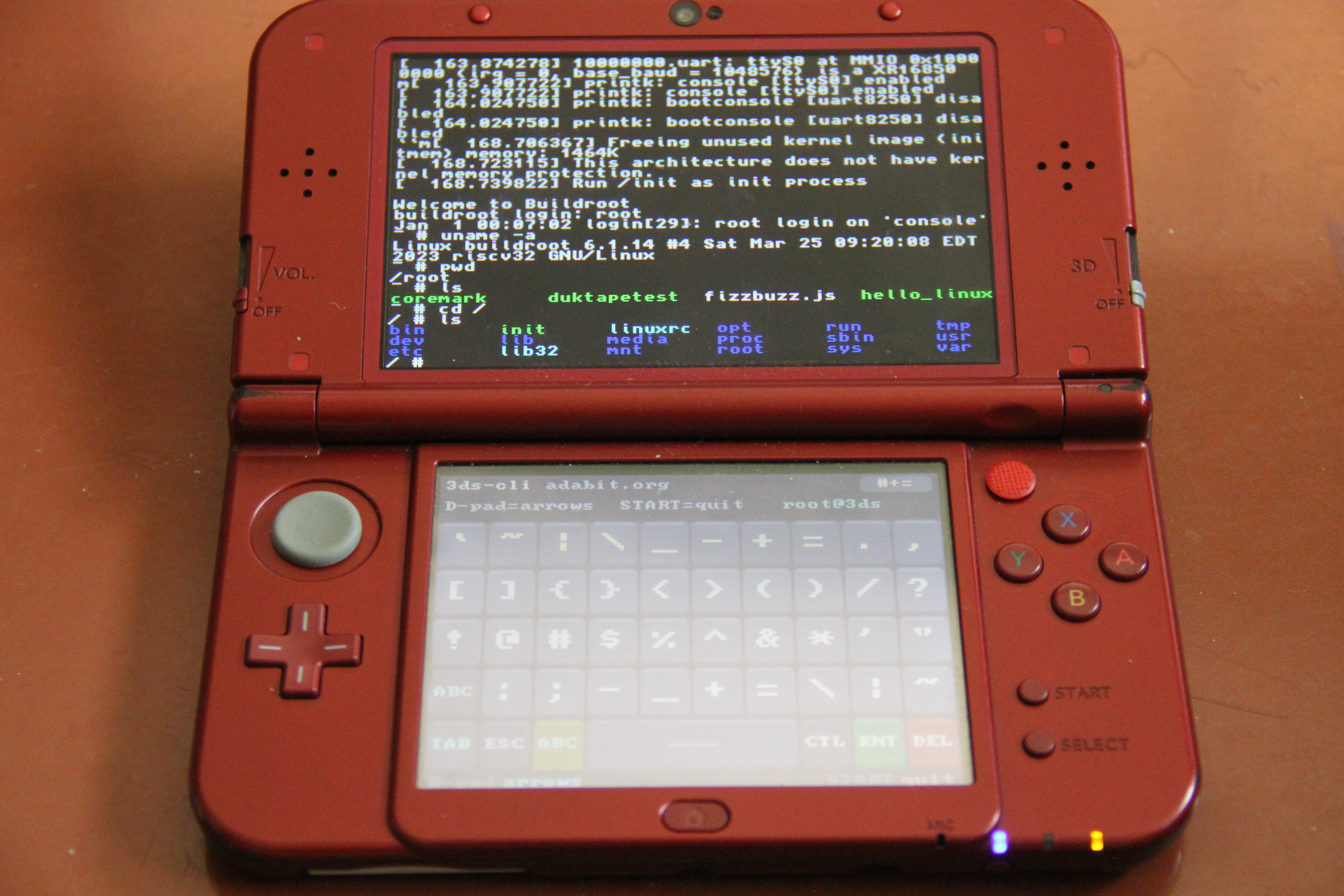
I’m releasing 3DS-CLI, a Nintendo 3DS homebrew app that boots a real RISC-V Linux environment inside the normal 3DS Homebrew Launcher. It uses mini-rv32ima by cnlohr as a compact RISC-V CPU emulator, with terminal output on the top screen and a custom touch keyboard on the bottom screen.
Features
Installation
Universal-Updater:
3DS-CLI can be installed directly from Universal-Updater. Just search for 3DS-CLI and install it from there.
Manual install:
This is mostly a fun technical experiment rather than a fast Linux machine. It is running through software emulation on 3DS hardware, so booting takes a while and performance is limited.
Download / Source
GitHub:
https://github.com/cmdada/3DS-CLI
Latest release:
https://github.com/cmdada/3DS-CLI/releases/latest
Credits
GPL-3.0.
I’m releasing 3DS-CLI, a Nintendo 3DS homebrew app that boots a real RISC-V Linux environment inside the normal 3DS Homebrew Launcher. It uses mini-rv32ima by cnlohr as a compact RISC-V CPU emulator, with terminal output on the top screen and a custom touch keyboard on the bottom screen.
Features
- Boots a RISC-V Linux image on real 3DS hardware through software emulation
- VT100-style terminal output on the top screen
- Custom bottom-screen touch keyboard
- D-pad sends arrow keys
- Includes a prebuilt Linux image with BusyBox tools, a JavaScript runtime, and CLI Doom
Installation
Universal-Updater:
3DS-CLI can be installed directly from Universal-Updater. Just search for 3DS-CLI and install it from there.
Manual install:
- Download 3DS-CLI_Install.zip from the latest GitHub release
- Unzip it
- Copy 3ds-cli.3dsx and Image into the /3ds/ folder on your SD card
- Launch 3DS-CLI from the Homebrew Launcher
- Wait for Linux to boot. On my SDXC card and 3ds ll it takes around 172 seconds to reach the login prompt.
- Log in as root with a blank password.
- Bottom screen: touch keyboard
- D-pad: arrow keys
- START: exit back to the Homebrew Launcher
This is mostly a fun technical experiment rather than a fast Linux machine. It is running through software emulation on 3DS hardware, so booting takes a while and performance is limited.
Download / Source
GitHub:
https://github.com/cmdada/3DS-CLI
Latest release:
https://github.com/cmdada/3DS-CLI/releases/latest
Credits
- Built with devkitARM / libctru
- Powered by mini-rv32ima by cnlohr
GPL-3.0.




 . I love to see this type of projects.