Hacking Transferring all of Mii Plaza's data from one hacked 3DS to another

  • Thread starter Thread starter MushGuy
  • Start date Start date
  • Views Views 4,926
  • Replies Replies 14
  • Likes Likes 2

MushGuy

Well-Known Member
Member
Joined
Feb 11, 2010
Messages
1,313
Reaction score
455
Trophies
1
XP
3,096
Country
United States
Hello, I'm currently trying to transfer all of the StreetPass Mii Plaza data from my hacked New 3DS to my recently hacked New 3DS LL, and I read here that I have to back up the system save, the extdata, and the BOSS data. So I did that to restore it to the LL system (I used JKSV), and it worked for the most part, but some things were still missing: Most of the Miis are missing their game icons (only the game icons from the games I currently installed are present), and while the StreetPass Tags are the same in number in both systems, the Plaza Population in my newer system is smaller than the one in my older system (more than 2000 in my New 3DS, around half in my New 3DS LL). Is there something I'm missing? Is so, what can I do to make the full transfer?

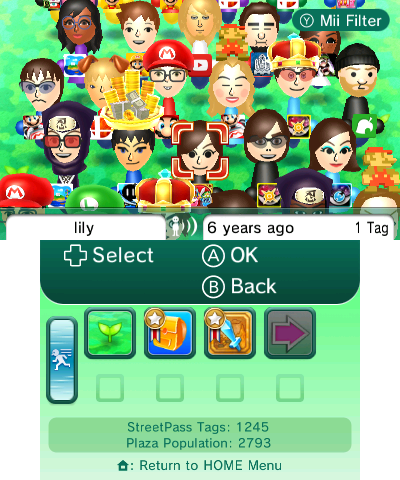
Here's how it looks in the source 3DS:
source 3ds.png

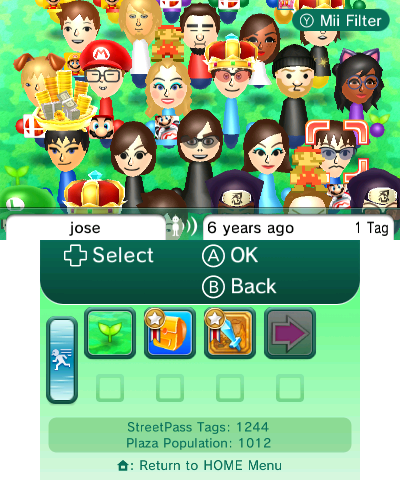
And how it looks in the destination 3DS (notice some are missing their game icons):
destination 3ds.png
 
Update: I found this thread about restoring the Activity Log to another 3DS, complete with the game icons, and how it was achieved. Unfortunately the instructions were not very clear, something about using Godmode9 and CMAC fixing. Can somebody explain how I can make this work to finally make the full transfer to my Japanese N3DS?
 
  • Like
Reactions: bonkmaykr
Sorry to necro the thread but I wanted to elaborate for anyone else who was still confused after reading this. Thanks for pointing me to the correct answer, @MushGuy

You need to go to this path in your old console's SYSNAND after booting GM9 from the boot menu:
1:/data/ <your console ID, there should only be one folder> /extdata/00048000
Then copy this folder in its entirety: f000000b
And insert it back into the same place on the new console.

This folder contains shared extra data for the entire system. 000b specifically includes your Miis (they aren't stored in Mii Maker) and most of your Streetpass encounters among other things.

I can confirm this fixed all of the missing Miis in my plaza.
Before: 1778057604282.png 1778057624913.png
After: 1778057644102.png
 
  • Love
Reactions: lightwo
Considering I may have to go through this process if I don't succeed at fixing my 3DS, this definitely looks promising! However, I thought I'd also throw this here for completeness sake:


I feel like restoring other things, like friends and friend code is almost as essential as Mii Plaza for someone who's used the 3DS extensively. Considering that I'm surely not the only one with a unit that's stuck in sleep mode due to how flimsy the console was built, GM9 being accessible despite this makes these instructions pretty essential.
 
  • Like
Reactions: bonkmaykr
like friends and friend code
I very much doubt you can restore those from a dead console. That would require interfacing with Nintendo's servers.

Also, considering online services have been discontinued, I don't know what you'd do with your friends and friend code anymore. Hardly "essential".

Considering that I'm surely not the only one with a unit that's stuck in sleep mode due to how flimsy the console was built
Actually, no, I don't think I've ever heard someone suggest their unit is "stuck in sleep mode" and I expect your problem is something else.
 
Last edited by Kwyjor,
I very much doubt you can restore those from a dead console. That would require interfacing with Nintendo's servers.

Also, considering online services have been discontinued, I don't know what you'd do with your friends and friend code anymore. Hardly "essential".

Actually, no, I don't think I've ever heard someone suggest their unit is "stuck in sleep mode" and I expect your problem is something else.
Pretendo exists though.

Also, I don't understand your point. What I expect to be the issue is that a connection through the ribbon cable for power has become unreliable due to trying to return it in position over and over to no avail. It looks like very few if any other people ran into this, but I'm willing to bet that at least one other person has run into this in the past.

But regardless, I'm sure there are other scenarios where moving from a broken 3DS with GM9 access to another working 3DS where the procedure in this thread would come in handy.

I'm hoping that this isn't going to become a discussion about my sleep mode blunders. I probably shouldn't have said anything.
 
  • Like
Reactions: bonkmaykr
I very much doubt you can restore those from a dead console. That would require interfacing with Nintendo's servers.

Also, considering online services have been discontinued, I don't know what you'd do with your friends and friend code anymore. Hardly "essential".

Actually, no, I don't think I've ever heard someone suggest their unit is "stuck in sleep mode" and I expect your problem is something else.
I was able to transfer those too, quite easily. The GM9Megascript has a dedicated option for it somewhere

But yes it is not particularly useful. Some of us never delete things on these old systems because they have sentimental value, of course ;) streetpass mii plaza certainly fits that description as that is kind of the whole point of having a plaza and not just game data
 
  • Like
Reactions: lightwo
  • Like
Reactions: bonkmaykr
Sorry to necro the thread but I wanted to elaborate for anyone else who was still confused after reading this. Thanks for pointing me to the correct answer, @MushGuy

You need to go to this path in your old console's SYSNAND after booting GM9 from the boot menu:
1:/data/ <your console ID, there should only be one folder> /extdata/00048000
Then copy this folder in its entirety: f000000b
And insert it back into the same place on the new console.

This folder contains shared extra data for the entire system. 000b specifically includes your Miis (they aren't stored in Mii Maker) and most of your Streetpass encounters among other things.

Yes, but game progress isn't restored even by injecting extdata saves as well (with JKSM or Checkpoint)
 
So.... What did you do?
In the end I got back all the work that had cost so much time and I can play only my incomplete minigames!

2026-05-18_10-53-23.585_bot.jpg
Given that I had kept everything from the old console, which I no longer own (NAND, SD backup, movable.sed, otp.bin, boot9.bin*, …), the file that was missing when I restored the MiiPlaza was precisely the "meet.dat".
* this is universal; if you have everything else you should have this too, otherwise you can extract it from the new console.

So, in the right order (not the one I followed, which I put the meet.dat last; but everything works anyway as long as don't launch the Mii Plaza minigames without replacing it, otherwise the saves of the launched minigames are reset and have to be put back), I'll make a quick list of the steps as answer, not a guide, also because the filenames are from the European console:
  • I mounted the old sysnand backup with Ninfs, extracted the meet.dat file and restored it to System save with JKSM
  • I copied f000000b (still extracted with Ninfs from NAND backup) to "1:/data/<console ID>/extdata/00048000" using GodMode9 (somebody says it might be unsafe, up in this thread, for friendcode or something, but those are details I wasn't interested in, I haven't noticed any problems)
  • I restored the Extra data, again with JKSM, which I had actually already inserted from an old dump of mine, but I still followed the steps in the guide you linked to me before realizing that the problem was the meet.dat file
Don't miss any of the three steps: the meet.dat file allows you to recognize saves and contains calendar, world, missions, statistics, etc.; the files in f000000b contain other settings, including your meets, chosen Mii (even if it's not in your current creation center), …; the Extra data files (meet_ext0.dat, meet_ext0.dat, meet_u000.dat, meet_u001.dat, mgBt10.dat, …) contain individual minigame saves (and the related backup).

For those who want to try their hand at it, the references are all on first page of this discussion, in case there are any unclear details on my list.
Obviously for use of the tools, further study will have to be done, if you are not used to using them, but I think I have mentioned necessary tools.
And remember to do all backups of the new console, before you start, especially f000000b dir, in case.

Finally, either you work on the old console physically, or you've extracted all the essentials (NAND, SD, movable.sed, ...) before losing it due to failure/sale/whatever: no, if you only have the old SD, without all the backups, you'll never get your old plaza back!

 
Last edited by Rulesless,
Following this up to mention that I had to remove the transferred friends data and reinstall the factory friend code in order to connect to Pretendo. Doing this permanently locked me out of Netpass. I am trying to get them to let me back in but the only people they have on support are way too busy. So don't bother with transferring your frndseed and your list, it's more trouble than its worth.
 

Site & Scene News

Popular threads in this forum