RetroFlow - Homebrew games box art collection
RETROFLOW HOMEBREW GAME/PORTS CUSTOM BOX ART COLLECTION
GOOGLE DRIVE DOWNLOAD
If you have any requests say and I'll add them to the drive when i get time.
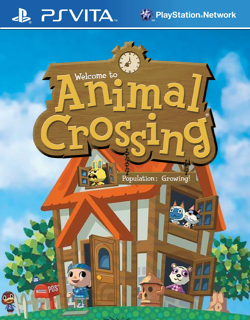


They're low resolution because Retroflow covers are only 250 x 320 in resolution which looks fine on the vita screen but not so much when scaled on a modern display. I think i got the app ids correct for the files if not just rename the image file to the app id for whatever game its for.
HOW TO APPLY CUSTOM COVERS IN RETROFLOW
In RetroFlow make sure you move the homebrew game to the vita category so it appears with your vita games because these covers only work when the game is in the vita category in retroflow it wont work if its in the homebrew category.
To do that open RetroFlow then press square to change categories go to the homebrew category and press triangle on the game you want to put in the PS vita category, you'll go into the games options where you'll see an override category option set it to PS vita and press the apply button.
Now you can close RetroFlow and add the custom box art image file to the /data/RetroFlow/COVERS/Sony - PlayStation Vita folder make sure the box art image file has the same name as the app id for example PCSB00047.png and some homebrew games have different app ids compared to official games for example GHSTSHP01, DOKU41220, CRAZYTAXI, 2SHIP2HAR to know the app id you can go into RetroFlow and press triangle on a game to go into the game options just like before and see the app id.
Once the image file is named properly and put in the correct folder you can reload RetroFlow and press start to go into settings, once in settings go to scan settings and select the rescan which will refresh the games box art and that should be it.


GOOGLE DRIVE DOWNLOAD
GOOGLE DRIVE DOWNLOAD
If you have any requests say and I'll add them to the drive when i get time.
They're low resolution because Retroflow covers are only 250 x 320 in resolution which looks fine on the vita screen but not so much when scaled on a modern display. I think i got the app ids correct for the files if not just rename the image file to the app id for whatever game its for.
HOW TO APPLY CUSTOM COVERS IN RETROFLOW
In RetroFlow make sure you move the homebrew game to the vita category so it appears with your vita games because these covers only work when the game is in the vita category in retroflow it wont work if its in the homebrew category.
To do that open RetroFlow then press square to change categories go to the homebrew category and press triangle on the game you want to put in the PS vita category, you'll go into the games options where you'll see an override category option set it to PS vita and press the apply button.
Now you can close RetroFlow and add the custom box art image file to the /data/RetroFlow/COVERS/Sony - PlayStation Vita folder make sure the box art image file has the same name as the app id for example PCSB00047.png and some homebrew games have different app ids compared to official games for example GHSTSHP01, DOKU41220, CRAZYTAXI, 2SHIP2HAR to know the app id you can go into RetroFlow and press triangle on a game to go into the game options just like before and see the app id.
Once the image file is named properly and put in the correct folder you can reload RetroFlow and press start to go into settings, once in settings go to scan settings and select the rescan which will refresh the games box art and that should be it.
GOOGLE DRIVE DOWNLOAD
Attachments
-
 2SHIP2HAR.png132.2 KB · Views: 5
 -
 ACGC00001.png166.3 KB · Views: 5
 -
 ALSA50001.png85.5 KB · Views: 7
 -
 AMTR01693.png150.5 KB · Views: 6
 -
 BALA00001.png126.2 KB · Views: 5
 -
 BULLY0000.png150.6 KB · Views: 6
 -
 CPHD23233.png129.5 KB · Views: 5
 -
 CRAZYTAXI.png195 KB · Views: 5
 -
 DEADSPACE.png142.1 KB · Views: 7
 -
 DOKU41220.png108.6 KB · Views: 7
 -
 DOOM00666.png168.7 KB · Views: 3
 -
 FOUT00002.png132.6 KB · Views: 5
 -
 GEOMETRYD.png102.6 KB · Views: 7
 -
 GHSTSHP01.png148.3 KB · Views: 11
 -
 GTACTW000.png150.2 KB · Views: 5
 -
 GTASA0000.png150 KB · Views: 9
 -
 HKVT12222.png145.3 KB · Views: 7
 -
 HLTK00001.png135.8 KB · Views: 11
 -
 HMRL00002.png59.5 KB · Views: 7
 -
 JNPRSK099.png148.9 KB · Views: 6
 -
 MANIA0001.png124 KB · Views: 6
 -
 MAXP00000.png36.6 KB · Views: 12
 -
 NZZMBSPTB.png123.6 KB · Views: 8
 -
 QUAK00001.png135.4 KB · Views: 7
 -
 QUAK00002.png124.6 KB · Views: 8
 -
 QUAK00003.png121.2 KB · Views: 8
 -
 RSDK00001.png150.9 KB · Views: 8
 -
 RSDK00003.png182.9 KB · Views: 6
 -
 RTCW00001.png132.1 KB · Views: 4
 -
 SHIPOFHAR.png146.9 KB · Views: 9
 -
 SONIC0001.png100.5 KB · Views: 7
 -
 SPAGHETTI.png172 KB · Views: 10
 -
 SPRMRWRLD.png124 KB · Views: 7
 -
 TPPG00001.png153.9 KB · Views: 7
 -
 ZELDASNES.png94.9 KB · Views: 6
 -
 ALSA50001.png85.5 KB · Views: 10