Homebrew ioQuake3-Wii

  • Thread starter Thread starter Mayo1990
  • Start date Start date
  • Views Views 6,223
  • Replies Replies 83
  • Likes Likes 16

Mayo1990

I just play vidya
Member
Joined
Jan 4, 2016
Messages
805
Reaction score
1,831
Trophies
3
Age
30
XP
4,094
Country
Italy
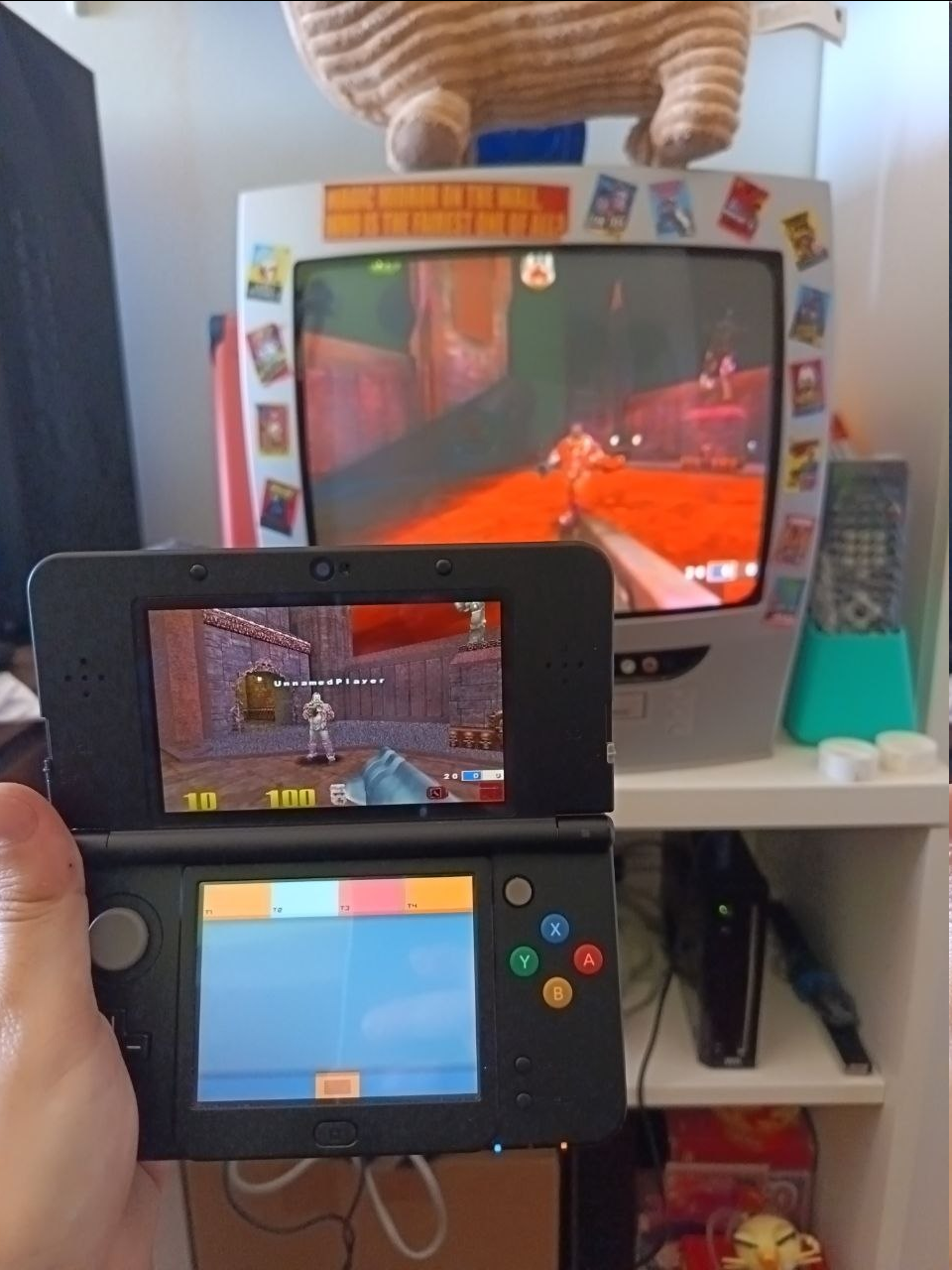
Greetings! This is one of my closet projects which involves porting ioQuake3 to the Nintendo Wii. AI has been used to assist me in this project due to lack of time. I won't share my CLAUDE.MD, but you can find the details of which AI models I used, and their respective role. I hope this will help and encourage more developers or people trying to approach this field in a much less intimidating way. Be aware that the approach was the same for basically every Quake 3 port I made.

Hardened code's skill module is mandatory. Without it, AI will hallucinate a lot and will either introduce issues or regressions.
Sonnet 4.6
did good chunk of the work code-wise. It would often struggle with more advanced things (ex. renderer). If it struggled or introduced regressions when implementing something, I would instantly swap to Opus to continue
Opus 4.6 does the much more complex stuff, then code review and comment trimming.
Codex although not mandatory does the double check on code.

Wii has very strict rules when it comes down to memory, it was a good learning field to trim and optimize as much as possible.


Main features:
  • Wiimote+Nunchuck (motion aiming) or GameCube/Pro/Classic controller
  • Mouse and keyboard support
  • Can play with other Quake 3 clients (ioQuake3DS, VitaQuake, various other ports, Steam's client, and so on)
  • Open Arena support
  • 240p and 264p resolution support
  • Game runs at stable 30 FPS.
  • Confirmed to work on WiiU's vWii. Also runs on Dolphin.

TODO:
  • Add mod support? Undoable at the moment because we're already tight on memory.
  • Use my port as a base for Lilium-Arena-Classic to let it play with Dreamcast players. -> Managed to get to the QVM and the renderer to work, but not to enter in game or open the multiplayer menu. The menu also runs at a very low framerate. Still investigating some of these issues but once these are addressed the port can crossplay with Dreamcast players.
Enjoy! Like other ioQuake3 ports, remember that you must provide your own Quake3 files.

Latest release

RELATED PROJECTS:
ioQuake3-PS3
ioQuake3-PS4
ioQuake3-One


1776887254528.png

1776887240105.png
 
Last edited by Mayo1990,
Incredible work!! Can't wait to try this out later

EDIT: I get a screen of garbled vertical strips and then return to HBC, am I doing something wrong? I have all the 8 paks in the "Quake 3/baseq3" folder on my SD card, and a gamecube controller plugged in. 256GB SDXC card if that maybe might be the issue
 
Last edited by Disorarara,
  • Like
Reactions: Happy1337
Incredible work!! Can't wait to try this out later

EDIT: I get a screen of garbled vertical strips and then return to HBC, am I doing something wrong? I have all the 8 paks in the "Quake 3/baseq3" folder on my SD card, and a gamecube controller plugged in. 256GB SDXC card if that maybe might be the issue

I'm not sure the Micro SD card is the issue, I'm also using a 256 GB Micro-SD card. I may have to look into that.
Post automatically merged:

I had a free morning so I polished a loooot of things. Build should be a lot more stable now (along with proper controller support)
Release page

Small update although not really that important: you can now compile OpenArena and get it to run on Wii using this port (you could do it before but I forgot to make a comand for it lol). If you feel like giving some help, you can also compile a debug build that makes a some logs inside the Q3 folder. Be aware that Open Arena is also Free. Whereas with Q3 you need to provide your files.

Still no Wiimote+Nunchuck support. It kept giving issues so It's shelved for now.
Please let me know if you run into any issues.
 
Last edited by Mayo1990,
  • Like
Reactions: Disorarara
Added mouse and keyboard support. Also bots will work as intended. It can now host servers online (haven't stress tested much on this though, be careful)

Latest release
I updated to this release but I'm still not having any luck, still the same garbled strips and no game. Can anyone else confirm it works on their setup? Or is there any way to enable logging so I can see what's happening?
 
I updated to this release but I'm still not having any luck, still the same garbled strips and no game. Can anyone else confirm it works on their setup? Or is there any way to enable logging so I can see what's happening?
You'd need to compile a debug build from source, but I can confirm that there must be something wrong with your SD card. I can confirm that it runs perfectly on Dolphin, vWii (WiiU's) and my Wii. Can you share a screenshot of your root SD card then?

Be aware that for it to run you need to have it like this:

Root:
|
- Apps folder - ioq3 homebrew (boot.dol and such)
|
-quake3-baseq3-pak0-8 must be inside baseq3's folder
 
You'd need to compile a debug build from source, but I can confirm that there must be something wrong with your SD card. I can confirm that it runs perfectly on Dolphin, vWii (WiiU's) and my Wii. Can you share a screenshot of your root SD card then?

Be aware that for it to run you need to have it like this:

Root:
|
- Apps folder - ioq3 homebrew (boot.dol and such)
|
-quake3-baseq3-pak0-8 must be inside baseq3's folder

it is indeed laid out like that, I looked at the diag.txt generated by the launcher and it shows this:

Hunk_Clear: enter
R_Init: enter
R_CreateImage[0]: '*default' 16x16 sbrk=0x817c6000
R_CreateImage[1]: '*white' 8x8 sbrk=0x817c6000
ScanAndLoadShaderFiles: enter, old s_shaderText=0x0
ScanAndLoadShaderFiles: found 30 shader files
ScanAndLoadShaderFiles: s_shaderText=0x9324f1f8 sum=590942
ScanAndLoadShaderFiles: compressed len=423072 end=0x932b6698
R_Init: R_InitShaders done, sbrk=0x817cf000
R_CreateImage[49]: 'gfx/colors/black.tga' 8x8 sbrk=0x90db4000

I'm going to try another SD card
 
  • Like
Reactions: Mayo1990
It works great for me. For an early version, you've done an excellent job: aiming with the Wii Remote and the button configuration are comfortable, the bots work as they should, and so far I haven't had any problems getting in and out of the game. I haven't changed any of the default settings.

I’ll be keeping a close eye on future updates. Thanks so much for sharing this. Quake 3 is a great game.
 
  • Love
Reactions: Mayo1990
it is indeed laid out like that, I looked at the diag.txt generated by the launcher and it shows this:


I'm going to try another SD card
If it didn't work, I found the issue. I'll be updating the source code real soon.

Apparently this only affected some Wii/devices.
 
Last edited by Mayo1990,
What was the cause of it not launching?
Basically with some Micro SD cards and some Wiis it would time out and hang. I came across this when I cloned my repo and rebuilt from source since I wanted to implement some new things to it. So when I noticed this behavior I pulled out one of my other Wiis and noticed that it would hang even with the release build. This didn't happen with my black WiiU and some Dolphin builds neither.

I had to rebuild most of the initial structure, luckily the most important pieces (memory management, networking, inputs etc) are intact, but I broke one or two very few things in the process which don't really affect gameplay (the QIII logo at the start and the Player model in the Setup screen). Once those are fixed I can implement Open Arena support (easy), standalone Team Arena and mods support. It will now skip the Insert CD Key screen though, like my PS3 and PS4 ports.

I also improved the controller experience as well as adding classic controller support. This would also let WiiU players play through their gamepad.
 
Basically with some Micro SD cards and some Wiis it would time out and hang. I came across this when I cloned my repo and rebuilt from source since I wanted to implement some new things to it. So when I noticed this behavior I pulled out one of my other Wiis and noticed that it would hang even with the release build. This didn't happen with my black WiiU and some Dolphin builds neither.

I had to rebuild most of the initial structure, luckily the most important pieces (memory management, networking, inputs etc) are intact, but I broke one or two very few things in the process which don't really affect gameplay (the QIII logo at the start and the Player model in the Setup screen). Once those are fixed I can implement Open Arena support (easy), standalone Team Arena and mods support. It will now skip the Insert CD Key screen though, like my PS3 and PS4 ports.

I also improved the controller experience as well as adding classic controller support. This would also let WiiU players play through their gamepad.

I appreciate you taking the time to fix this, looking forward to the next release!
 
I appreciate you taking the time to fix this, looking forward to the next release!
I wanted to get back to it eventually to implement other stuff, so discovering new issues apparently paid off.
At the moment I fixed some of the things addressed. I'm currently working on mod support.

I'll post a release shortly and address the mod issues this weekend.
Post automatically merged:

Fifth release:
  • Improved stability (should work on all Wii/emu/WiiU now)
  • Added Classic Controller support (I literally made this so WiiU players can play it from the gamepad while I figure out the WiiU port)
  • Added music playback support
  • Improved GameCube controller (which will also affect the Classic Controller) feedback
  • Fixed a crash that people would eventually get when connecting to community servers. It should work fine now
Known issues which don't affect the user experience:
  • Loading mods will lead to a crash
  • The Q3 logo is now missing in the top of the menu
  • The Player model in the Player setup screen is missing
TODO:
  • Fix mods issue (so we can have a standalone Team Arena build)
  • Open Arena support (should get a standalone release within this weekend)
  • Fix the Q3 logo and the Player model issue

Latest release
 
Last edited by Mayo1990,
I wanted to get back to it eventually to implement other stuff, so discovering new issues apparently paid off.
At the moment I fixed some of the things addressed. I'm currently working on mod support.

I'll post a release shortly and address the mod issues this weekend.
Post automatically merged:

Fifth release:
  • Improved stability (should work on all Wii/emu/WiiU now)
  • Added Classic Controller support (I literally made this so WiiU players can play it from the gamepad while I figure out the WiiU port)
  • Added music playback support
  • Improved GameCube controller (which will also affect the Classic Controller) feedback
  • Fixed a crash that people would eventually get when connecting to community servers. It should work fine now
Known issues which don't affect the user experience:
  • Loading mods will lead to a crash
  • The Q3 logo is now missing in the top of the menu
  • The Player model in the Player setup screen is missing
TODO:
  • Fix mods issue (so we can have a standalone Team Arena build)
  • Open Arena support (should get a standalone release within this weekend)
  • Fix the Q3 logo and the Player model issue

Latest release

It works!! Amazing!
 
  • Love
Reactions: Mayo1990

Site & Scene News

Popular threads in this forum