This error typically indicates that the EdiZon overlay file (ovl-EdiZon.ovl) is outdated or incompatible with your current version of Atmosphere or the Switch firmware.
I think u have to download the latest EdiZon
im having trouble for text to item, everytime i press ZL + Dpad right i got nothing,,can anyone help me, do i have to update edison because im still on 3.0.0
Hi, could someone help me with the Animal Crossing cheat? Some cheats work, but when it comes to money and Nook Miles
it doesn’t work. Could someone please help me?
im having trouble for text to item, everytime i press ZL + Dpad right i got nothing,,can anyone help me, do i have to update edison because im still on 3.0.0
Hi, could someone help me with the Animal Crossing cheat? Some cheats work, but when it comes to money and Nook Miles
it doesn’t work. Could someone please help me?
What update? Check this post for the latest one (3.0.1) > "Info – Newcomers" section.
In the same post, you’ll find the currency codes, adjusted to match your player count.
Hi, I've been using the Slot1 multiplier cheat and it works great, but I just wanted to know if it was possible to edit it for myself to make it duplicate to a higher amount like 90 or 100 since I have a stack mod for all items so that they can exceed the usual limit.
Most codes vary depending on how many human players live on your island.
If you have:
1 registered human player → use the “1P on Island” tab.
2 registered human players → use the “2P on Island” tab.
3–8 registered human players → use the corresponding tab.
To determine how many registered human players you have, open your in-game map (press ZL to open the phone menu & select Map option). Example: this island has 2 registered human players (shown in the top-left corner).
Even if you are playing solo, you must use the tab that matches the total number of registered human players on your island.
[Speed Up x2/x3/x4]
Increase your character’s running speed by holding the B button. [Walk through Walls (Hold Y)]
Walk through walls (indoors and outdoors) by holding the Y button. [Animation Speed x1/x2/x5/x50]
Increases the speed of all in-game animations (for example, your character’s idle animations), without affecting game time. [Moonjump (Y)]
Hold Y to make your character float in the air. [Increased Swim Speed+Dive] - For 1 player only (multiplayer version = unlimited underwater diving only)
Increases your character’s swimming speed, both above and underwater. Also allows you to stay underwater indefinitely. [Zero Knockback on Rocks]
Disables the knockback animation when hitting rocks. [Time control]
Allows you to control in-game time. Useful for skipping wait times (construction completion, shop opening, etc.). [Instant Text Speed]
Removes all text animation for instant dialogue display. [Max Stamina]
Sets your stamina to the maximum value (10/10). [Easy DIY]
When enabled, only the first required resource (x1) is needed to craft any DIY item. [Duplicate S1toS2 (Zr)]
Duplicates the item in Slot 1 into Slot 2. Make sure Slot 2 does not contain an item you want to keep. [S1 x10, x30, x50]
Multiplies the item in Slot 1 by 10, 30, or 50 (Resources only: wood, branches, fences, fruits, nuggets...).
Press Zr + Dpad Top for x10
Press Zr + Dpad Right for x30
Press Zr + Dpad Bottom for x50
[Slot 1 to empty slot (Minus)]
Press Minus to duplicate the item in Slot 1 into empty inventory slots. Useful if you want to duplicate an item without overwriting occupied slots. Based on Sky' [furniture you touch to empty slot] code. [Text to Slot 1]
To spawn an item in Slot 1:
Make sure Slot 1 is empty (move any item you want to keep).
Open the in-game chat (R button).
Enter the item ID (e.g. 1026) and confirm.
Press X + D-Pad Right to spawn the item in Slot 1.
To change color/quantity - if available/possible:
Keep the desired item in Slot 1.
Open the in-game chat (R button).
Enter a number (e.g. 0–5) in chat and confirm.
Press X + D-Pad Left.
All item HEX IDs here [Chat Buffer to Slot 1]
When the code is enabled:
Make sure Slot 1 is empty (move any item you want to keep).
Open the in-game chat (R button).
Enter the item ID (e.g. 1026) without confirming.
Press ZR + D-Pad Right to spawn the item in Slot 1.
To change color/quantity - if available/possible:
Keep the desired item in Slot 1.
Open the in-game chat (R button).
Enter a number (e.g. 0–5) without confirming.
Press ZR + D-Pad Left.
All item HEX IDs here [Nook Shopping App to Empty Slot (Minus)]
Open the NookPhone app or the Nook Shopping service at Nook Stop in Resident Services.
Hover over the desired item.
Press Minus to spawn it into an empty inventory slot.
You may receive 3–5 copies of the item - this is normal.
[furniture you touch to empty slot (Minus)]
Hold A on a placed outdoor item. You should see your character holding it with his hands.
Press Minus to spawn it into an empty inventory slot.
You may receive 3–5 copies of the item - this is normal.
[Max ABD 999,999,999] / [Max Nook Miles 9,999,999]
Press ZL + Dpad Top.
Open the Nook Stop (at the Resident Services).
You now have 999,999,999 bells in ABD / 9,999,999 Nook Miles.
[Min ABD] / [Min Nook Miles]
Press ZL + Dpad Down.
Open the Nook Stop (at the Resident Services).
You now have zero bell in ABD / no Nook Miles.
[Max Poki 999,999]
Go to Lottie's Island.
Press ZL + Dpad Top.
You now have 999,999 Poki.
[Min Poki]
Go to Lottie's Island.
Press ZL + Dpad Down.
You now have zero Poki.
[Unlock all reactions]
To unlock all reactions. Open the reactions menu with the ZR button to view them. [Random items / All flowers / All...]
"Sxx" refers to Inventory Slot xx. Example: [S1/10 All Golden Tools] spawns Golden Tools into Slots 1–10.
You must unlock all 40 inventory slots before using these codes:
No button activators - ensure target slots are empty before use. The [Unbreakable Tools] must remain enabled at all times. Turning them off will cause tools to break normally. [Empty slot]
Deletes all items from your inventory (40 slots). You can customize it (e.g. Empty Slots 1–20 only) by removing the corresponding lines.
Additional C.Codes
3.0.0 items/DIY aren’t included yet. DIY / Items from 2.0.0 / Insects-Fish-Fossils-Paintings-Sculptures-Gyroids / Mario items
You can’t include these additional C.Codes in the same .txt file as the ones above, as there are too many of them.
Solution #1
Edit the .txt file via USB whenever needed.
Solution #2
Create multiple .txt files based on your needs and organize them into folders:
SD/ACNH/Main AIO/BID.txt
SD/ACNH/DIY Part 1/BID.txt
SD/ACNH/DIY Part 2/BID.txt
SD/ACNH/All Mario Items/BID.txt
Then, use NX-Shell to copy, delete, or paste the desired file to:
SD > atmosphere > contents folder > 01006f8002326000 folder > cheats folder > BID.txt
First, make sure you have selected the correct C.Codes for the number of players on your island. For more information, see the “Info - New comers” section at the beginning of this post.
If it still doesn’t work, try disabling some of your sysmodules.
If you use SaltyNX, you need to add X01006F8002326000 to exceptions.txt in SaltySD.
Important: due to the new memory limits introduced by recent updates, you should:
reduce the number of mods you are using, or
stop using mods that are too large or resource-heavy.
+ Please note that some mods released before the Happy Home Paradise DLC include outdated ResourceSizeTable files and may cause compatibility issues. As a result, some letters, objects, or icons may become invisible, even if the patch is applied. In the worst case, the game may crash.
Possible Fix #1 - Use an updated ResourceSizeTable
Always activate it last (for example, with Simple Mod Manager, after enabling all other mods).
Some mod packs already include their own ResourceSizeTable file Make sure to delete those and use only this updated version.
It is strongly recommended to keep it separate from other mod folders.
Example folder structure:
00 ResourceSizeTable
../mods/Animal Crossing New Horizon/00 ResourceSizeTable/contents/01006F8002326000/romfs/System/Resource/ResourceSizeTable.srsizetable
01 Black sand beach
../mods/Animal Crossing New Horizon/01 Black Sand/contents/01006F8002326000/romfs/Model/...zs
Possible Fix #2 - Merge mods into a custom RSTB
Try this tool to merge your mods and automaticallly create a personalized RSTB patch.
Note: I haven’t personally tested this tool, so please don’t ask me for support regarding it.
If you want to add a button activator to a code, don’t forget to include the 20000000 line at the end. You can use Mopsy's ACNH Code Generator to combine activators easily.
Code:
Without button activator:
[S36 Medicine X10 - 1P]
08100000 B27BB718 00000009 00000AD9

With button activator:
[S36 Medicine X10 - 1P (Zr)]
80000200
08100000 B27BB718 00000009 00000AD9
20000000

Without combined button activators:
[Max ABD (ZL)]
80000100
081A0000 B27E8D2C 5501C176 AB86064B
20000000
-
[Min ABD (ZL)]
80000100
081A0000 B27E8D2C 5501C176 6B080114
20000000

With combined button activators:
[Max/Min ABD (ZL+Dpad↑/↓)]
80002100
081A0000 B27E8D2C 5501C176 AB86064B
20000000
80008100
081A0000 B27E8D2C 5501C176 6B080114
20000000
Most codes vary depending on how many human players live on your island.
If you have:
1 registered human player → use the “1P on Island” tab.
2 registered human players → use the “2P on Island” tab.
3–8 registered human players → use the corresponding tab.
To determine how many registered human players you have, open your in-game map (press ZL to open the phone menu & select Map option). Example: this island has 2 registered human players (shown in the top-left corner).
Even if you are playing solo, you must use the tab that matches the total number of registered human players on your island.
[Speed Up x2/x3/x4]
Increase your character’s running speed by holding the B button. [Walk through Walls (Hold Y)]
Walk through walls (indoors and outdoors) by holding the Y button. [Animation Speed x1/x2/x5/x50]
Increases the speed of all in-game animations (for example, your character’s idle animations), without affecting game time. [Moonjump (Y)]
Hold Y to make your character float in the air. [Increased Swim Speed+Dive] - For 1 player only (multiplayer version = unlimited underwater diving only)
Increases your character’s swimming speed, both above and underwater. Also allows you to stay underwater indefinitely. [Zero Knockback on Rocks]
Disables the knockback animation when hitting rocks. [Time control]
Allows you to control in-game time. Useful for skipping wait times (construction completion, shop opening, etc.). [Instant Text Speed]
Removes all text animation for instant dialogue display. [Max Stamina]
Sets your stamina to the maximum value (10/10). [Easy DIY]
When enabled, only the first required resource (x1) is needed to craft any DIY item. [Duplicate S1toS2 (Zr)]
Duplicates the item in Slot 1 into Slot 2. Make sure Slot 2 does not contain an item you want to keep. [S1 x10, x30, x50]
Multiplies the item in Slot 1 by 10, 30, or 50 (Resources only: wood, branches, fences, fruits, nuggets...).
Press Zr + Dpad Top for x10
Press Zr + Dpad Right for x30
Press Zr + Dpad Bottom for x50
[Slot 1 to empty slot (Minus)]
Press Minus to duplicate the item in Slot 1 into empty inventory slots. Useful if you want to duplicate an item without overwriting occupied slots. Based on Sky' [furniture you touch to empty slot] code. [Text to Slot 1]
To spawn an item in Slot 1:
Make sure Slot 1 is empty (move any item you want to keep).
Open the in-game chat (R button).
Enter the item ID (e.g. 1026) and confirm.
Press X + D-Pad Right to spawn the item in Slot 1.
To change color/quantity - if available/possible:
Keep the desired item in Slot 1.
Open the in-game chat (R button).
Enter a number (e.g. 0–5) in chat and confirm.
Press X + D-Pad Left.
All item HEX IDs here [Chat Buffer to Slot 1]
When the code is enabled:
Make sure Slot 1 is empty (move any item you want to keep).
Open the in-game chat (R button).
Enter the item ID (e.g. 1026) without confirming.
Press ZR + D-Pad Right to spawn the item in Slot 1.
To change color/quantity - if available/possible:
Keep the desired item in Slot 1.
Open the in-game chat (R button).
Enter a number (e.g. 0–5) without confirming.
Press ZR + D-Pad Left.
All item HEX IDs here [Nook Shopping App to Empty Slot (Minus)]
Open the NookPhone app or the Nook Shopping service at Nook Stop in Resident Services.
Hover over the desired item.
Press Minus to spawn it into an empty inventory slot.
You may receive 3–5 copies of the item - this is normal.
[furniture you touch to empty slot (Minus)]
Hold A on a placed outdoor item. You should see your character holding it with his hands.
Press Minus to spawn it into an empty inventory slot.
You may receive 3–5 copies of the item - this is normal.
[Max ABD 999,999,999] / [Max Nook Miles 9,999,999]
Press ZL + Dpad Top.
Open the Nook Stop (at the Resident Services).
You now have 999,999,999 bells in ABD / 9,999,999 Nook Miles.
[Min ABD] / [Min Nook Miles]
Press ZL + Dpad Down.
Open the Nook Stop (at the Resident Services).
You now have zero bell in ABD / no Nook Miles.
[Max Poki 999,999]
Go to Lottie's Island.
Press ZL + Dpad Top.
You now have 999,999 Poki.
[Min Poki]
Go to Lottie's Island.
Press ZL + Dpad Down.
You now have zero Poki.
[Unlock all reactions]
To unlock all reactions. Open the reactions menu with the ZR button to view them. [Random items / All flowers / All...]
"Sxx" refers to Inventory Slot xx. Example: [S1/10 All Golden Tools] spawns Golden Tools into Slots 1–10.
You must unlock all 40 inventory slots before using these codes:
No button activators - ensure target slots are empty before use. The [Unbreakable Tools] must remain enabled at all times. Turning them off will cause tools to break normally. [Empty slot]
Deletes all items from your inventory (40 slots). You can customize it (e.g. Empty Slots 1–20 only) by removing the corresponding lines.
Additional C.Codes
3.0.0 items/DIY aren’t included yet. DIY / Items from 2.0.0 / Insects-Fish-Fossils-Paintings-Sculptures-Gyroids / Mario items
You can’t include these additional C.Codes in the same .txt file as the ones above, as there are too many of them.
Solution #1
Edit the .txt file via USB whenever needed.
Solution #2
Create multiple .txt files based on your needs and organize them into folders:
SD/ACNH/Main AIO/BID.txt
SD/ACNH/DIY Part 1/BID.txt
SD/ACNH/DIY Part 2/BID.txt
SD/ACNH/All Mario Items/BID.txt
Then, use NX-Shell to copy, delete, or paste the desired file to:
SD > atmosphere > contents folder > 01006f8002326000 folder > cheats folder > BID.txt
First, make sure you have selected the correct C.Codes for the number of players on your island. For more information, see the “Info - New comers” section at the beginning of this post.
If it still doesn’t work, try disabling some of your sysmodules.
If you use SaltyNX, you need to add X01006F8002326000 to exceptions.txt in SaltySD.
Important: due to the new memory limits introduced by recent updates, you should:
reduce the number of mods you are using, or
stop using mods that are too large or resource-heavy.
+ Please note that some mods released before the Happy Home Paradise DLC include outdated ResourceSizeTable files and may cause compatibility issues. As a result, some letters, objects, or icons may become invisible, even if the patch is applied. In the worst case, the game may crash.
Possible Fix #1 - Use an updated ResourceSizeTable
Always activate it last (for example, with Simple Mod Manager, after enabling all other mods).
Some mod packs already include their own ResourceSizeTable file Make sure to delete those and use only this updated version.
It is strongly recommended to keep it separate from other mod folders.
Example folder structure:
00 ResourceSizeTable
../mods/Animal Crossing New Horizon/00 ResourceSizeTable/contents/01006F8002326000/romfs/System/Resource/ResourceSizeTable.srsizetable
01 Black sand beach
../mods/Animal Crossing New Horizon/01 Black Sand/contents/01006F8002326000/romfs/Model/...zs
Possible Fix #2 - Merge mods into a custom RSTB
Try this tool to merge your mods and automaticallly create a personalized RSTB patch.
Note: I haven’t personally tested this tool, so please don’t ask me for support regarding it.
If you want to add a button activator to a code, don’t forget to include the 20000000 line at the end. You can use Mopsy's ACNH Code Generator to combine activators easily.
Code:
Without button activator:
[S36 Medicine X10 - 1P]
08100000 B27BB718 00000009 00000AD9

With button activator:
[S36 Medicine X10 - 1P (Zr)]
80000200
08100000 B27BB718 00000009 00000AD9
20000000

Without combined button activators:
[Max ABD (ZL)]
80000100
081A0000 B27E8D2C 5501C176 AB86064B
20000000
-
[Min ABD (ZL)]
80000100
081A0000 B27E8D2C 5501C176 6B080114
20000000

With combined button activators:
[Max/Min ABD (ZL+Dpad↑/↓)]
80002100
081A0000 B27E8D2C 5501C176 AB86064B
20000000
80008100
081A0000 B27E8D2C 5501C176 6B080114
20000000
I'm a beginner, and I gave it a try. This is a code to generate items from S1 to S39.
Confirmed to work in Ver. 3.0.1
Change the "0000XXXX" at the end to generate different items.
Sorry if my English sounds awkward; I'm using a translator.
The cheat codes below do not work on NS Atmosphere version 20.4 with the game version 3.0.1. There are 5 animal npc villagers on my island besides myself. I have also tried the 5-player code, yet the codes still fail to work. Does anyone know what the issue could be?
[№ 9. Max ABD 999,999,999]
081A0000 B27E8D2C 5501C176 AB86064B
[№10. Max Nook Miles 9,999,999]
081A0000 B27961C8 020C1E37 C4D2BFDA
[№11. Max Poki 999,999]
081A0000 B449E6C8 630DBDE2 D5107F2C
[№12. Max Pocket bells 999,999]
081A0000 B27BB810 630DBDE2 D5107F2C
[№13. Max Hotel Tickets]
081A0000 B27F7D60 630DBDE2 D5107F2C
The animal villagers (NPCs) living on your island have nothing to do with using the codes for "5 players". If you have only one human player on your island (your character), the codes provided by Oblivion are enough.
Seemingly out of nowhere a PC port for Pokemon Platinum has surfaced online, bundled alongside the source code for those interested in building and developing it for...
With very little in the way of announcement, Valve has today increased the price of the Steam Deck but some fairly considerable margins. Both of the available models...
Nintendo's expected Summer showcase is here, offering up plenty of new announcements and exciting reveals. Let's see what they have in store in the latest Nintendo...
Continuing with the great news of Pokémon Platinum getting a native unofficial PC port just a few days ago, today, yet another classic title from the franchise has...
The latest in a growing number of native PC ports, Paper Mario ReCut got its first pre-release build earlier this week. Based on the N64 recompilation toolchain, the...
When you talk about 3DS emulation, most people would jump to Citra. As the defacto choice since its first release it's seen tremendous success, and even after its...
What once seemed like a far off dream, and after many, many community restarts throughout the years, the elusive Mother 1 / EarthBound Beginnings Remake, which is a...
After much speculation, a lot of which being caused by dbrand's unceremonious reveal of their Companion Cube casing, the Steam Machine is finally available to order...
A whole hour of PlayStation content is on the way, thanks to the latest State of Play showcase. Headlining the stream will be Marvel's Wolverine, alongside a...
Since being decompiled Super Mario 64 has seen a considerable amount of interest. We've had multiple PC ports, but the efforts beyond that are really astounding. It's...
After much speculation, a lot of which being caused by dbrand's unceremonious reveal of their Companion Cube casing, the Steam Machine is finally available to order...
With very little in the way of announcement, Valve has today increased the price of the Steam Deck but some fairly considerable margins. Both of the available models...
Nintendo's expected Summer showcase is here, offering up plenty of new announcements and exciting reveals. Let's see what they have in store in the latest Nintendo...
The delays may be behind us, but the news isn't all good for Grand Theft Auto VI. Rockstar have today announced that pre-orders for the game will go live tomorrow, on...
Seemingly out of nowhere a PC port for Pokemon Platinum has surfaced online, bundled alongside the source code for those interested in building and developing it for...
With rumours circulating about a Nintendo Direct in the coming days and weeks, fans are left speculating and hoping as to what might be included. At the centre of all...
The latest in a growing number of native PC ports, Paper Mario ReCut got its first pre-release build earlier this week. Based on the N64 recompilation toolchain, the...
After much speculation and rumour, the fabled Nintendo Direct is upon us. Set to go live tomorrow, the 9th of June, at 3pm in the UK, it'll feature 50 minutes of...
A whole hour of PlayStation content is on the way, thanks to the latest State of Play showcase. Headlining the stream will be Marvel's Wolverine, alongside a...
Following an investigation over misleading commercial practices, today Nintendo has been imposed a fine of 35 million euros related to the controller malfunctions...



 for anyone else having the atmos crash when loading cheat menu,




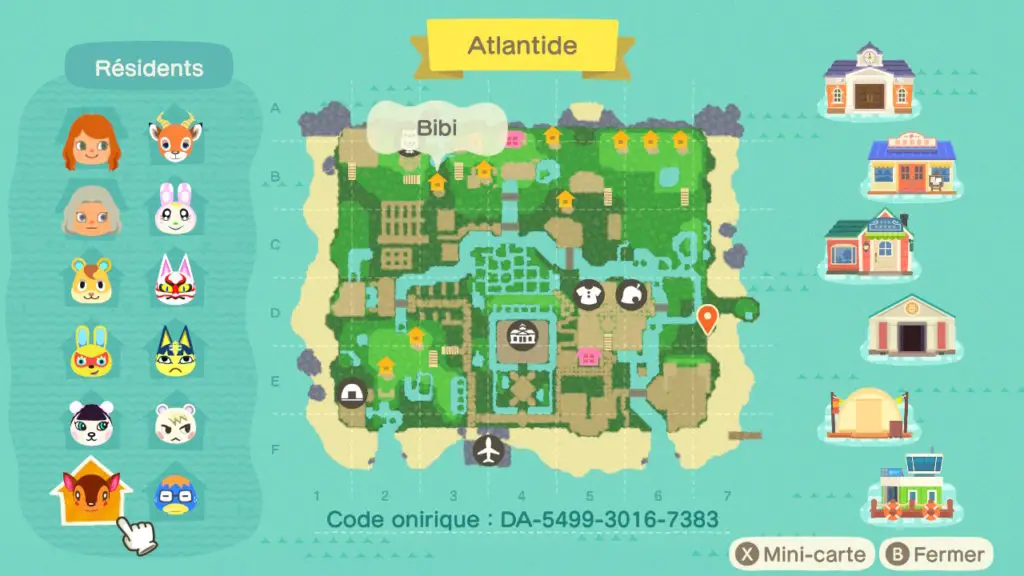
 Even if you are playing solo, you must use the tab that matches the total number of registered human players on your island.
 All item HEX IDs