Hacking Homebrew Tutorial
Updated
Wii U Cafe SDK Deluxe, Easily install Unity Wii U Games to your Retail Wii U
Hello everyone,
Today, I introduce a tool to easily make installable images from a Unity Wii U Build for any Retail Wii U !
This tool is currently in beta, some functions are not ready yet but the big part about decrypting Unity Build and repack it is working.
This is a short tutorial about how to use this tool. You can download it from my GitHub Repo here.
Installation & Setup
To Install Wii U Cafe SDK Deluxe you just need to download it from the Release Page of the GitHub and extract it to your Unity's Build folder. Like that :
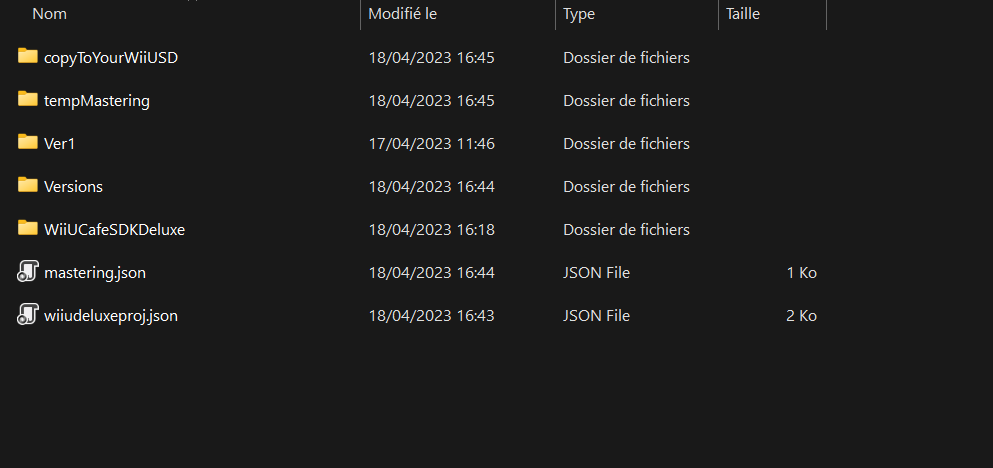 Here we are inside my "Builds" folder of my Unity Project. The folder "Ver1" is my Unity Build with raw and dev files. You need to add the extracted folder "WiiUCafeSDKDeluxe" to the root folder of your build like in the picture. The "Versions" folder is created by Wii U Cafe Deluxe to store your Wii U Game versions. "tempMastering" is the folder who contains the mastering files (deleted after mastering done) and finaly, "copyToYourWiiUSD" contains the installable files to use with WUP Installer or System Config Tool on Retail Wii U. The two JSON files are the settings to use with the tool.
To set up the tool, you just need to run WiiUCafeSDKDeluxe.exe from the folder of the same name. You will have a message box to ask you if you want to create a new project, select "yes" and you will see this window :
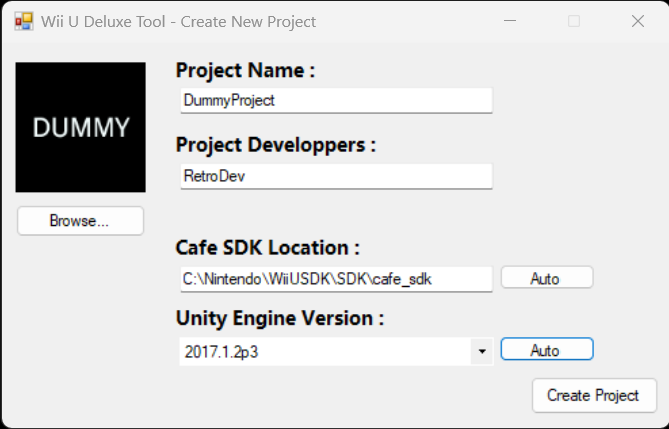
The "Project Name" is how your final game is named. If later, you check the option "Automatically Copy To SD", this field will be used to create the folder in your SD Card with the installable files.
You can add an icon and developers, but it just aesthetics now.
Cafe SDK Location and Unity version are required later, add them manually or locate your Cafe SDK automatically and your Unity Version from your project files.
For now only Unity.1.2p3 has been tested, other version can work, but I didn't make any tests.
Now we have finished with the installation and the setup. I will now explain the different functionalities and usage of my tool.
Usage and Functions
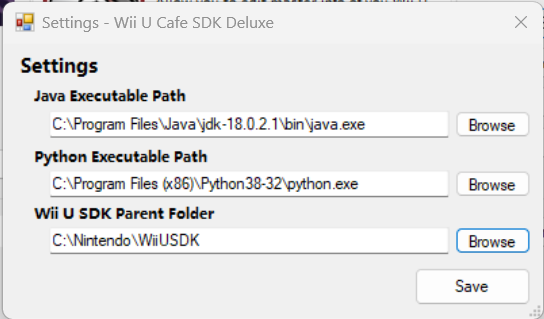
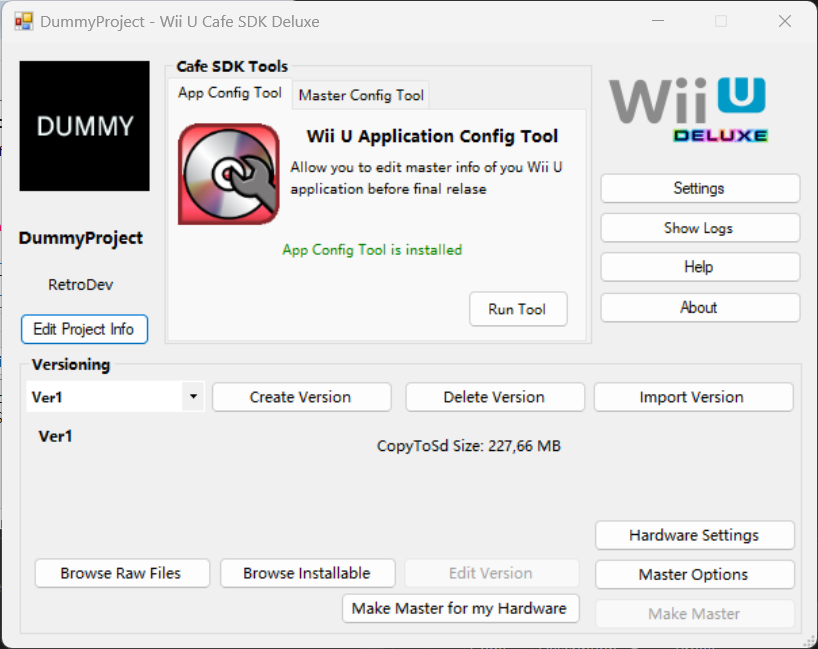 This is the home of the tool. Here you can access to all functions. You can edit the project info, basic for now. First, we need to configure 3 options in the tool. So go to settings and change java.exe and the python.exe path to make NUSPacker and Kii U Generator to works. You can now change the path of your Wii U SDK parent directory. It's the folder who contains "SDK" folder and files like "SetupEnvironment". To use Kii U Generator, open a terminal window and enter this command to install all the decencies :
If you have installed App Config Tool and/or Master Editor from the NDI, restart the app, and you will be able to launch them. Now we will take a look at the versions. If you already have a build, you can use this 'Import Version' options, but you need to move first the version folder if he is located in the same parent folder as Wii U Cafe SDK Deluxe. If you don't have any version now, make a build in Unity and save it with a name, for me, I use 'Ver + version number' and place it in the parent build folder. After, use 'Create Version' Option, you will see this window :
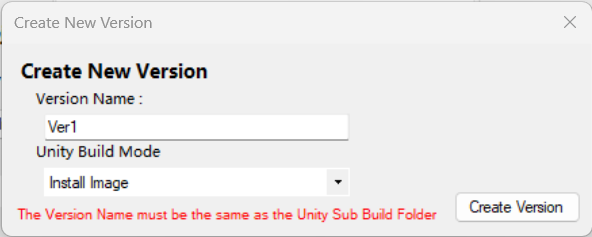 Enter the SAME NAME as your Unity Build Folder Name ! And select how you have made your build. Actually, only 'Install Image' works. And create the version. You will see after selecting it in the list the size of the folder 'CopyToSDCard' who contains the normal dev files. Before making a master for the hardware, you need to go in 'Hardware Settings' and pick up your hardware.
I recommend you to dev a game to have a Wii U Deluxe Set with 32go of NAND storage. Now go in 'Master Options' :
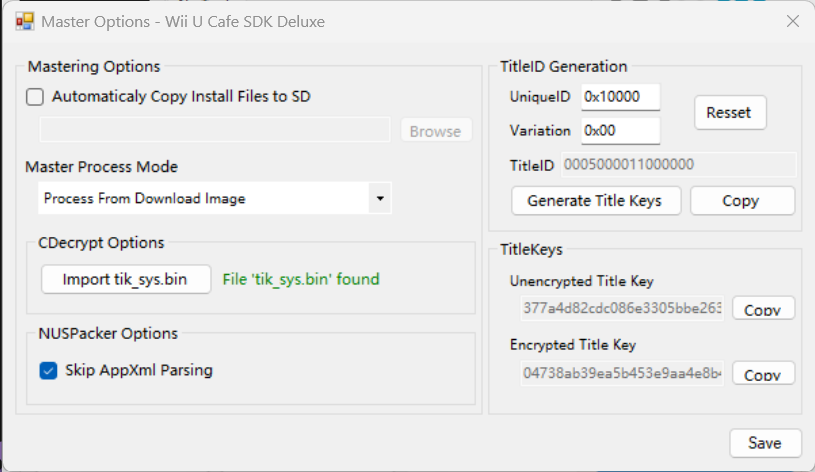
We are now able to add our game infos. To correctly create the installation files, we need an TitleID and a TitleKey. To create them, we need an UniqueID and a Variation. Variation is not very important, but UniqueID is important, you can change the input with random things, copy the TitleID and check if the TitleID is already used with this website. If the ID is not used, click on 'Generate Title Keys' (Generated with Kii U Generator)
After, you need for CDecrypt to import the Wii U Dev Common Key located in the SDK, just click on 'Import tik_sys.bin' and the tool will try to locate the file, if it failed you can search if manually. It's here, if you want to enable the automatic copy to your Wii U's SD Card and choose the 'Install' folder (For WUP Installer) in Wii U SD. Save and close, you are ready to create your Wii U Installable files.
In the home, select the version to use (if you have multiple versions) and click on 'Make Master for my Hardware' (If in your folder 'copyToSDCard' you have multiple build type (Development or Master From Unity) Wii U Cafe Deluxe will ask you which one to use). Now wait, the tool can freeze, and you will have your files in the parent folder in 'CopyToWiiUSD' folder (if you have enabled the automatic reproduction, you just need to unplug your SD). Now install it to your Wii U.
It's all for me today, to check if there is an update of this tool, follow this thread of manually go to About > Check for Updates.
Have a good day and fun with your Wii U and Unity.
(For interested people about making a Wii U game on Unity, I am currently writing a complete tutorial and documentation in English and French based on my week searchs and Wii U Software and knowledge)
Today, I introduce a tool to easily make installable images from a Unity Wii U Build for any Retail Wii U !
This tool is currently in beta, some functions are not ready yet but the big part about decrypting Unity Build and repack it is working.
This is a short tutorial about how to use this tool. You can download it from my GitHub Repo here.
Installation & Setup
To Install Wii U Cafe SDK Deluxe you just need to download it from the Release Page of the GitHub and extract it to your Unity's Build folder. Like that :
To set up the tool, you just need to run WiiUCafeSDKDeluxe.exe from the folder of the same name. You will have a message box to ask you if you want to create a new project, select "yes" and you will see this window :
The "Project Name" is how your final game is named. If later, you check the option "Automatically Copy To SD", this field will be used to create the folder in your SD Card with the installable files.
You can add an icon and developers, but it just aesthetics now.
Cafe SDK Location and Unity version are required later, add them manually or locate your Cafe SDK automatically and your Unity Version from your project files.
For now only Unity.1.2p3 has been tested, other version can work, but I didn't make any tests.
Now we have finished with the installation and the setup. I will now explain the different functionalities and usage of my tool.
Usage and Functions
Code:
pip install pycryptodomeIf you have installed App Config Tool and/or Master Editor from the NDI, restart the app, and you will be able to launch them. Now we will take a look at the versions. If you already have a build, you can use this 'Import Version' options, but you need to move first the version folder if he is located in the same parent folder as Wii U Cafe SDK Deluxe. If you don't have any version now, make a build in Unity and save it with a name, for me, I use 'Ver + version number' and place it in the parent build folder. After, use 'Create Version' Option, you will see this window :
I recommend you to dev a game to have a Wii U Deluxe Set with 32go of NAND storage. Now go in 'Master Options' :
We are now able to add our game infos. To correctly create the installation files, we need an TitleID and a TitleKey. To create them, we need an UniqueID and a Variation. Variation is not very important, but UniqueID is important, you can change the input with random things, copy the TitleID and check if the TitleID is already used with this website. If the ID is not used, click on 'Generate Title Keys' (Generated with Kii U Generator)
After, you need for CDecrypt to import the Wii U Dev Common Key located in the SDK, just click on 'Import tik_sys.bin' and the tool will try to locate the file, if it failed you can search if manually. It's here, if you want to enable the automatic copy to your Wii U's SD Card and choose the 'Install' folder (For WUP Installer) in Wii U SD. Save and close, you are ready to create your Wii U Installable files.
In the home, select the version to use (if you have multiple versions) and click on 'Make Master for my Hardware' (If in your folder 'copyToSDCard' you have multiple build type (Development or Master From Unity) Wii U Cafe Deluxe will ask you which one to use). Now wait, the tool can freeze, and you will have your files in the parent folder in 'CopyToWiiUSD' folder (if you have enabled the automatic reproduction, you just need to unplug your SD). Now install it to your Wii U.
It's all for me today, to check if there is an update of this tool, follow this thread of manually go to About > Check for Updates.
Have a good day and fun with your Wii U and Unity.
(For interested people about making a Wii U game on Unity, I am currently writing a complete tutorial and documentation in English and French based on my week searchs and Wii U Software and knowledge)
Last edited by RetroAndDev,