Sonic mania port for Wii (Not Wii U) Tutorial Windows - [Port of Mephiles]

  • Thread starter Thread starter SpanishFreddy
  • Start date Start date
  • Views Views 28,188
  • Replies Replies 17
  • Likes Likes 6

SpanishFreddy

Active Member
Newcomer
Joined
Aug 24, 2022
Messages
30
Reaction score
38
Trophies
0
Location
Idk lol
XP
253
Country
Spain
Hi, here a tutorial of how to download/compile sonic mania for your wii!
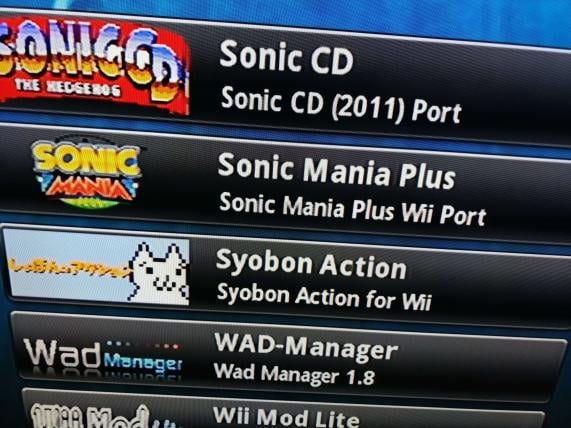
IMG_20221005_181917.jpg

First of all, you can download the non plus version of it here: (Github link of the port), download it, put your data.rsdk/data folder of sonic mania, and copy the "SonicMania" folder in the folder of your sd/usb called "apps", and open it in homebrew launcher, all done!

Now, if you want compile it to have sonic mania plus like me (I make it in windows), i'm going to recommend to do it using DevKitPro and putting the wii dev and gamecube dev option only on it, and latter, open msys2, and type and install:

Make:
pacman -S make

Git:
pacman -S git


and now, put some commands in the archive called "Pacman.conf", this is the commands (This can be unnecessary):

[dkp-libs]
Server = https://pkg.devkitpro.org/packages

[dkp-windows]
Server = https://pkg.devkitpro.org/packages/windows/$arch/


and now, type and install this:

pacman -Syu

pacman -Syu wii-dev


and latter, download this script: (Script download link), and put it in "c/" (The root of your sdd/hdd), and now in msys2, put

cd /c

./ManiaWiiQuickBuild.sh


If all works correctly, it will start copying and moving sonic mania and rsdkv5 decomp files, and then it will start compiling it.
Don't worry if you get an error or if it takes a while, it's normal.

Now, the files can be here:
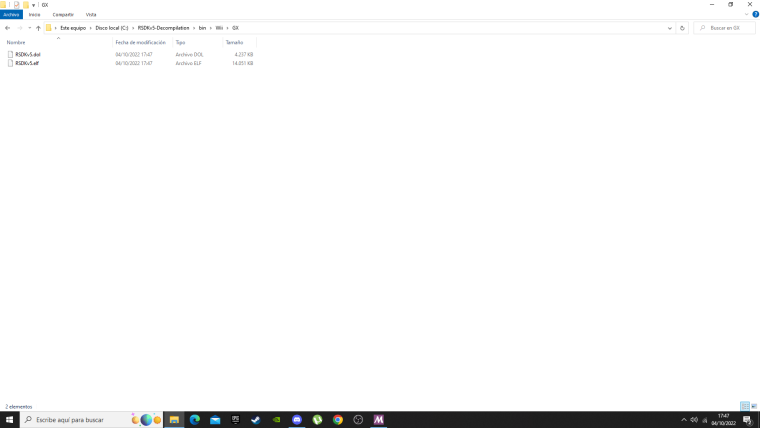
Desktop_Screenshot_2022.10.04_-_17.47.53.70.png


If this didn't work for you, i recommend you go to ask in the official server where is who made this port, Mephiles:
(Here the server link)

If you want to talk to me, im "Spanish Freddy" in that server.
Thx for read this, see you guys!​
 
Last edited by SpanishFreddy,
Hi can somebody help? The 240p mode is not 100% compatible with pal tvs. The author said this:
The way this works is by forcing the current Wii render mode to NTSC 240P. Unsure if that is what would be causing the issue on your set but ik others that have tried this on PAL tubes without issue. One thing you can try is compiling your own copy with a small change - in RSDKv5/RSDK/Graphics/GX/GXRenderDevice.cpp, change line 74 from "vmode = &TVNtsc240Ds;" to "vmode = &TVPal264Ds;" (264 lines, maybe your set will like this better) or "vmode = &TVMPal240Ds;". Make sure not to include the quotation marks. Then just make that your ini file is set up as per usual. Hope this helps!

In what part of the tutorial do you have to modify this ? Thanks in advance
 
Hi, here a tutorial of how to download/compile sonic mania for your wii!
View attachment 332554
First of all, you can download the non plus version of it here: (Github link of the port), download it, put your data.rsdk/data folder of sonic mania, and copy the "SonicMania" folder in the folder of your sd/usb called "apps", and open it in homebrew launcher, all done!

Now, if you want compile it to have sonic mania plus like me (I make it in windows), i'm going to recommend to do it using DevKitPro and putting the wii dev and gamecube dev option only on it, and latter, open msys2, and type and install:

Make:
pacman -S make

Git:
pacman -S git


and now, put some commands in the archive called "Pacman.conf", this is the commands (This can be unnecessary):

[dkp-libs]
Server = https://pkg.devkitpro.org/packages

[dkp-windows]
Server = https://pkg.devkitpro.org/packages/windows/$arch/


and now, type and install this:

pacman -Syu

pacman -Syu wii-dev


and latter, download this script: (Script download link), and put it in "c/" (The root of your sdd/hdd), and now in msys2, put

cd /c

./ManiaWiiQuickBuild.sh


If all works correctly, it will start copying and moving sonic mania and rsdkv5 decomp files, and then it will start compiling it.
Don't worry if you get an error or if it takes a while, it's normal.

Now, the files can be here:
View attachment 332557

If this didn't work for you, i recommend you go to ask in the official server where is who made this port, Mephiles:
(Here the server link)

If you want to talk to me, im "Spanish Freddy" in that server.
Thx for read this, see you guys!​
I followed all the steps but I keep getting this error. How am I supposed to fix this?

1698390375085.png
 
I followed all the steps but I keep getting this error. How am I supposed to fix this?

View attachment 401277
copy the GameMain.h file from the Game/SonicMania folder to the RSDKv5 folder, it worked for me
Post automatically merged:

I followed all the steps but I keep getting this error. How am I supposed to fix this?

View attachment 401277
copy the GameMain.h file from the Game/SonicMania folder to the RSDKv5 folder, it worked for me
 
When I try to download devkitPro, it says "Your internet connection seems to be not permitted or dropped out! Please reconnect and click Retry to resume installation." And every time I click retry it says the same thing. I don't have a VPN on and my Wi-Fi is on, any fix?
Edit: Never mind, figured it out
 
Last edited by MaseG,
I followed all the steps but I keep getting this error. How am I supposed to fix this?

View attachment 401277
Hi, here a tutorial of how to download/compile sonic mania for your wii!
View attachment 332554
First of all, you can download the non plus version of it here: (Github link of the port), download it, put your data.rsdk/data folder of sonic mania, and copy the "SonicMania" folder in the folder of your sd/usb called "apps", and open it in homebrew launcher, all done!

Now, if you want compile it to have sonic mania plus like me (I make it in windows), i'm going to recommend to do it using DevKitPro and putting the wii dev and gamecube dev option only on it, and latter, open msys2, and type and install:

Make:
pacman -S make

Git:
pacman -S git


and now, put some commands in the archive called "Pacman.conf", this is the commands (This can be unnecessary):

[dkp-libs]
Server = https://pkg.devkitpro.org/packages

[dkp-windows]
Server = https://pkg.devkitpro.org/packages/windows/$arch/


and now, type and install this:

pacman -Syu

pacman -Syu wii-dev


and latter, download this script: (Script download link), and put it in "c/" (The root of your sdd/hdd), and now in msys2, put

cd /c

./ManiaWiiQuickBuild.sh


If all works correctly, it will start copying and moving sonic mania and rsdkv5 decomp files, and then it will start compiling it.
Don't worry if you get an error or if it takes a while, it's normal.

Now, the files can be here:
View attachment 332557

If this didn't work for you, i recommend you go to ask in the official server where is who made this port, Mephiles:
(Here the server link)

If you want to talk to me, im "Spanish Freddy" in that server.
Thx for read this, see you guys!​

Hi, here a tutorial of how to download/compile sonic mania for your wii!
View attachment 332554
First of all, you can download the non plus version of it here: (Github link of the port), download it, put your data.rsdk/data folder of sonic mania, and copy the "SonicMania" folder in the folder of your sd/usb called "apps", and open it in homebrew launcher, all done!

Now, if you want compile it to have sonic mania plus like me (I make it in windows), i'm going to recommend to do it using DevKitPro and putting the wii dev and gamecube dev option only on it, and latter, open msys2, and type and install:

Make:
pacman -S make

Git:
pacman -S git


and now, put some commands in the archive called "Pacman.conf", this is the commands (This can be unnecessary):

[dkp-libs]
Server = https://pkg.devkitpro.org/packages

[dkp-windows]
Server = https://pkg.devkitpro.org/packages/windows/$arch/


and now, type and install this:

pacman -Syu

pacman -Syu wii-dev


and latter, download this script: (Script download link), and put it in "c/" (The root of your sdd/hdd), and now in msys2, put

cd /c

./ManiaWiiQuickBuild.sh


If all works correctly, it will start copying and moving sonic mania and rsdkv5 decomp files, and then it will start compiling it.
Don't worry if you get an error or if it takes a while, it's normal.

Now, the files can be here:
View attachment 332557

If this didn't work for you, i recommend you go to ask in the official server where is who made this port, Mephiles:
(Here the server link)

If you want to talk to me, im "Spanish Freddy" in that server.
Thx for read this, see you guys!​
How do i install mods onto the COMPILED port?
 
Hi, here a tutorial of how to download/compile sonic mania for your wii!
View attachment 332554
First of all, you can download the non plus version of it here: (Github link of the port), download it, put your data.rsdk/data folder of sonic mania, and copy the "SonicMania" folder in the folder of your sd/usb called "apps", and open it in homebrew launcher, all done!

Now, if you want compile it to have sonic mania plus like me (I make it in windows), i'm going to recommend to do it using DevKitPro and putting the wii dev and gamecube dev option only on it, and latter, open msys2, and type and install:

Make:
pacman -S make

Git:
pacman -S git


and now, put some commands in the archive called "Pacman.conf", this is the commands (This can be unnecessary):

[dkp-libs]
Server = https://pkg.devkitpro.org/packages

[dkp-windows]
Server = https://pkg.devkitpro.org/packages/windows/$arch/


and now, type and install this:

pacman -Syu

pacman -Syu wii-dev


and latter, download this script: (Script download link), and put it in "c/" (The root of your sdd/hdd), and now in msys2, put

cd /c

./ManiaWiiQuickBuild.sh


If all works correctly, it will start copying and moving sonic mania and rsdkv5 decomp files, and then it will start compiling it.
Don't worry if you get an error or if it takes a while, it's normal.

Now, the files can be here:
View attachment 332557

If this didn't work for you, i recommend you go to ask in the official server where is who made this port, Mephiles:
(Here the server link)

If you want to talk to me, im "Spanish Freddy" in that server.
Thx for read this, see you guys!​
How do i install mods?I want to install the no special stage deco mod since it really lags on special stages.
 

Site & Scene News

Popular threads in this forum