



Step 1 (Host AND Clients)
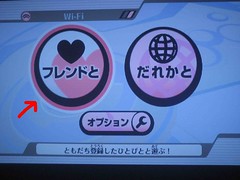
After clicking the Wi-Fi button on the Smash main menu, click that giant heart.
Step 2 (Host AND Clients)
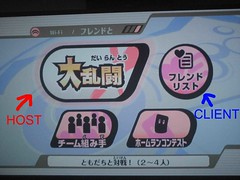
Hosts and Clients click the list button next to the large button, labeled "Client" in this picture. HOSTS, DO NOT CLICK THE LEFT BUTTON YET!
Step 3 (Host AND Clients)
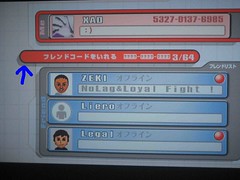
Click the thin red banner. Type in your opponent's friend code. Give them any name, the Wii will overwrite it once they pull your opponent's real name.
Step 4 (Hosts)
Hosts back up back to this menu, and NOW click the huge button.
Step 5 (Host)
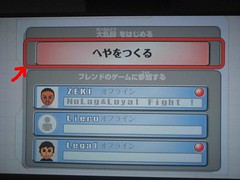
Click that red button
Step 6 (Host)
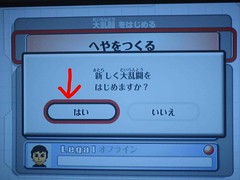
Click the LEFT button. Now just set up the match, and you are ready to play!
Step 4 (Clients)
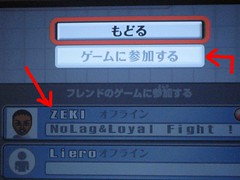
Once your opponent's information appears in the lower list, click their name. A menu will appear, with the second option GRAYED OUT. Once they have finished setting up the match, it will light up. Click that second option.
Step 5 (Clients)
Click the LEFT button. Now just set up the match, and you are ready to play!
After clicking the Wi-Fi button on the Smash main menu, click that giant heart.
Step 2 (Host AND Clients)
Hosts and Clients click the list button next to the large button, labeled "Client" in this picture. HOSTS, DO NOT CLICK THE LEFT BUTTON YET!
Step 3 (Host AND Clients)
Click the thin red banner. Type in your opponent's friend code. Give them any name, the Wii will overwrite it once they pull your opponent's real name.
Step 4 (Hosts)
Hosts back up back to this menu, and NOW click the huge button.
Step 5 (Host)
Click that red button
Step 6 (Host)
Click the LEFT button. Now just set up the match, and you are ready to play!
Step 4 (Clients)
Once your opponent's information appears in the lower list, click their name. A menu will appear, with the second option GRAYED OUT. Once they have finished setting up the match, it will light up. Click that second option.
Step 5 (Clients)
Click the LEFT button. Now just set up the match, and you are ready to play!


