Hacking SWITCH NOOB PARADISE - Ask questions here

  • Thread starter Thread starter APartOfMe
  • Start date Start date
  • Views Views 5,999,028
  • Replies Replies 47,915
  • Likes Likes 66
*update - just read around and saw that using a VM could cause this - Ive got Rekado working on my phone. Trying to auto inject Hekate. But the switch screen is blank ?*
Does anyone have a clear list of what files I need on my SD card?


Guys - would welcome any pointers here- especially as I don't have any errors to work from.

1. Verified on website that my switch can be patched.
2. new sd card (formatted as FAT 32) and jig.
3, Hekate, Atmosphere and Homebrew SD Setup (Reccomended Defaults) downloaded. Files transferred over to SD card and all in place.
4. Running Tegra - it picks up my switch. I also point it to Hekate (see below).
5. It says it all works - BUT nothing on the switch. This is despite trying about 10 times (at least).

Any help welcome here.
Mark
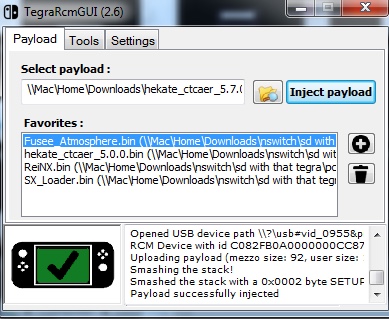

hecate.jpeg


RCM Device detected
Invoking TegraRcmSmash.exe with args : "\\Mac\Home\Downloads\hekate_ctcaer_5.7.0.bin"
TegraRcmSmash (32bit) 1.2.1-3 by rajkosto
Opened USB device path \\?\usb#vid_0955&pid_7321#5&19f4c0d2&0&13#{aa0dbd45-3117-f331-5c49-76bf65225042}
RCM Device with id C082FB0A0000000CC872306401101062 initialized successfully!
Uploading payload (mezzo size: 92, user size: 108844, total size: 175060, total padded size: 176128)...
Smashing the stack!
Smashed the stack with a 0x0002 byte SETUP request!
Payload successfully injected
 
Last edited by MarkEagle131,

Guys - would welcome any pointers here- especially as I don't have any errors to work from.

1. Verified on website that my switch can be patched.
2. new sd card (formatted as FAT 32) and jig.
3, Hekate, Atmosphere and Homebrew SD Setup (Reccomended Defaults) downloaded. Files transferred over to SD card and all in place.
4. Running Tegra - it picks up my switch. I also point it to Hekate (see below).
5. It says it all works - BUT nothing on the switch. This is despite trying about 10 times (at least).

Any help welcome here.
Mark


View attachment 300667


RCM Device detected
Invoking TegraRcmSmash.exe with args : "\\Mac\Home\Downloads\hekate_ctcaer_5.7.0.bin"
TegraRcmSmash (32bit) 1.2.1-3 by rajkosto
Opened USB device path \\?\usb#vid_0955&pid_7321#5&19f4c0d2&0&13#{aa0dbd45-3117-f331-5c49-76bf65225042}
RCM Device with id C082FB0A0000000CC872306401101062 initialized successfully!
Uploading payload (mezzo size: 92, user size: 108844, total size: 175060, total padded size: 176128)...
Smashing the stack!
Smashed the stack with a 0x0002 byte SETUP request!
Payload successfully injected
You need to use a real windows machine, not a VM

edit: you could try a Mac native injector…haven’t done so myself though
https://gbatemp.net/threads/fusee-gelee-tutorial-for-osx-users.501950/

edit2: this looks promising as well
https://switch.exploit.fortheusers.org/

edit3: another one here (with a link to the source code…hmmm. Gonna have to try this.
https://atlas44.s3-us-west-2.amazonaws.com/web-fusee-launcher/index.html

https://github.com/atlas44/web-fusee-launcher
 
Last edited by binkinator,
You need to use a real windows machine, not a VM

edit: you could try a Mac native injector…haven’t done so myself though
https://gbatemp.net/threads/fusee-gelee-tutorial-for-osx-users.501950/

edit2: this looks promising as well
https://switch.exploit.fortheusers.org/

edit3: another one here (with a link to the source code…hmmm. Gonna have to try this.
https://atlas44.s3-us-west-2.amazonaws.com/web-fusee-launcher/index.html

https://github.com/atlas44/web-fusee-launcher
Thanks man. I will try those. I couldn't get much better on my phone 0 even when running rekador and everything seems to connect.
 
Thanks man. I will try those. I couldn't get much better on my phone 0 even when running rekador and everything seems to connect.
Well, some of the folks that got that same error message ended up being on patched switches. Fingers crossed yours is unpatched.

Rekador should have just worked. Your switch is in fact unpatched, correct? Want to make sure you’re reading the results properly…

edit: the web stuff is really cool. Make sure to use chrome. Regardless if your switch is patched…none of this will work and you will need a modchip installed.
 
  • Like
Reactions: MarkEagle131
Well, some of the folks that got that same error message ended up being on patched switches. Fingers crossed yours is unpatched.

Rekador should have just worked. Your switch is in fact unpatched, correct? Want to make sure you’re reading the results properly…

edit: the web stuff is really cool. Make sure to use chrome. Regardless if your switch is patched…none of this will work and you will need a modchip installed.
Your switch is in fact unpatched, correct? -

Certain - just checked again
patch.jpeg

So I reckon its got to be me putting the wrong files on the SD card...
Checking this was patched was honestly the first thing I did....
 
  • Like
Reactions: MarkEagle131
Not great - just hangs (I see the APX-Paired) option so it must be connecting...
even sending a jpeg - it says connected- but nothing.

View attachment 300679

It’s even identifying that it’s connected to NV. “NVIDIA Corp“ is not part of the source code. Maybe try the other site, try it on an Android or try the OSX Python version. Have to get past the first hurdle before we can have any fun…
 
  • Like
Reactions: MarkEagle131
It’s even identifying that it’s connected to NV. “NVIDIA Corp“ is not part of the source code. Maybe try the other site, try it on an Android or try the OSX Python version. Have to get past the first hurdle before we can have any fun…
Binky - you are da MAN. Im not there yet - but closer hopefully...
tegra.jpeg

I don't think im 100% there yet cause its jjust rebooted into the nintendo menu
BUT looking at system updaste - it says 13.2.1 AMS 1.2.6S which wasn't there before.
 
Binky - you are da MAN. Im not there yet - but closer hopefully...
View attachment 300688
I don't think im 100% there yet cause its jjust rebooted into the nintendo menu
BUT looking at system updaste - it says 13.2.1 AMS 1.2.6S which wasn't there before.

Cool! Yes, it booted the latest fusee and the S means you are on the SysNand (we want to get you to an E for emunand)

Assuming you’re starting from scratch, grab a good guide and finish this thing.

https://rentry.org/SwitchHackingIsEasy
 
  • Like
Reactions: MarkEagle131
Sorry how to start the switch on regular mode cause every time I try to load Pokémon sword physical copy got error. So I want to get out from atmosphere but hekate not giving me an option to load stock
 
Sorry how to start the switch on regular mode cause every time I try to load Pokémon sword physical copy got error. So I want to get out from atmosphere but hekate not giving me an option to load stock

Please post your hekate_ipl.ini file. (It’s likely you are missing the Stock boot option.)

edit:

Here is how I boot OFW from Hekate (yours might be slightly different)

[Stock SysNAND]
fss0=atmosphere/package3
stock=1
emummc_force_disable=1
icon=/graphics/icons/current/stock.bmp
id=sysn
 
Last edited by binkinator,
In one of the recent changes to Atmosphere, fusee-secondary.bin was renamed to package3. The ini file it is referring to is your hekate_ipl.ini file located within the /bootloader folder. Simply rename all instances of fusee-secondary.bin in that file to package3.
IT WORKED OMG! THANK YOU!
I would have never thought about doing this :rofl2:
 
  • Like
Reactions: Draxzelex
I heard when u have CFW and connect to the internet u will / can get banned. But how do you use tinfoil for downloading from freeshops? Are all the people who download from freeshops banned by nintendo? How do you really prevent that if u wanna use apps that need internet connection like tinfoil. Thanks!
 
I heard when u have CFW and connect to the internet u will / can get banned. But how do you use tinfoil for downloading from freeshops? Are all the people who download from freeshops banned by nintendo? How do you really prevent that if u wanna use apps that need internet connection like tinfoil. Thanks!
The reasoning is simple. Having an Internet connection doesn't always mean having a connection to Nintendo; if you can stop traffic with Nintendo's servers only, you can enjoy utilizing wireless activities without the fear of a ban. There are multiple ways to achieve this state.

The first, and one I recommend, is 90DNS which as the name implies are DNS settings that you input alongside your normal Wi-Fi connection. The second, and my least favorite, is Incognito. It wipes your console's serial number making it impossible for Nintendo to identify you. My problem with this one is that the wipe can become permanent without a proper backup. Not to mention that it doesn't wipe everything; some info is still transmitted such as your device's battery ID. The last ones I will group together since they are done via the same mechanism and that is dns.mitm/exosphere. dns.mitm takes the DNS settings of 90DNS but instead blocks it on a console level rather than a DNS level. What I mean to say is that the console itself will block the specific URL addresses that 90DNS blocks instead of the server 90DNS uses. This is a bit more "safe" since you do not have to rely on 90DNS' servers being up in order for the blocking to be effective. exosphere mimics Incognito except that it pretends to blank out your serial number without actually wiping it. Another reason why I group these 2 methods together is that they are only applied when you launch CFW; if you do not launch CFW, they are not applied unlike 90DNS & Incognito which can persist outside of CFW.

In the end, its ultimately down to your preference which one you use. None is worse nor more effective than the last but some are safer to use than others.
 
  • Like
Reactions: Tayfunx3
If one wanted to go about doing a fresh atmosphere/hekate install on an already hacked system using the same sd card, what would be the best way to go about doing that? Is there anyway of doing that without having to retransfer all of your games?
 
If one wanted to go about doing a fresh atmosphere/hekate install on an already hacked system using the same sd card, what would be the best way to go about doing that? Is there anyway of doing that without having to retransfer all of your games?

edit:
Were you able to inject fusee.bin (instead of Hekate) like @Draxzelex recommended? The reason we want you to try that is it completely bypasses hekate and its configs on your SD card and boots straight into Atmosphere on Sysnand. It will prove/disprove any non-working components and clear the path for next steps…

“When you went to download Atmosphere from its GitHub page, there was another thing you can download called fusee.bin. Its a payload similar to Hekate. Try sending that instead of Hekate; its designed to automatically launch Atmosphere.”

5045726A-4C59-44D8-9DC0-1CE1365B593B.jpeg
 
Last edited by binkinator,
Please post your hekate_ipl.ini file. (It’s likely you are missing the Stock boot option.)

edit:

Here is how I boot OFW from Hekate (yours might be slightly different)

[Stock SysNAND]
fss0=atmosphere/package3
stock=1
emummc_force_disable=1
icon=/graphics/icons/current/stock.bmp
id=sysn
thanks im going to try and report not sure how to fix it do I need to just add your setting? if wrong setup for me thanks
my look like this
[config]
autoboot=0
autoboot_list=0
bootwait=3
backlight=100
autohosoff=0
autonogc=0
updater2p=1
bootprotect=0

[Atmosphere CFW]
fss0=atmosphere/fusee-secondary.bin
icon=bootloader/res/icon_payload.bmp
emummcforce=1
kip1patch=nosigchk
 
thanks im going to try and report not sure how to fix it do I need to just add your setting? if wrong setup for me thanks
my look like this
[config]
autoboot=0
autoboot_list=0
bootwait=3
backlight=100
autohosoff=0
autonogc=0
updater2p=1
bootprotect=0

[Atmosphere CFW]
fss0=atmosphere/fusee-secondary.bin
icon=bootloader/res/icon_payload.bmp
emummcforce=1
kip1patch=nosigchk

The fact that you have a fusee-secondary.bin file indicates you are using an older version of Hekate/Atmosphere.

I would recommend following a good guide to upgrade everything to the latest.

This is one I use: https://rentry.org/SwitchHackingIsEasy

edit:

Upgrade your CFW this one first https://rentry.org/MigrateToAtmosphere1_0_0
Upgrade your FW afterwards by following https://rentry.org/UpgradeDowngrade
 
Last edited by binkinator,
  • Like
Reactions: Blauhasenpopo
The fact that you have a fusee-secondary.bin file indicates you are using an older version of Hekate/Atmosphere.

I would recommend following a good guide to upgrade everything to the latest.

This is one I use: https://rentry.org/SwitchHackingIsEasy

edit:

Upgrade your CFW this one first https://rentry.org/MigrateToAtmosphere1_0_0
Upgrade your FW afterwards by following https://rentry.org/UpgradeDowngrade
I got the lasted of hekate and atmosphere just my setup is bad. it work when I added your steps but I still get the same error code 2002-2634 when inserted physical game black screen on both cfw or ofw
 

Attachments

  • 85147585-A17C-4019-9D38-A20CC23199BC.jpeg
    85147585-A17C-4019-9D38-A20CC23199BC.jpeg
    1.6 MB · Views: 92

Site & Scene News

Popular threads in this forum