Homebrew RELEASE Release - Super Mario 64 v8

  • Thread starter Thread starter iriez
  • Start date Start date
  • Views Views 106,109
  • Replies Replies 209
  • Likes Likes 22
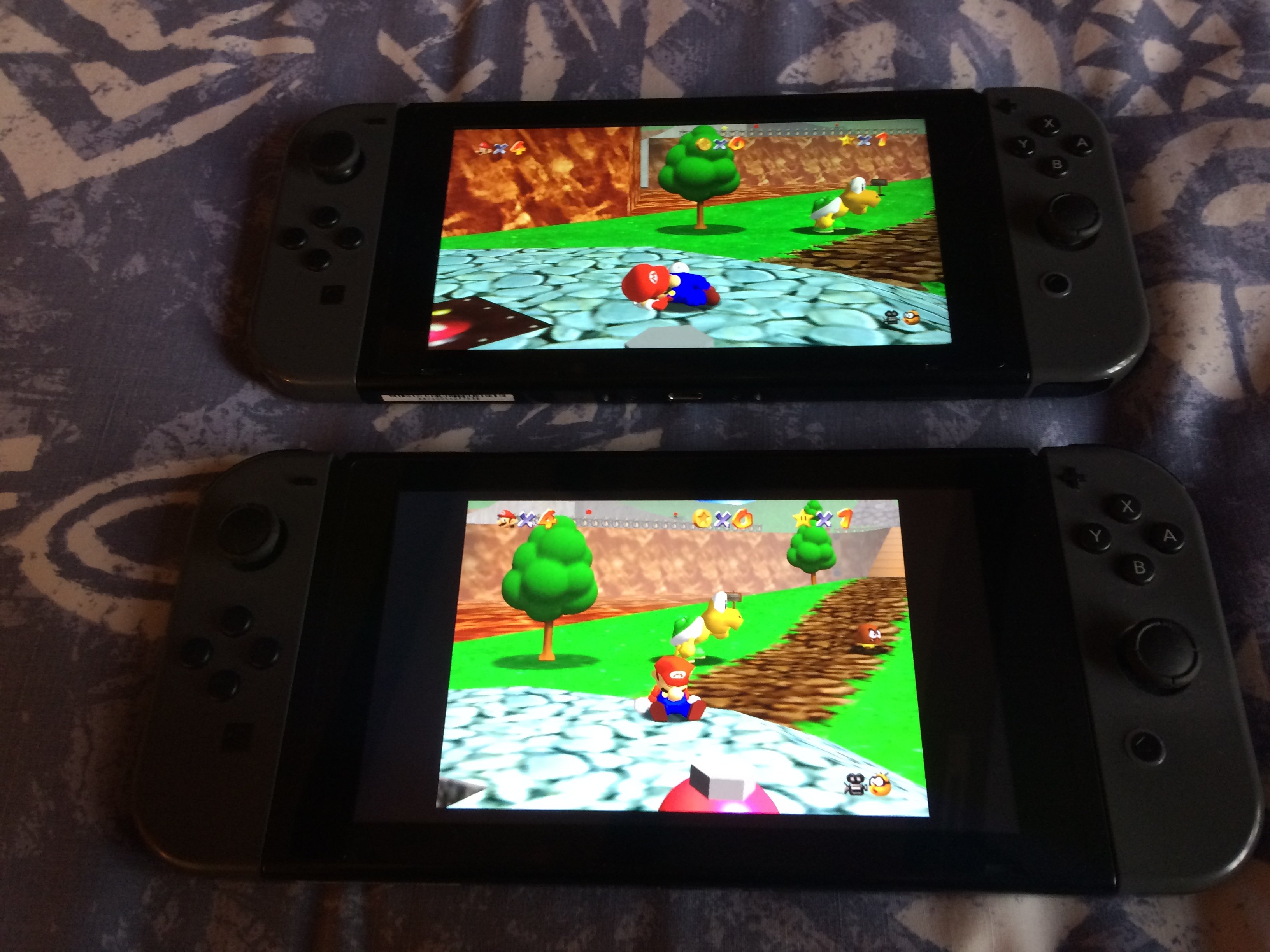
I’m really impressed with v8, it looks fantastic!

This makes owning a hackable switch so well worth it :)
21BC60F3-5C63-41AA-A0D7-08508C840357.jpeg


The only issue I have noticed so far with v8 is the standard camera angle looks offset.
 
  • Like
Reactions: RahFah and peteruk
How do you get version 8 from Tinfoil? I see its posted there but when i download it and then run it, it still shows V7 when i run the game....

Sounds like you need to disable other sources. Uninstall v7, make sure the old nsp is not on your SD card then
go to the file browser tab, hit X on any entry you've added other than the one that has SM64.
scroll down to enabled
turn them off then hit X again to save
reboot the app

Then try reinstalling. It sounds like its trying to grab the same file hosted by a diff source as there are a few that mirror.
 
How do you get version 8 from Tinfoil? I see its posted there but when i download it and then run it, it still shows V7 when i run the game....
You need to disable any source that isnt giving the v8 nsp (aka anything besides jack) because otherwise they can override our copy with their own outdated one. Also delete the nsp from your sd card if you have it there.

How would you guys compare this vs the official Nintendo release?
Much much better. A world of difference.
 
Last edited by Deleted member 514822,
  • Like
Reactions: iriez and lordelan
I managed to get it running without issues :)
I found that enabling the SGI and tree models and disabling Dist. Clip (which is basically disabling extended draw distance) helps a lot for performance.

I found 3 issues so far:
  1. Mario's "M" texture in his hat with SGI is broken
  2. All coins have some sort of dull lighting to them, they don't shine.
  3. The tree models look too bright when enabled. Like the shading is not working on them.
 
This might help have a look at my photo above that shows one switch running v8 at the top and the bottom ones running Mario 3D Stars of eshop
Thanks, I got it running but kind of overwhelmed with all the graphics options (in a good way). I haven't keep up with the modding community, any must have recommendations that you're using? Do they overlap each other?
 
  • Like
Reactions: peteruk
Thanks, I got it running but kind of overwhelmed with all the graphics options (in a good way). I haven't keep up with the modding community, any must have recommendations that you're using? Do they overlap each other?
Personally i recommend sgi, the custom tree models and the enhanced graphics options. They run full speed for me and look very nice. The other model pack i forget the name of works great too if you dont like sgi.
 
I cant get this to work. It just says that it is "unable to start software" from the home menu. I tried both the nsp and xci. Installed via awoo and goldleaf (I cant get tinfoil to install). Do I need to update atmosphere? Im on 0.12. Ive been having this same problem with the earlier releases as well.
 
Personally i recommend sgi, the custom tree models and the enhanced graphics options. They run full speed for me and look very nice. The other model pack i forget the name of works great too if you dont like sgi.
Do the 3D trees look kinda saturated on your end, and the coins kinda dark?
 
Do the 3D trees look kinda saturated on your end, and the coins kinda dark?
Yeah theyre a bit weird but they look better than the standard texture imo just by being actual models.
I cant get this to work. It just says that it is "unable to start software" from the home menu. I tried both the nsp and xci. Installed via awoo and goldleaf (I cant get tinfoil to install). Do I need to update atmosphere? Im on 0.12. Ive been having this same problem with the earlier releases as well.
Sounds like you dont have working fs sigpatches
How can we add the texture packs? The packs on switch/sm64 are not working
Those are for v7, youll have to make new paks with the script on the github for v8. Im not sure exactly how to do it but someone on our discord figured it out.
 
Last edited by Deleted member 514822,
  1. What does the "Disable Dist Clip" setting do? By default, the setting is off. Is this something we should toggle to "on?"
  2. What Mods (i.e., textures) are you guys using?
Gm1e.jpg
The dist clips is models being hidden if they are far away. The N64 used this to keep speed up. Since we have more power we can show all objects all the time. I think you should not disable the distance clip if you are using the HD models, etc.
I'd suggest SDI and Cleaner Aesthetic and possibly trees if you are overclocking CPU. The trees really ramp up the overhead...
 
  • Like
Reactions: sorabora

Site & Scene News

Popular threads in this forum