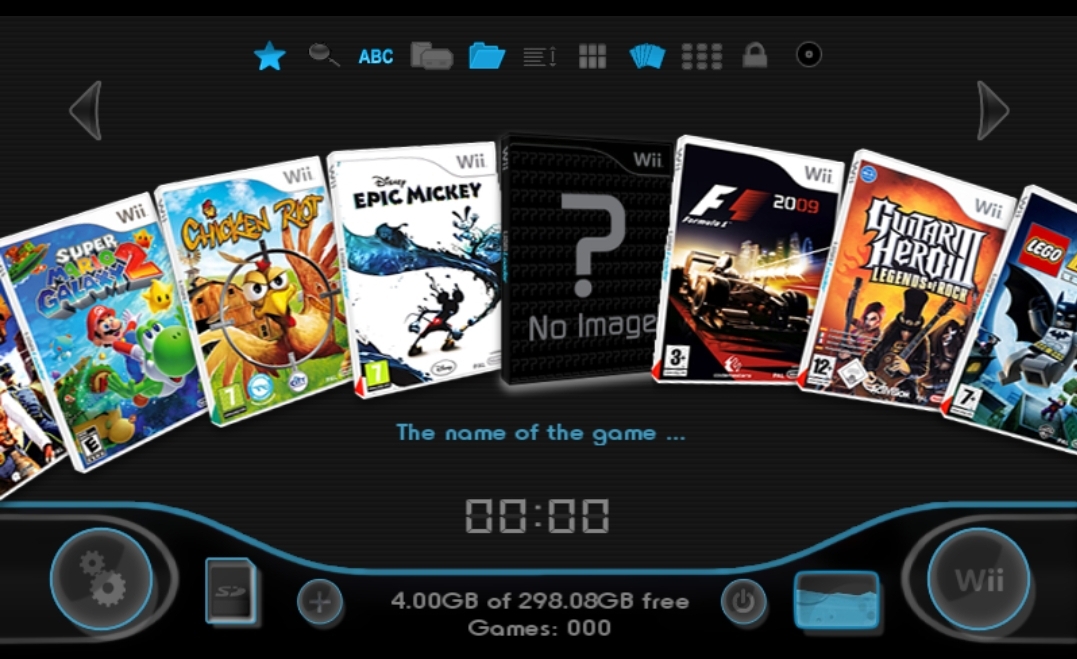
Hacking Wii U menu USB Loader GX style?

  • Thread starter Thread starter freshgoatmilk
  • Start date Start date
  • Views Views 5,644
  • Replies Replies 7
  • Likes Likes 1

freshgoatmilk

Member
Newcomer
Joined
Dec 30, 2019
Messages
14
Reaction score
20
Trophies
0
Age
42
XP
137
Country
United States
I find the Wii U menu quite boring and messy after installing a few games, is there a mod out there that can turn it into the style of the USB Loader GX like in this picture? It looks much cleaner and is in alphabetical order.

Screenshot_20200308-193459_Gallery.jpg
 
  • Like
Reactions: FanNintendo
Well if that layout is truly important to you, you can opt to load your Wii U games through Loadiine:
maxresdefault.jpg


Of course this comes at the expense of taking significantly longer to boot each game up. Which to me simply isn't worth it, especially since I repurposed Loadiine as essentially a "DS Emulator" and only loaded it up with only hundreds of DS games and injects, that I can boot into from my Wii U menu on the same page with all my other emulators as seen here:

nBl0B26.jpg

To anyone curious, the Wii icon is USBloader GX, and the Arcade+ icon is just Retroarch (and yes I'm aware I could consolidate a lot of these emulators in Retroarch,but I'm not the biggest fan of Retroarch, it takes too long to load, and each game takes to long to boot, plus the menu is overwhelming with needlessly too many options, so I just use it for emulators that don't have equal or better individual versions for the Wii U like Mame, Atari, Turbografx, etc).

 
Well if that layout is truly important to you, you can opt to load your Wii U games through Loadiine:
maxresdefault.jpg


Of course this comes at the expense of taking significantly longer to boot each game up. Which to me simply isn't worth it, especially since I repurposed Loadiine as essentially a "DS Emulator" and only loaded it up with only hundreds of DS games and injects, that I can boot into from my Wii U menu on the same page with all my other emulators as seen here:

nBl0B26.jpg

To anyone curious, the Wii icon is USBloader GX, and the Arcade+ icon is just Retroarch (and yes I'm aware I could consolidate a lot of these emulators in Retroarch,but I'm not the biggest fan of Retroarch, it takes too long to load, and each game takes to long to boot, plus the menu is overwhelming with needlessly too many options, so I just use it for emulators that don't have equal or better individual versions for the Wii U like Mame, Atari, Turbografx, etc).

Thanks for the suggestion, is Loadiine compatible with USB hard drive? From what I'm reading it's only SD card?
 
  • Like
Reactions: Alexander1970
Thanks for the suggestion, is Loadiine compatible with USB hard drive? From what I'm reading it's only SD card?
I'm late but there is an experimental version of mocha that makes a fat32 hard drive act like an sd card which allows you to use loadiine gx2 with a usb drive
edit: I have to say I haven't been able to get it working theoretically it should work and I have seen guides made for this
 
Last edited by MrBlizzard,

Site & Scene News

Popular threads in this forum