Tutorial
Updated
How to customize Windows 10.
Today I am going to show you ways you can customize Windows 10 to your liking.
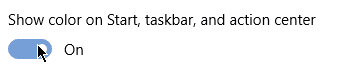
1. Taskbar color.
You can color your taskbar by going into settings but I feel like that is limiting. Plus all the colours are always dark which sometimes people don't want. But have no fear because there is an program that can help you. Even if you like the colours dark perhaps you want a specific colour that Windows 10 doesn't have. Anyways here is the program. http://rammichael.com/getting-brighter-colors-in-windows-10
By the way if you want the color dark but you want the secondary colour what you want then configure this.
2. Taskbar Placement.
This might not matter to you but you can adjust the placement of the taskbar. You can change this by dragging the taskbar. But if this doesn't work you can adjust it in settings here.

3. Dark and Light themes.
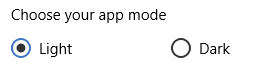
In settings you can pick a Dark or Light theme.
4. Taskbar look.
There are several options to customize the taskbar. Here are some of them.
You can make the taskbar smaller by enabling this.
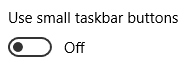
You can make the icons have labels (like in Windows XP and other versions) by changing this.

You can make your taskbar transparent or blury using this program.
https://github.com/TranslucentTB/TranslucentTB
Clear

Blur

There's also a program that allows you to change your taskbar. You can make it so programs never combine even without labels and have seconds on the system clock.
http://rammichael.com/7-taskbar-tweaker
5. Rainmeter
Rainmeter is a program that allows you to add widgets to your desktop. But not all of them are widgets if you get good one and get creative you can make cool desktops. (Here's mine.)
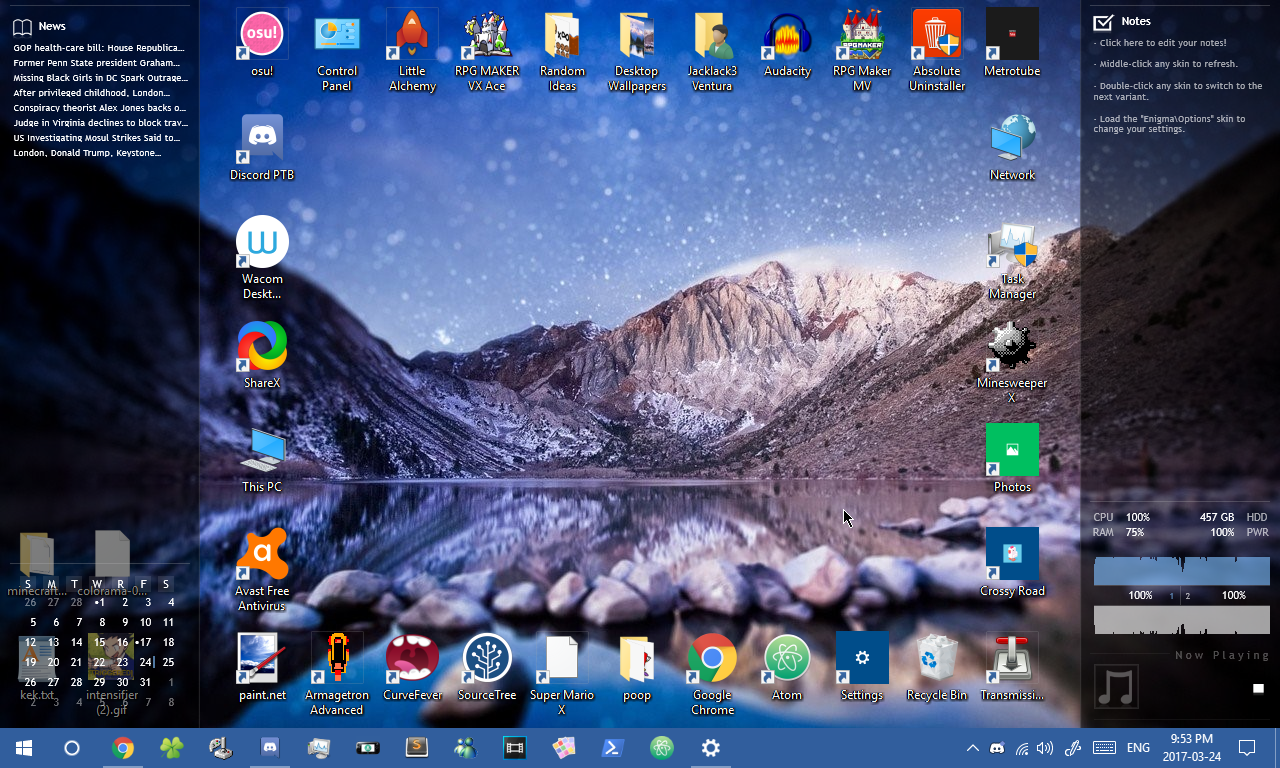
Here's a link to the website where you can get it. https://www.rainmeter.net/
6. Screensaver
You can change the screensaver by going into Control Panel. (not settings.) You can also get a screensaver that plays videos. I have one that plays the Wii to Wii U transfer (with the pikman.)
7. Start Menu
Do you not like the start menu? Don't worry. Simply get ClassicShell. It allows you to get 3 new start menus (that were in previous versions of Windows.) You can even customize the Windows Start Menu icon. I'd recommend it.

8. Icon Packs
You can install Icon Packs in 2 ways. One is to just going in properties and change the icon to a different ico/exe file. Or you can do another way that doesn't require you to do manual stuff.
http://unisira.deviantart.com/art/WinRemix-Icon-Pack-for-Windows-10-601279163
Visual Styles. NOT RECOMMENDED
You can get Visual Styles which will make your Windows 10 look even better. However it is a bit risky. I'd recommend making an restore point. But if you do want to get one, go follow this tutorial. (it also links how to make an restore point.)
EDIT: IF YOU WANT TO UPDATE TO CREATORS UPDATE UNINSTALL UXSTYLE BEFORE UPDATING
If you were like me and didn't know this and already updated, do ctrl+alt+delete, then hold shift while pressing restart, then go to troubleshoot, and select the option to view more stuff to do (under reset system.) then go to "go to previous version of windows" and wait. Then boom!
http://neiio.deviantart.com/art/How-to-Install-Custom-Themes-262833454
Done!
If you followed everything correctly you should now have Windows 10 all customized! By the way, you can save your theme in Control Panel. Also you can make your taskbar hide. This way to show it you must move the mouse to where the taskbar is. Anyways if you got any other tips feel free to let me and us know. Anyways cya!
Also I actually realized in Windows 10 the icons are smaller, there is an way to make them big like in Windows 7 though. Do some googlin'.
1. Taskbar color.
You can color your taskbar by going into settings but I feel like that is limiting. Plus all the colours are always dark which sometimes people don't want. But have no fear because there is an program that can help you. Even if you like the colours dark perhaps you want a specific colour that Windows 10 doesn't have. Anyways here is the program. http://rammichael.com/getting-brighter-colors-in-windows-10
By the way if you want the color dark but you want the secondary colour what you want then configure this.
2. Taskbar Placement.
This might not matter to you but you can adjust the placement of the taskbar. You can change this by dragging the taskbar. But if this doesn't work you can adjust it in settings here.
3. Dark and Light themes.
In settings you can pick a Dark or Light theme.
4. Taskbar look.
There are several options to customize the taskbar. Here are some of them.
You can make the taskbar smaller by enabling this.
You can make the icons have labels (like in Windows XP and other versions) by changing this.
You can make your taskbar transparent or blury using this program.
https://github.com/TranslucentTB/TranslucentTB
Clear
Blur
There's also a program that allows you to change your taskbar. You can make it so programs never combine even without labels and have seconds on the system clock.
http://rammichael.com/7-taskbar-tweaker
5. Rainmeter
Rainmeter is a program that allows you to add widgets to your desktop. But not all of them are widgets if you get good one and get creative you can make cool desktops. (Here's mine.)
Here's a link to the website where you can get it. https://www.rainmeter.net/
6. Screensaver
You can change the screensaver by going into Control Panel. (not settings.) You can also get a screensaver that plays videos. I have one that plays the Wii to Wii U transfer (with the pikman.)
7. Start Menu
Do you not like the start menu? Don't worry. Simply get ClassicShell. It allows you to get 3 new start menus (that were in previous versions of Windows.) You can even customize the Windows Start Menu icon. I'd recommend it.
8. Icon Packs
You can install Icon Packs in 2 ways. One is to just going in properties and change the icon to a different ico/exe file. Or you can do another way that doesn't require you to do manual stuff.
http://unisira.deviantart.com/art/WinRemix-Icon-Pack-for-Windows-10-601279163
Visual Styles. NOT RECOMMENDED
You can get Visual Styles which will make your Windows 10 look even better. However it is a bit risky. I'd recommend making an restore point. But if you do want to get one, go follow this tutorial. (it also links how to make an restore point.)
EDIT: IF YOU WANT TO UPDATE TO CREATORS UPDATE UNINSTALL UXSTYLE BEFORE UPDATING
If you were like me and didn't know this and already updated, do ctrl+alt+delete, then hold shift while pressing restart, then go to troubleshoot, and select the option to view more stuff to do (under reset system.) then go to "go to previous version of windows" and wait. Then boom!
http://neiio.deviantart.com/art/How-to-Install-Custom-Themes-262833454
Done!
If you followed everything correctly you should now have Windows 10 all customized! By the way, you can save your theme in Control Panel. Also you can make your taskbar hide. This way to show it you must move the mouse to where the taskbar is. Anyways if you got any other tips feel free to let me and us know. Anyways cya!
Also I actually realized in Windows 10 the icons are smaller, there is an way to make them big like in Windows 7 though. Do some googlin'.
Attachments

Last edited by Jacklack3,