Official MediCat USB - A Multiboot Linux USB for PC Repair

  • Thread starter Thread starter Jayro
  • Start date Start date
  • Views Views 8,962,377
  • Replies Replies 4,084
  • Likes Likes 284
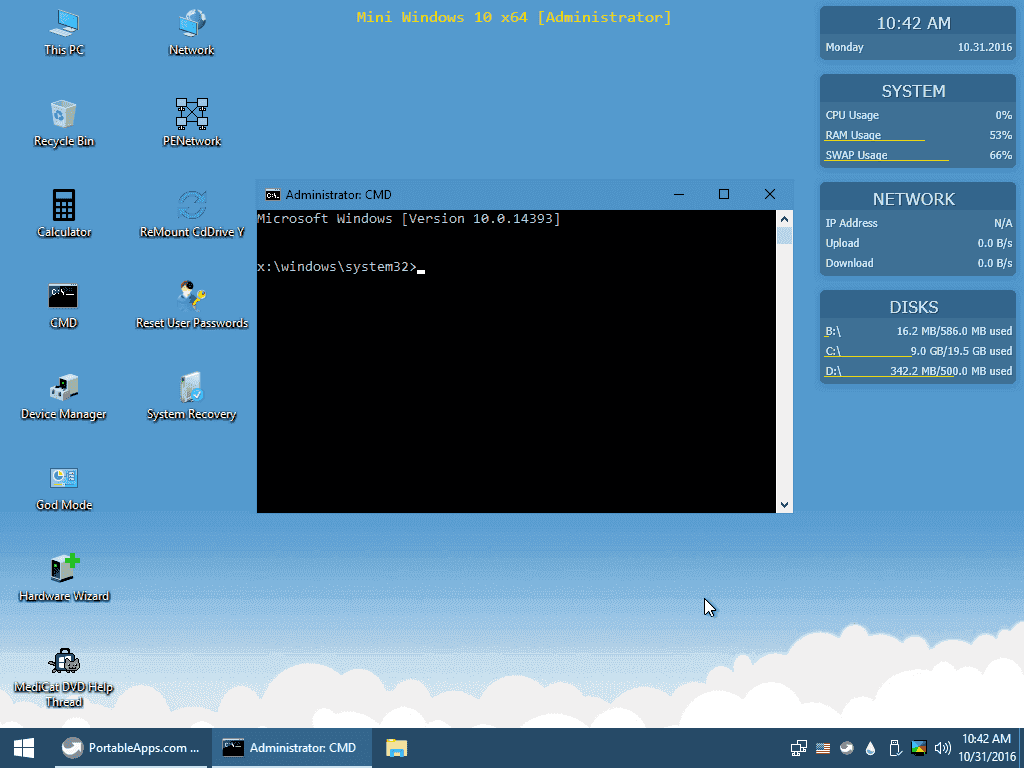
I've got a Redstone build of Mini Windows 10 up and running (version 10.0.14393). Progress is good so far. (DON'T GET TOO EXCITED, I'M NOT RELEASING IT YET)

Windows 10 x64-2016-10-31-03-42-32.png
 
Jayro, at first I would like to thank you for this great work. Finally, one great tool for all needed tasks.
I there a way to change the keyboard layout in the Windows 10 Mini Environment. As I am from germany, it is a little hazzle typing on a non qwerty keyboard? The language options are all greyed out.... Or how do i customizye the Win10 Mini files...
 
Last edited by msc2016,
Sorry if this was already asked, but what's the difference between this and pendrivelinux? Just curious which one I should use.
 
Sorry if this was already asked, but what's the difference between this and pendrivelinux? Just curious which one I should use.
I have only tested it with Rufus, I have not tested this with PendriveLinux/YUMI, but it should work with the right settings.
 
Hey Jayro, i got an idea to help make things easier when it comes to uploading MediCat, what if you setup Syncthing on an server or something so that others can help off load the bandwidth needed to download. i have an VPS laying around that i dont use and i will offer to set it up if needed.
 
Hey Jayro,

Couple of questions. If there somewhere on the image I can stick new drivers? Not the biggest issue but it's a bit of a pain but manually installing the network drivers is a bit of a pain when I need to get through a dozen computers in a day.
Second is it possible to add my own files (ie a batch file).

Cheers.
 
i want to know how do i add ubuntu 16.04 lts to mediacat dvd as a bootable os or is there an option to do so and i am using windows 10 pro
 
i like ubuntu 16.04 over lubuntu it's easy for me to use and i like to added it to medicat dvd is there an easy way of adding it as a live bootable os
 
You're welcome, it's my absolute pleasure making this.

1.) If I add UBCD, I'll probably get rid of Parted Magic altogether, since it just adds redundancy and bloat to MediCat. In the up-and-coming v16.10, MediCat will already come with Gparted (4MParted) under the "Harddisk Tools" menu, and also has EaseUS Partition Master and AOMEI Partition Assistant added to the PortableApps menu in Mini Windows 10 x64. So there won't be any shortage of partitioning applications on this next release. I stopped using Parted Magic when it became locked behind a paywall. I could, however... Look into assimilating parts of UBCD into MediCat, especially since they just released a new version last month. I'll have to look at it and see if I can integrate things, but it may be too late during the 16.10 release cycle, but who knows what the 17.04 release could bring? ;)

How about UBCD live?

2.) I used to include Linux Mint, but it's become too bloated and has a terrible floating "release schedule", if you can even call it that. Lubuntu is lightweight, small for a full-featured LiveCD (930MB vs 1.4GB), and works well enough to let users move files from a botched Windows system or external disks. Also installable, which is nice, and releases when Ubuntu does. I've never cared for the Xubuntu desktop layout, and Xubuntu is just as bloated as the other Ubuntu counterparts (By bloat, I mean installed apps making the ISO almost twice the size of a 700MB Live CD). Lubuntu 16.10 should also come with the new LXQt desktop environment, making it even lighter on resources than it already is.

Xubuntu core solves this issue, maybe you could consider it?

3.) I know nothing about github, I've only ever used it to download 3DS homebrew. But I'll look into setting one up after the release later this month. I'll be able to host the latest PSD files for the artwork, all the menus, among other stuff you mentioned.
 
Last edited by QwertyChouskie,
Been away for a while ( since April)..... Is there a setup instuctions file? I note that you have the Rufus installer in the directory, perhaps 7zip would also be a good addition? I note there are multiple files in the DVD directory... How do we put them together?? Or is that what is supposed to done? I apologize if this has been asked before....
Update I am trying to extract them all now.... that being said is there a reason that you do not upload the single .iso file?
 
Last edited by Markinhfx,
Been away for a while ( since April)..... Is there a setup instuctions file? I note that you have the Rufus installer in the directory, perhaps 7zip would also be a good addition? I note there are multiple files in the DVD directory... How do we put them together?? Or is that what is supposed to done? I apologize if this has been asked before....
Update I am trying to extract them all now.... that being said is there a reason that you do not upload the single .iso file?
Splitting the large ISO file up into smaller chunks was done to make downloading easier for people on slower connections, since the ISO is about 7GB unzipped. I'll consider using a self-extracting .exe installer going forward. I just need to experiment with 7zip. All you need to do is open the file that ends with .001 with 7zip, and extract the ISO. 7zip will do the rest by itself. Each file is hashed, so if one chunk of the download is corrupt, you don't have to re-download all 7GB, only a 1GB file.

I ended up adding UBCD in the current release.


what is the best way of making a mediacat dvd boot usb on a windows 10 pro computer and how
Use Rufus. It's in the download directory. 7Zip extracts the .ISO image. The Download folders even tell
you to use 7zip to open them.

Does this happen to have some sort of anti malware suit?
You tell me:

Untitled-1.png
 

Site & Scene News

Popular threads in this forum