Homebrew [3DS] mGBA Alpha 1v Released

  • Thread starter Thread starter NCorp.
  • Start date Start date
  • Views Views 269,248
  • Replies Replies 842
  • Likes Likes 35

mGBA/CitrAGB/Reroarch gPSP, What do you like.


  • Total voters
    337
I need some help.
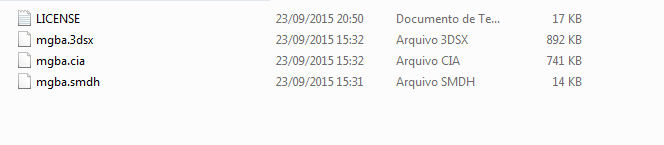
I downloaded the latest build and extract it, it says error, and this happens:
W3NDJFI.png

Anyways, I put it in the SD Card, but it doesn't work.
First off, you're doing it wrong. You need mgba.3dsx, not .cia. Second off, mgba.3dsx and mgba.smdh are supposed to go in a folder called 'mgba'. That folder should be placed inside the '3ds' folder.

Not to mention all your files are 0KB, which essentially means they're empty. Try redownloading them, or check your SD card to make sure it's not messed up.
 
So I'm finally in a position to upgrade my broken 3DS. I know N3DS is the priority for the emulator right now, but after games are running smoothly on it, how likely is it O3DS will be able to match performance even if it is a long way off? Debating between getting a cheap O3DS or a new N3DS atm.
 
So I'm finally in a position to upgrade my broken 3DS. I know N3DS is the priority for the emulator right now, but after games are running smoothly on it, how likely is it O3DS will be able to match performance even if it is a long way off? Debating between getting a cheap O3DS or a new N3DS atm.
If you can, just get the n3DS. No question about it. It's more future proof and always will have better performance then o3DS.
 
First off, you're doing it wrong. You need mgba.3dsx, not .cia. Second off, mgba.3dsx and mgba.smdh are supposed to go in a folder called 'mgba'. That folder should be placed inside the '3ds' folder.

Not to mention all your files are 0KB, which essentially means they're empty. Try redownloading them, or check your SD card to make sure it's not messed up.

These files aren't in the SD card, they are in my computer. And that's the problem, all the files are 0KB, and I redownloaded it like 4 times already.
 
These files aren't in the SD card, they are in my computer. And that's the problem, all the files are 0KB, and I redownloaded it like 4 times already.

Can you post a link to the site you're downloading these files from? Try turning off your antivirus for a little bit, maybe they're being detected as threats?
 
  • Like
Reactions: teampleb
I need some help.
I downloaded the latest build and extract it, it says error, and this happens:
W3NDJFI.png

Anyways, I put it in the SD Card, but it doesn't work.

Try redownloading or opening the archive with a different program, if you're using winrar try using 7zip and if you're using 7zip try winrar.
 
  • Like
Reactions: Haslus
I am downloading from the OP's link: https://s3.amazonaws.com/mgba/mGBA-nightly-latest-3ds.7z and yes, I already tried turning off my antivirus.

Well that's odd. Try unzipping this straight to your SD Card to see if it works. These are the same files I'm using right now, so I can confirm they're working properly.
No ROMs or any other copyrighted material is included in this file of course, so pls no bully mods.
 
Try redownloading or opening the archive with a different program, if you're using winrar try using 7zip and if you're using 7zip try winrar.

Ok, I tried with 7zip and now the files aren't 0KB anymore, thanks. I dunno why it works with 7zip.
c1c3a57771a73f02ed8ba4dd14aee7e0.png
 
With the new update i can really see the changes in mother 3 and other games on O3DS
Noticeable 3-7fps increase on n3DS too. I get 60 fps in SM3. :)

Yes, but I just tried downloading the .7z file and it works just fine with WinRAR. Compression is weird.
Oh I know. Engrampa 1.10 opens it just fine too.
 
  • Like
Reactions: SLiV3R
Noticeable 3-7fps increase on n3DS too. I get 60 fps in SM3. :)

Odd, I just tried Super Mario Advance - my go-to game for testing, and I'm still getting 18~19FPS. Not seeing the speed improvement. Maybe it's not working properly on O3DS?
 

Site & Scene News

Popular threads in this forum