Hacking Injecting GBC roms (for noobs)

  • Thread starter Thread starter Dean_
  • Start date Start date
  • Views Views 28,816
  • Replies Replies 122
  • Likes Likes 2
I think you’ll only need to alter that if you’ll change the location of \rom\vc_rom.bin

I think it actually means the path of the "romfs".

Rom:
# Specifies the root path of the file system to include in the ROM.
HostRoot : "$(ROMFS_ROOT)"
That instruction may mean "read romfs.bin from the root of the folder where makerom.exe is located". Setting it to HostRoot: "folder" may mean "read romfs contents from 'folder' and rebuild them". Thus, I'm omitting the "--romfs" command. I'd like to know if this is truly wrong or not.

 
The romfs folder are in the makerom.exe dir? If not, it needs to be there, and don't edit the rsf, just change the Title and the product code, i don't know as more edits will work fine

I used my own RSF, which I edited according to what the OP posted. The change I made according to you was just the path of romfs.

And yes, the romfs folder is in the makerom.exe path.
 
I think it actually means the path of the "romfs".

Rom:
# Specifies the root path of the file system to include in the ROM.
HostRoot : "$(ROMFS_ROOT)"
That instruction may mean "read romfs.bin from the root of the folder where makerom.exe is located". Setting it to HostRoot: "folder" may mean "read romfs contents from 'folder' and rebuild them". Thus, I'm omitting the "--romfs" command. I'd like to know if this is truly wrong or not.

That is correct, i don't know why it's giving a error
 
Guys what I cant understand is GBC VC roms have always been able to use on a GW card BBB supplied in the Pokemon Yellow, Red, Crystal etc.. range a .3ds file for card users and a .cia for dev users so what is the point in the tool anyway if you can already use the rom?
 
Guys what I cant understand is GBC VC roms have always been able to use on a GW card BBB supplied in the Pokemon Yellow, Red, Crystal etc.. range a .3ds file for card users and a .cia for dev users so what is the point in the tool anyway if you can already use the rom?

We can play any GBC game, not just the Pokemon, GBC have more games
 
Ok, the homebrew makerom seems to work simlar as the ctr_makerom32 of Nintendo CTR SDK, so the RomFS dir must to be in RSF, here is my rsf, just change the title and the Product Code
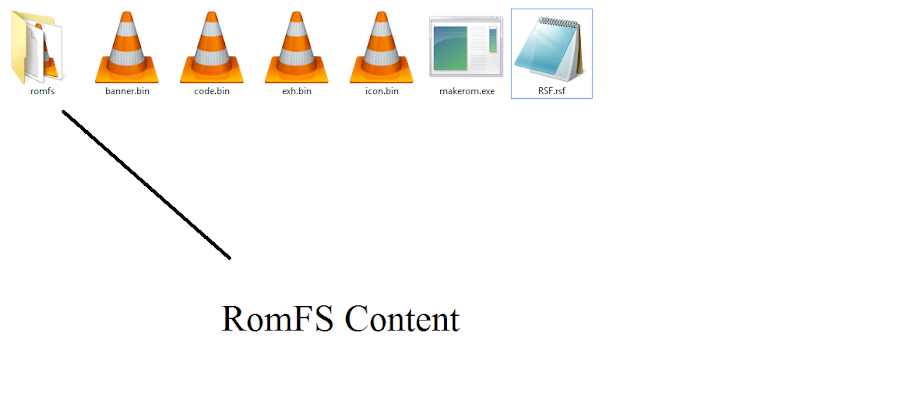
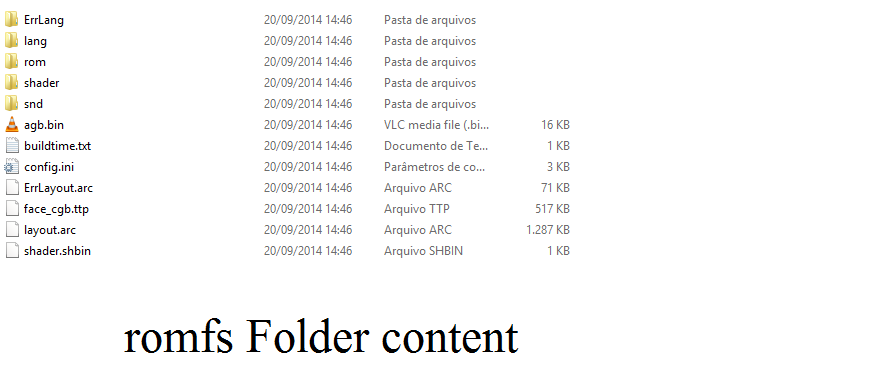
In your makerom directory, create a folder named "romfs" and paste your romfs content there, look an example:

GBATEmp%2520tuturial.png

GBATEmp%2520tuturial%25202.png

And just rebuild the .3ds using my RSF in Makerom and tada!, You will got a Working edited RomFS.bin in your .3ds
can u post the cmd line of this step please?
i try makerom -f cci -o NAME.3ds -rsf RSF.rsf -alignwr -target d -exheader exh.bin -code exefs/code.bin -icon exefs/icon.bin -banner exefs/banner.bin -romfs romfs in the first post but not work :S
 
can u post the cmd line of this step please?
i try makerom -f cci -o NAME.3ds -rsf RSF.rsf -alignwr -target d -exheader exh.bin -code exefs/code.bin -icon exefs/icon.bin -banner exefs/banner.bin -romfs romfs in the first post but not work :S

makerom -f cci -o NAME.3ds -rsf RSF.rsf -alignwr -target d -exheader exh.bin -code exefs/code.bin -icon exefs/icon.bin -banner exefs/banner.bin
 
Can someone tell me what is definitely wrong with my rsf file?

I changed the extension so the forum would allow me to upload the file.
 

Attachments

makerom -f cci -o NAME.3ds -rsf RSF.rsf -alignwr -target d -exheader exh.bin -code exefs/code.bin -icon exefs/icon.bin -banner exefs/banner.bin
hummm i dont know what i'm doing wrong....i place those file and folder just like u and it tolds me
[NCCH ERROR] Failed to open banner file 'exefs/banner.bin'
[NCCH ERROR] NCCH Build Process Failed
[RESULT] Failed to build outfile
and try to put full exefts folder inside it complete, but it just gave me a 4.68 mb files
 
This is way to complicated for me. Thanks to Nic333 he gave me some great advice but its really beyond me sorry, I think I will just wait for GW's next update, much easier that way for me! :)
 
Can someone tell me what is definitely wrong with my rsf file?

I changed the extension so the forum would allow me to upload the file.

You are putting permissions that you can't have, so the 3DS are denying the boot of the Application, you can use my RSF, just make the changes that you want

hummm i dont know what i'm doing wrong....i place those file and folder just like u and it tolds me
[NCCH ERROR] Failed to open banner file 'exefs/banner.bin'
[NCCH ERROR] NCCH Build Process Failed
[RESULT] Failed to build outfile
and try to put full exefts folder inside it complete, but it just gave me a 4.68 mb files

makerom -f cci -o NAME.3ds -rsf RSF.rsf -alignwr -target d -exheader exh.bin -code code.bin -icon icon.bin -banner banner.bin
Try that
 
You are putting permissions that you can't have, so the 3DS are denying the boot of the Application, you can use my RSF, just make the changes that you want


makerom -f cci -o NAME.3ds -rsf RSF.rsf -alignwr -target d -exheader exh.bin -code code.bin -icon icon.bin -banner banner.bin
Try that

But what about the padding and that stuff that involves card2 games?
 
But what about the padding and that stuff that involves card2 games?

Change the game to card2 in my rsf, i bet as the card2 game will not use that:
#FileSystemAccess:
#- CategorySystemApplication
#- CategoryHardwareCheck
#- CategoryFileSystemTool
#- Debug
#- TwlCardBackup
#- TwlNandData
#- Boss
#- DirectSdmc
#- Core
#- CtrNandRo
#- CtrNandRw
#- CtrNandRoWrite
#- CategorySystemSettings
#- CardBoard
#- ExportImportIvs
#- DirectSdmcWrite
#- SwitchCleanup
#- SaveDataMove
#- Shop
#- Shell
#- CategoryHomeMenu
#IoAccessControl:
#- FsMountNand
#- FsMountNandRoWrite
#- FsMountTwln
#- FsMountWnand
#- FsMountCardSpi
#- UseSdif3
#- CreateSeed
#- UseCardSpi
 
Change the game to card2 in my rsf, i bet as the card2 game will not use that:
#FileSystemAccess:
#- CategorySystemApplication
#- CategoryHardwareCheck
#- CategoryFileSystemTool
#- Debug
#- TwlCardBackup
#- TwlNandData
#- Boss
#- DirectSdmc
#- Core
#- CtrNandRo
#- CtrNandRw
#- CtrNandRoWrite
#- CategorySystemSettings
#- CardBoard
#- ExportImportIvs
#- DirectSdmcWrite
#- SwitchCleanup
#- SaveDataMove
#- Shop
#- Shell
#- CategoryHomeMenu
#IoAccessControl:
#- FsMountNand
#- FsMountNandRoWrite
#- FsMountTwln
#- FsMountWnand
#- FsMountCardSpi
#- UseSdif3
#- CreateSeed
#- UseCardSpi

What's with that? the # makes those "commands" to not be taken into consideration, so they affect nothing.
 
You are putting permissions that you can't have, so the 3DS are denying the boot of the Application, you can use my RSF, just make the changes that you want


makerom -f cci -o NAME.3ds -rsf RSF.rsf -alignwr -target d -exheader exh.bin -code code.bin -icon icon.bin -banner banner.bin
Try that
same happened....:wacko: and here is my rsf file i just edit two place the name and the ProductCode
donno why,seems that my makerom dont pack the romfs file

im using the makerom.exe in http://gbatemp.net/threads/release-romfs-generator.371770/
#17 if possable can u upload the exe u use?
 

Attachments

Attachments

Site & Scene News

Popular threads in this forum