Thank you for the reply! So i gave it a shot, I enabled the cheat through EdiZon and went to my in-game chat and typed in "0083" (HEX for "Lucky Cat"). I then pressed enter and pressed zr+right right after, nothing spawned. Am i doing something wrong?
after you enter the code 0083 as your example, press zr+right dpad first. Once done, tap confirm on the chat window. open your inventory and viola!
Post automatically merged:
is it possible to update the list of hex id based on 3.0? The one posted earlier are partially working and the names are also confusing when translated to english. Thanks
I am currently trying to figure out the following offsets:
1)villager
2)villager house
3)online session
4)online player name
5)field item
Would appreciate if someone can point me to the right direction.
I am currently trying to figure out the following offsets:
1)villager
2)villager house
3)online session
4)online player name
5)field item
Would appreciate if someone can point me to the right direction.
I believe these are right
public const ulong VillagerAddress = 0xB104B4E0;
public const ulong VillagerHouseAddress = 0xB14CD0E0;
public const ulong FieldItemStart = VillagerAddress - 0x10 + 0x22F3F0;
I cant seem to get the nook shopping bit to work but i know the address i have is correct as it still shows the same as last update. but furniture code works for me 100%
Walk through walls will not work because if you hold L you will just gonna jump. Its because of the new 3.0 update. Just a heads up. Thank you for updating the cheats.
Most of codes are different depending on how many human players you have living on your island. If you have 1 registered human player on island, then use codes in "1P on island" tab. If you have 2 registered human players on island, then use codes in "2P on island" tab... and so on...
Open your Map in game, to see how many registered human players you have:
Press ZL on your controller and you'll bring up the phone menu.
Next, highlight the Map option and select it with A.
Eg. this person has 2 registered human players (see top-left):
She must use codes in the "2P on Island" tab, even if she is playing solo:
This tab is for 1 registered human player on island.
Code:
This tab is for 2 registered human players on island.

Even if you're playing solo, you must use codes of this tab.
Code:
This tab is for 3 registered human players on island.

Even if you're playing solo, you must use codes of this tab.
Code:
This tab is for 4 registered human players on island.

Even if you're playing solo, you must use codes of this tab.
Code:
This tab is for 5 registered human players on island.

Even if you're playing solo, you must use codes of this tab.
Code:
This tab is for 6 registered human players on island.

Even if you're playing solo, you must use codes of this tab.
Code:
This tab is for 7 registered human players on island.

Even if you're playing solo, you must use codes of this tab.
Code:
This tab is for 8 registered human players on island.

Even if you're playing solo, you must use codes of this tab.
If not already installed:
Download nx-ovlloader.zip > unzip it > put 420000000007E51A folder into SD>atmosphere>contents
Download ovlmenu.zip > unzip it > put .overlays folder into SD>switch
Download EdizonOverlay > unzip it > put ovlEdiZon.ovl into SD>switch>.overlay
TXT file / location on SD
Copy codes you are interested in.
Paste codes in a txt file and rename it to CBF780093C874152.txt
Put the txt file in SD card: atmosphere folder > contents folder > 01006f8002326000 folder (create it if necessary) > cheats folder > CBF780093C874152.txt
Run your game, open Tesla Menu (hold down L and DPad Down and push on the right joy stick)
You can now do magic
2.0.8 - C.Codes for 1/8 players
Main C.Codes Stamina / Movement / Spawn, Duplication / Bells, Miles, Poki / Tools, Random items, Natural Ressources / Reactions / DIY / FPS / Time control / Empty slot...
The number of C.Codes in these lists is fine for Edizon. It doesn't exceed the allowed limit. Have fun! Again, most codes vary depending on the number of human players living on your island. Even if you're playing solo, you should choose codes that correspond to the total number of registered players on your island. eg. codes in "2P on island" tab if you have 2 registered human players on your island.
Please, be logical and do not use certain codes at the same time. Like: [Text to S1] / [Chat Buffer to S1] [Funiture you touch to empty slots] / [Nook Shopping App to Empty Slot] [Duplicate S1 to S2] / [Duplicate S1 to S20] / [Duplicate S1 to S40] Or random items that use the same slots...
[Max Stamina]
To get max 10/10 energy.
[Speed Up x2/x3/x4]
Increase the running speed of your character, by holding B.
[Walk through Walls (Hold L)]
By holding L, you'll be able to walk through walls (indoor & outdoor). A perfect combo when used with [Speed Up x4] to cross the map.
[Moonjump (L)]
By holding L, your character will float in the air.
[Infinite underwater diving]
Stay under water as long as you wish.
[Zero Knockback on Rocks]
To cancel knock back animation, when hitting rocks.
[Animation Speed x1/x2/x5/x50 (L + Dpad ↑ → ↓ ←)]
Press [L + Dpad ↑ → ↓ ←] to increase all the animations speed of the game (eg. the way your character is acting when you do nothing). Without any effect on time.
L + Dpad ↑ = x1
L + Dpad → = x2
L + Dpad ↓ = x5
L + Dpad ← = x50
OC, you can remove the button activators:
[Animation Speed x1]
04000000 043BC3C0 3F800000
[Text to Slot 1]
When code is activated:
Make sure to not have something you want to keep in slot 1. If so, move it to another slot!
Open the game chat function by pushing the "R" button on your controller.
Enter the ID you are looking for (for example 1026). Confirm.
Then press "X + D-Pad Right" to spawn the item in your inventory (slot 1).
To modify the color of the item (if a variant exists), keep the item in slot 1 and send in chat a number between 0 and 5 (for example). Then press "X + D-pad Left". Same for quantity, but it depends of the item too.
Make sure to not have something you want to keep in slot 1. If so, move it to another slot!
Open the game chat function by pushing the "R" button on your controller.
Enter the ID you are looking for (for example 1026). Do not confirm.
Then press "Zr + D-Pad Right" to spawn the item in your inventory (slot 1).
To modify the color of the item (if a variant exists), keep the item in slot 1 and write in chat a number between 0 and 5 (for example). Then press "Zr + D-pad Left". Same for quantity, but it depends of the item too.
[Duplicate S1toS2 (Zr)]
This code will let you duplicate the item which is in your slot 1 to your slot 2. Make sure to not have something you want to keep in slot 2, before activating.
[Duplicate S1toS20 (Zr)]
This code will let you duplicate the item which is in your slot 1 into your first 20 slots. Make sure to not have something you want to keep in these slots, before activating.
[Duplicate S1toS40 (Zr)]
This code will let you duplicate the item which is in your slot 1 into all of your 40 slots. Make sure to not have something you want to keep in inventory, before activating.
[S1 x10, x30, x50 (ZL + Dpad ↑ → ↓)]
The item in your slot 1 will be multiplied by 10, 30 or 50 (only for resources like wood, wooden Branch, fences, fruits, gold/silver nugget...).
Zl + Dpad ↑ = x10
Zl + Dpad → = x30
Zl + Dpad ↓ = x50
OC, you can remove the button activators:
[Slot 1 x10]
04100000 AFB1E6E4 00000009
[Slot 1 to empty slot (Minus)]
Press minus to duplicate what is in your slot 1 to empty slot in your inventory.
Based on Sky' [furniture you touch to empty slot] code.
When using this code, you'll have about 3-5 copies of the item in your empty slots. No matter how quickly you're pressing the minus button. It's just... normal.
[Nook Shopping App to Empty Slot (Minus)]
Open your NookPhone app (or the Nook Shopping service at Nook Stop in Resident Services)
Hover an item you want.
Then, just press minus to spawn that item to an empty slot in your inventory.
When using this code, you'll have about 3-5 copies of the item in your empty slots. No matter how quickly you're pressing the minus button. It's just... normal.
[furniture you touch to empty slot (Minus)]
Just hold your A button on an item outside that is placed. You would see your character holding it with his hands.
Then, press minus to spawn that item to an empty slot in your inventory.
When using this code, you'll have about 3-5 copies of the item in your empty slots. No matter how quickly you're pressing the minus button. It's just... normal.
[Max ABD 999,999,999] / [Max Nook Miles 9,999,999]
On/Off the codes.
Open the Nook Stop (at the Resident Services).
You now have 999,999,999 bells in ABD / 9,999,999 Nook Miles.
[Max Poki 999,999]
Go to Lottie's Island.
On/Off the code.
You now have 999,999 Poki.
[Min ABD] / [Min Nook Miles]
On/Off the codes.
Open the Nook Stop (at the Resident Services).
You now have zero bell in ABD / no Nook Miles.
[Min Poki]
Go to Lottie's Island.
On/Off the code.
You now have zero Poki.
"Sxx" is for "Inventory Slot xx". eg. [S1/10 All Golden Tools] = Golden Tools will spawn into your slots 1/2/3/4/5/6/7/8/9/10.
You'll have to unlock the 40 slots before using these codes. To unlock the 40 slots:
Go to the Resident Services building.
Connect to the Nook Stop machine.
Buy the Pocket Organization Guide for 5,000 Nook Miles to have 30 slots.
Then, you'll have to complete some objectives given by Tom Nook, to upgrade Resident Services. After that, you'll be able to buy the Ultimate Pocket Stuffing Guide for 8,000 Nook Miles. You'll net another 10 slots, bringing your total to 40.
If you want to use these codes with fewer slots, just change the inventory offsets yourself:
No button activators on these codes, if you want some: "Misc. info" section of this post. So make sure to not have something you want to keep in concerned slot, before activating or it will be overwritten.
[Unbreakable Tools codes] need to be always activated. If you just on/off the code, tools will break in a normal way (eg. after 30 uses for a fishing rod).
[Unlock all reactions]
This code will unlock all reactions. Open up the reactions menu by pressing the ZR Button on the back right of your controller to see it.
[Easy DIY]
When activated, you just need the 1st ressource (x1) to build whatever you want at your workstation.
e.g. the recipe for Flimsy axe: 5× Tree branch + 1× Stone with this code, you'll only need 1x Tree branch to build it.
[Instant Text Speed]
To cancel the text animation.
[FPS 30/60/120]
To increase/decrease the FPS of the game (30 = default).
[Freeze/Unfreeze Time (ZL + Dpad ↑ → )]
To freeze/unfreeze time.
Zl + Dpad ↑ = Freeze time
Zl + Dpad → = Unfreeze time
[Fast Forward Time x2/x3/x4/x5 (L)]
Press L to speed up time. Usefull when you have to wait for a construction to finish or for shop to open.
[Empty slot]
To delete all the stuff in your 40 pockets. By default, this code is for all 40 slots, but you can custom it by deleting some lines.
As always, many thanks to OblivionReign for updating her codes. Same inventory offsets as in 2.0.5/2.0.6/2.0.7 upd. Only certain codes required updating, see below. Duplicate codes have been added for all players (S1toS2, S1toS20, S1toS40). C.Codes for all rugs/room floors/room walls have been added for all players in "Additional C.Codes" section. The AIO lists have been reorganized to make them more readable. As the "Usage info" section. The submenu sections have been modified (thanks to Dsrules' advice). To make AIO lists compatible with Edzion Overlay and Breeze.
Here are the code versions you'll find in AIO lists of this post. These codes all work with 2.0.8 update.
Credit: OblivionReign
[Speed Up x2/3/4 - 2.0.8]
[Walk through Walls - 2.0.8]
[Moonjump - 2.0.8]
[Infinite underwater diving - 2.0.8] - no more increased swim speed
[Instant Text Speed - 2.0.6]
[Max Stamina - 2.0.6]
[Text to Slot 1 - 2.0.6]
[Chat Buffer to Slot 1 - 2.0.6]
[Nook Shopping App to Empty Slot - 2.0.6]
[furniture you touch to empty slot - 2.0.6]
[Max ABD/Nook Miles/Poki - 2.0.6]
[Animation Speed x1/2/5/50 - 2.0.6]
[30/60/120 FPS - 2.0.6]
[Freeze/Unfreeze Time - 2.0.6]
[FastForwardTime x2/3/4/5 - 2.0.6]
[Easy DIY - 2.0.6]
[Unlock all Reactions - 2.0.6]
1st, check if you have chosen the correct C.Codes for the number of players on your island. For more info: "Good to know" section, at the beginning of this post. If it still doesn't work, try disabling some of your sys-modules and should be ok then.
Bidziilla readme: "Text2Item does not work! Why not? This issue has been worked on in the newest build. However, it was pointed out by user orc4ow that certain sys-modules may cause certain cheats to not work as intended. (This seems to only affect cheats that write to HEAP). Try disabling them and then try again."
Since Happy Home Paradise DLC, mods which require a modified "ResourceSizeTable.srsizetable" can cause issues if activated. If you use a lot of mods, they may no longer work on the latest Nintendo update.
As a result of changes made to nintendo's software in 20.0.0, there is roughly 10MB less memory available for custom system modules. We can only steal a maximum of 14MB from the applet pool, down from 40MB. To facilitate this, a new helper module (memlet) was added, so that memory may be temporarily stolen during the romfs building process.
If you are affected by this, you will see "Data abort (0x101)" when trying to launch the game with mods.
Please reach out to sciresm on discord if this occurs to share your error report binary. However, some issues may be impossible to fix.
I apologize sincerely if the issue is impossible to resolve, but I have been forced unavoidably to make compromises here, and I think this is the best balance to be struck.
What to do then?
Solution #1
You can try this updated "ResourceSizeTable.srsizetable". It should allow mods to be universally compatible with the game, including the Happy Home Paradise DLC. But again, due to the new memory limits, you should reduce number of mods or stop using the ones that are too heavy. Or some letters, objects and icons could be invisible, despite the patch. In the worst case, your game will crash. Note that if you use this new ResourceSizeTable file:
You should always activate it last (eg. with Simple Mod Manager, after activating other mods).
Some modders already include this file in their packs. Make sure to delete it and only use the updated one. It's much more convenient to have it separate from other mods folders. e.g:
00 ResourceSizeTable
../mods/Animal Crossing New Horizon/00 ResourceSizeTable/contents/01006F8002326000/romfs/System/Resource/ResourceSizeTable.srsizetable
01 Black sand beach
../mods/Animal Crossing New Horizon/01 Black Sand/contents/01006F8002326000/romfs/Model/...zs
Solution #2
You can try this tool to merge your mods and automaticallly create a personalized RSTB patch. I haven't tried it so don't ask me about it.
If you want to add a button activator to a code, do not forget the "20000000" line at the end.
Without button activator
Code:
[S36 Medicine X10 - 1P]
08100000 AFB1E750 00000009 00000AD9
I cant seem to get the nook shopping bit to work but i know the address i have is correct as it still shows the same as last update. but furniture code works for me 100%
Thanks for these codes. Can you tell me how to get a quantity of 10 for an item in slot 1, for example. (I would like to do it for the Nook Miles tickets.)
Thanks for these codes. Can you tell me how to get a quantity of 10 for an item in slot 1, for example. (I would like to do it for the Nook Miles tickets.)
It’s about that time of year again where I check in with the community to see if we can get the front page aligned with what people are interested in knowing and what...
WiiCompiled is a new project that lets PC gamers play Mario Kart Wii natively on PC without emulation. Using static recompliation to convert the code into native PC...
Images for the rumoured Zelda-themed limited edition Switch 2 for The Legend of Zelda's 40th Anniversary have started to leak online.
The leak shows only the...
After being announced last year, the fan-made remake Gamma Emerald has finally gotten its first early access release. A complete rebuild of fan-favourite Pokemon...
The long awaited Grand Theft Auto VI Extended Look gameplay trailer has finally dropped on YouTube. As you all know, it had dropped 6 hours earlier on Netflix, and...
Though we knew all the way back in May that this was coming, the exact numbers remained a mystery for prospective Nintendo gamers in the UK. If you happen to have...
Thanks to the recent decomplication efforts; The Minish Cap 3DS brings the Game Boy Advance classic Zelda title to your 3DS.
The port takes full advantage of the 3DS...
In the wake of Sony's shift to a digital-only ecosystem within the next year, Xbox have today announced a surprising scheme. Aiming to offer physical buyers the same...
GBAtemp is and always has been an independent community. Since 2002 our staff have voluntarily kept the site running, added new forums, features, provided constant...
To celebrate its 25th anniversary, XBOX has launched pre-orders for the XBOX 25th Anniversary Collection. For the occasion, the trailer below was aired.
This...
It’s about that time of year again where I check in with the community to see if we can get the front page aligned with what people are interested in knowing and what...
After being announced last week, the first of two broadcasts is set to go live later today with a stark focus on The Legend of Zelda and its 40th anniversary...
Though we knew all the way back in May that this was coming, the exact numbers remained a mystery for prospective Nintendo gamers in the UK. If you happen to have...
In the wake of Sony's shift to a digital-only ecosystem within the next year, Xbox have today announced a surprising scheme. Aiming to offer physical buyers the same...
Images for the rumoured Zelda-themed limited edition Switch 2 for The Legend of Zelda's 40th Anniversary have started to leak online.
The leak shows only the...
The long awaited Grand Theft Auto VI Extended Look gameplay trailer has finally dropped on YouTube. As you all know, it had dropped 6 hours earlier on Netflix, and...
It is with a heavy heart that I announce the departure of our beloved Chary from the position of Chief Editor. Chary took over early 2021 and has done a wonderful job...
After being announced last year, the fan-made remake Gamma Emerald has finally gotten its first early access release. A complete rebuild of fan-favourite Pokemon...
Thanks to the recent decomplication efforts; The Minish Cap 3DS brings the Game Boy Advance classic Zelda title to your 3DS.
The port takes full advantage of the 3DS...
GBAtemp is and always has been an independent community. Since 2002 our staff have voluntarily kept the site running, added new forums, features, provided constant...















 If you have 1 registered human player on island, then use codes in "1P on island" tab.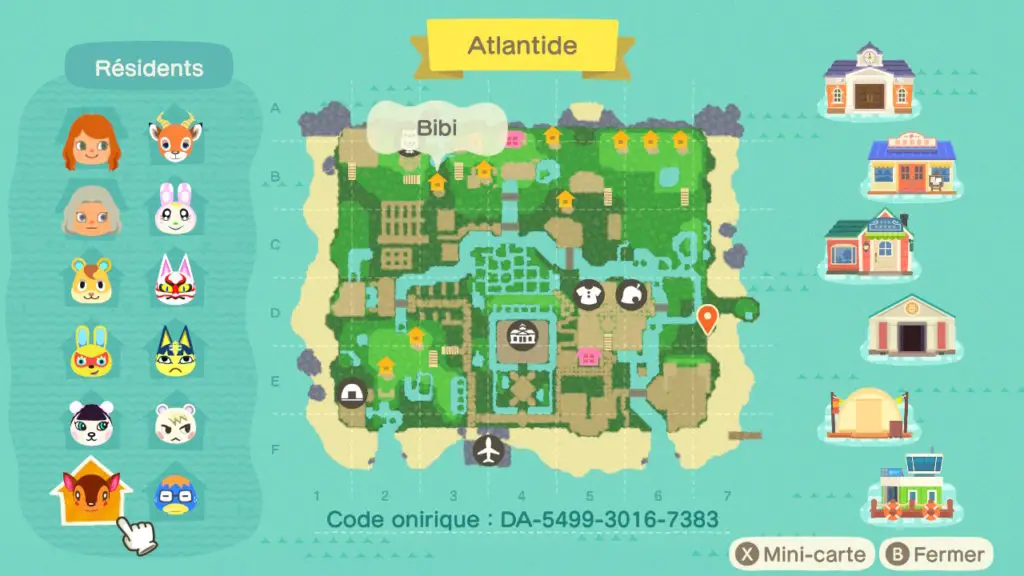
 with this code, you'll only need 1x Tree branch to build it.
 not sure what donating it to the museum will do. It might interfere with game mechanics, IDK. Proceed at your own risk.


