I have started adding tooltips to the options in pop-fe-psp.
It will be in the next release.
I am not really sure about what the usecases are for all of these options, I know what they do obviously but am less certain about the why and when you really need to use them.
I think for example the CDDA option is mostly to handle V-Rally2's special dependency of how audio trakcs are played.
(cdda tracks will automatically start playing the next track when the current track ends? but atrac3 does not?)
(yeah, next version will also include PSX-undither as a selectable option, the more features the better is my motto)
I am not asking you to work for me and proofread without compensation. If you help me with this, in exchange I will add a GUI and a Windows build to gba2psp.
Your GBA games could look like this on your PSP:
Could you add the option to make ICON0.png look the same as PSX2PSP's, with the PlayStation logo and name displayed vertically, and add an option to set a boot/warning image BOOT.PNG when the game starts, as well as the option to use our own custom images in the conversion options, similar to the options in PSX2PSP?.
Here are some examples of what I mean:
Could you add the option to make ICON0.png look the same as PSX2PSP's, with the PlayStation logo and name displayed vertically, and add an option to set a boot/warning image BOOT.PNG when the game starts, as well as the option to use our own custom images in the conversion options, similar to the options in PSX2PSP?.
Here are some examples of what I mean:
I think pop-fe-psp already supports providing the BOOT.PNG.
That is what the warning/pops screen that is shown when the emulator starts, before it even shows the initial PS logo, right?
It is called LOGO in pop-fe-psp and there is also a checkbox if you automatically just want to use the icon1 background image for it. I always use it in my own conversions.
Changing the frame for icon0 to the one you suggested.
I am not sure it will look very good because that frame contains the "Playstation" text and also the PS logo on the left column but that it sometimes/very often also provided inside the bitmap for the cover image that is automatically downloaded for the game.
The difference is that on the cover images this same thing, Playstation text and PS logo, is sometimes along one of the vertical borders, sometimes it is at the top, sometimes at the bottom, sometimes it is transparent instead of a solid black background etc etc.
So I think in many situations it would just end up containing the same thing twice. Once in the frame border and a second time in the cover image that is pasted inside it.
The game covers used come in many different styles. Differing by region and sometimes individual publishers or even individual games sometimes have unique styles.
The benefit of the current frame I use is that it works quite well regardless of how/what the style of the cover image actually looks like.
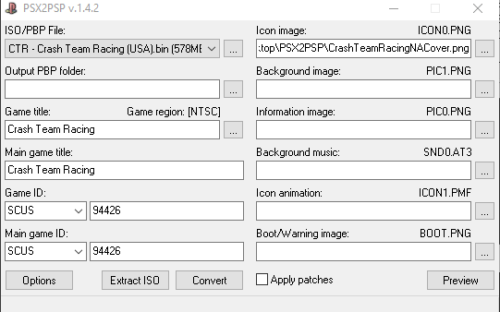
I attached examples of what it would look like. I.e. not good In this example the cover image contains the text and the logo in the left-colums, but others contain it elsewhere, so it would require the database to be updated for each game to specify "which part of the cover image we download contains the text and logo that has to be removed".
There are thousands and thousands of different entries this would have to be done for
Post automatically merged:
Even if it turns out to not be feasible to do automatically in pop-fe,
you can create these icon0 files manually, crop away the text/logo from the cover and then paste it into the frame in your post.
Then save them and store them as the same name as your cue file but ending in "_cover.png" and pop-fe will automatically use it instead of trying to download and frame an image.
I think pop-fe-psp already supports providing the BOOT.PNG.
That is what the warning/pops screen that is shown when the emulator starts, before it even shows the initial PS logo, right?
It is called LOGO in pop-fe-psp and there is also a checkbox if you automatically just want to use the icon1 background image for it. I always use it in my own conversions.
Changing the frame for icon0 to the one you suggested.
I am not sure it will look very good because that frame contains the "Playstation" text and also the PS logo on the left column but that it sometimes/very often also provided inside the bitmap for the cover image that is automatically downloaded for the game.
The difference is that on the cover images this same thing, Playstation text and PS logo, is sometimes along one of the vertical borders, sometimes it is at the top, sometimes at the bottom, sometimes it is transparent instead of a solid black background etc etc.
So I think in many situations it would just end up containing the same thing twice. Once in the frame border and a second time in the cover image that is pasted inside it.
The game covers used come in many different styles. Differing by region and sometimes individual publishers or even individual games sometimes have unique styles.
The benefit of the current frame I use is that it works quite well regardless of how/what the style of the cover image actually looks like.
I attached examples of what it would look like. I.e. not good In this example the cover image contains the text and the logo in the left-colums, but others contain it elsewhere, so it would require the database to be updated for each game to specify "which part of the cover image we download contains the text and logo that has to be removed".
There are thousands and thousands of different entries this would have to be done for
Post automatically merged:
Even if it turns out to not be feasible to do automatically in pop-fe,
you can create these icon0 files manually, crop away the text/logo from the cover and then paste it into the frame in your post.
Then save them and store them as the same name as your cue file but ending in "_cover.png" and pop-fe will automatically use it instead of trying to download and frame an image.
What I mean is this: PSX2PSP has the option to attach your own edited images without the program having to search for them, and that's something many of us like.
Regarding the BOOT.PNG file, some users like to replace the warning message with the game's logo so it appears at startup, for example:
An interesting detail.
Regarding the ICON0.PNG file, you can edit the cover art and crop the PlayStation logo so that it looks like this:
That's what everyone would theoretically do, and honestly, it looks better this way in my opinion. People still prefer NTSC region covers because they look better in most cases, but you could also add one with the PlayStation name horizontally to allow for PAL region covers. Obviously, in this case, you'd have to crop the name from the bottom so it doesn't repeat.
The PSX2PSP program might be outdated and look very basic, but that's precisely what many of us like about it: it's easy to understand, and the options for adding your own images, among other things, are very good and interesting. It's even fun to convert games with it because of those options.
That's what I mean by giving the option to add user-edited images, like PSX2PSP does, so there are more options to suit everyone's tastes.
I really like POP FE and it's the definitive PSX game conversion program, It's just missing a few small details.
I think we are talking across each other.
Just like in PSX2PSP you can provide your own image. PSX2PSP calls it BOOT but it is called LOGO in pop-fe.
On the left, just above the SND0: file selector there is a file selector for Logo:
You can use this to provide whatever image you want for the initial warning/pops image.
Am I missing something? Please explain because I don't know if you mean something completely different.
If you have your own image you want to use instead of the default / generated icon0 image.
Just click on the icon0 image in the UI and there will be a file selector where you can pick your own file, just like in PSX2PSP, to use instead of the default one . Same for pic0, pic1, click on them and you can provide something else.
Post automatically merged:
For auto cropping and use a different frame.
I do not dislike the idea to have a better frame it is just that
I have a lack of cycles.
Many/most NTSC-U games have the Playstation text and logo in a column on the left but not all of them.
For PAL, many/some have this as a row at the bottom, or the top, of the cover but far far from all of them.
Look at PAL Brave Fencer Musadhi, it does not. There is quite little consistency across PAL games here.
And for NTSC-J, it is the wild-west, anything goes.
Realistically, "we" (a.k.a I) would would have to tag all the games in the database with info on how and what to crop to make it work well.
There are close to 15.000 entries in the database and honestly I am the only one working on populating it.
I simply do not have cycles to start adding this to the database either, not now or in the next few years.
I don't even have proper pic1 background images for all the games.
There are about 350 games in SLUS that needs one, about 700 PAL games and over a thousand games in NTSC-J that needs a pic1 background.
I am adding images when I can, slowly, but pic1 has a LOT higher priority to me personally at this point in time
so I have to decline this issue, not because I don't think it has merit, it does have merit, but because I already have "signed" up on higher priority work (pic1) which will take me the next few years to do and realistically there is no one else that is going to step in and spend time and do the work.
I think we are talking across each other.
Just like in PSX2PSP you can provide your own image. PSX2PSP calls it BOOT but it is called LOGO in pop-fe.
On the left, just above the SND0: file selector there is a file selector for Logo:
You can use this to provide whatever image you want for the initial warning/pops image.
Am I missing something? Please explain because I don't know if you mean something completely different.
If you have your own image you want to use instead of the default / generated icon0 image.
Just click on the icon0 image in the UI and there will be a file selector where you can pick your own file, just like in PSX2PSP, to use instead of the default one . Same for pic0, pic1, click on them and you can provide something else.
Post automatically merged:
For auto cropping and use a different frame.
I do not dislike the idea to have a better frame it is just that
I have a lack of cycles.
Many/most NTSC-U games have the Playstation text and logo in a column on the left but not all of them.
For PAL, many/some have this as a row at the bottom, or the top, of the cover but far far from all of them.
Look at PAL Brave Fencer Musadhi, it does not. There is quite little consistency across PAL games here.
And for NTSC-J, it is the wild-west, anything goes.
Realistically, "we" (a.k.a I) would would have to tag all the games in the database with info on how and what to crop to make it work well.
There are close to 15.000 entries in the database and honestly I am the only one working on populating it.
I simply do not have cycles to start adding this to the database either, not now or in the next few years.
I don't even have proper pic1 background images for all the games.
There are about 350 games in SLUS that needs one, about 700 PAL games and over a thousand games in NTSC-J that needs a pic1 background.
I am adding images when I can, slowly, but pic1 has a LOT higher priority to me personally at this point in time
so I have to decline this issue, not because I don't think it has merit, it does have merit, but because I already have "signed" up on higher priority work (pic1) which will take me the next few years to do and realistically there is no one else that is going to step in and spend time and do the work.
Thanks for replying.
First of all, I apologize, my English is bad and I'm using a translator to avoid taking too long to write.
If you're saying that LOGO is the same as BOOT.PNG, then I believe you and there's no need to add anything. I hadn't even noticed that option; there are so many options...
I don't know where you got the idea about Brave Fencer Musashi PAL
Just to clarify, games like Brave Fencer Musashi, as well as Chrono Cross, Xenogears, and many others, were never released in PAL regions, which is why their only official language in the West is English.
And regarding the cover art being cropped, you don't have to do any of that or link anything to the database. It's not necessary to go to that trouble.
You can simply select "another ICON0.PNG option" with the vertical PlayStation logo frame I showed you, and everyone can add their own cropped image without the program doing it for them.
I don't think anyone would mind having to upload their own image; it doesn't bother me, and I do it without any problems.
If nobody complained about having to upload their own file for each thing with PSX2PSP, I don't see why anyone would with this option.
The POP FE program is fantastic; it's said that many of the converted games run so well that they seem like official PSX games for PSP from the PSN Store.
Below, I've included the file containing the ICON0 folder for the PSX2PSP program.
Inside that folder are all the folders for the ICON0 options used, and one of them is Default - 80x80. This contains the frame and the necessary files for that option. Hopefully, it will work.
You can simply select "another ICON0.PNG option" with the vertical PlayStation logo frame I showed you, and everyone can add their own cropped image without the program doing it for them.
Can you really do that?
But you can use the same frame as the PSX2PSP, right?
You could also add another frame with the logo horizontally for those who want to use PAL region covers, if you'd like.
Thanks for doing this.
Post automatically merged:
One last question:
Are fan-translated games also compatible and can they be converted to eboots for the PSP with POP FE?
There are many games that were never officially translated into Spanish, and then fan translations came out.
I wish you the best of luck with your work on the program.
Can you really do that?
But you can use the same frame as the PSX2PSP, right?
You could also add another frame with the logo horizontally for those who want to use PAL region covers, if you'd like.
Thanks for doing this.
Post automatically merged:
One last question:
Are fan-translated games also compatible and can they be converted to eboots for the PSP with POP FE?
There are many games that were never officially translated into Spanish, and then fan translations came out.
I wish you the best of luck with your work on the program.
Please try this version : https://github.com/sahlberg/pop-fe/actions/runs/20318377565
At the bottom of this page is a new scratch build of pop-fe.
You need to be logged in to github or else the link will not be visible.
Create an account on github, log in, and then download this test build.
To use this:
1, select a game disk
2, tick the new check-box "NTSC-U style ICON0"
3, Click the top-centre ICON0 preview box and select the cropped cover image you want to use.
The cover image should be cropped to not contain the Playstation text in the left column.
The cover image should be re-scaled to 60x67 pixels.
Please try this version : https://github.com/sahlberg/pop-fe/actions/runs/20318377565
At the bottom of this page is a new scratch build of pop-fe.
You need to be logged in to github or else the link will not be visible.
Create an account on github, log in, and then download this test build.
To use this:
1, select a game disk
2, tick the new check-box "NTSC-U style ICON0"
3, Click the top-centre ICON0 preview box and select the cropped cover image you want to use.
The cover image should be cropped to not contain the Playstation text in the left column.
The cover image should be re-scaled to 60x67 pixels.
But is it the same framework that PSX2PSP uses?
Take your time to add whatever's needed, POP FE.
I can wait patiently once you add it to the program.
By the way, you didn't answer my last question.
Are fan-translated games also compatible and can they be converted to eboots for the PSP with POP FE?
There are many games that were never officially translated into Spanish, and then fan translations came out.
By the way, you didn't answer my last question.
Are fan-translated games also compatible and can they be converted to eboots for the PSP with POP FE?
There are many games that were never officially translated into Spanish, and then fan translations came out.
I was referring to the icon0 frame from the PlayStation cover; the translator translated it incorrectly.
I've attached a RAR file above containing the PSX2PSP icon0 images, including the vertical NTSC PlayStation logo frame I've been talking about. You can find it in a previous message.
They're just images, but I'm not sure if you can use them with the program.
Regarding fan-translated games, I'll test later to see which games are compatible and which aren't, but I'm sure many games have already been added in Spanish, because there aren't many, at least not in my language. For obvious reasons, I only play games with fan translations in Spanish.
I think there is a language issue. Let me show what pop-fe-psp I linked to will do :
View attachment 546120
1, Click this box.
2, Load your cropped image by clicking this box. This is the cropped image I used: View attachment 546121
3, this is what it will look like on the psp.
What do you mean by language issue?.
Is there anything wrong with the image you used?
or is there a problem with icon0?.
My apologies, I don't understand English very well and I don't know if the translator I'm using is translating incorrectly.
I have started adding tooltips to the options in pop-fe-psp.
It will be in the next release.
I am not really sure about what the usecases are for all of these options, I know what they do obviously but am less certain about the why and when you really need to use them.
I think for example the CDDA option is mostly to handle V-Rally2's special dependency of how audio trakcs are played.
(cdda tracks will automatically start playing the next track when the current track ends? but atrac3 does not?)
(yeah, next version will also include PSX-undither as a selectable option, the more features the better is my motto)
I am not asking you to work for me and proofread without compensation. If you help me with this, in exchange I will add a GUI and a Windows build to gba2psp.
Your GBA games could look like this on your PSP:
But the game has bugs with enemies freezing and moving strangely, which can be fixed by changing the ID to a Japanese initial, for example:
Original Terracon ID: SCES-02836
Change to:
SCPS-02836
SLPM-02836
SLPS-02836
This fixes the problem. I tried integrating the ID with other CMDs and Val... in an attempt to fix it, but so far only this change works, along with the Panekit configuration for performance improvement.
Does anyone have any ideas to avoid using SCPS, etc.?
But the game has bugs with enemies freezing and moving strangely, which can be fixed by changing the ID to a Japanese initial, for example:
Original Terracon ID: SCES-02836
Change to:
SCPS-02836
SLPM-02836
SLPS-02836
This fixes the problem. I tried integrating the ID with other CMDs and Val... in an attempt to fix it, but so far only this change works, along with the Panekit configuration for performance improvement.
Does anyone have any ideas to avoid using SCPS, etc.?
Hi chief, how are you? Sorry to change the subject. Do you remember which ID to use when creating the PSP eboot for Racing Lagoon (to avoid slowdowns)? I need to convert the PSX ISO patched with the recent Italian translation. Regards.
Ocarina of Time is back in style as the upcoming Switch 2 remake looms on the horizon. But what's a fan of the game to do over the next few months? If you've been...
Tired of waiting for Game Freak to bring Pokemon Emerald to modern platforms? We've got you covered with a brand new port in the works. Currently available on GitHub...
If you've been waiting for an excuse to replay Super Mario Sunshine and happen to have up to nine friends, do I have some good news for you. Released earlier today...
It's a good time to be a first generation Pokemon fan. But when was it not a good time to be one? In recent weeks we've seen a native LOVE2D recreation of Pokemon Red...
For fans of Sinnoh, the pickings are slim. If you want the best experience you're left deciding between the updated region in Platinum, or the somewhat controversial...
The Switch 2 has been out for a year now, but you shouldn't count the original system out yet! Released a few days ago, popular PS2 emulator NetherSX2 has found its...
Hot on the heels of their NetherSX2 port, @Nagaa is back with another hugely anticipated release: a Switch port of the popular Wii U emulator Cemu. We've got more...
The golden age of emulation on the Switch continues as a native Dolphin port was released by @Nagaa earlier today. Included in this port, we're looking at cover art...
The Pokemon series is known for its vast assortment of spin off titles, with the majority being well-received. We've had an assortment of Mystery Dungeon titles, a...
Hoenn to the ROM hacking scene is like Kanto to the official games. It's everywhere. At this point you've probably played through Pokemon Emerald with a party of...
Ocarina of Time is back in style as the upcoming Switch 2 remake looms on the horizon. But what's a fan of the game to do over the next few months? If you've been...
Images for the rumoured Zelda-themed limited edition Switch 2 for The Legend of Zelda's 40th Anniversary have started to leak online.
The leak shows only the...
With the latest entry to the Fire Emblem series, Fortune's Weave, set to launch in September, Nintendo have today announced a new Nintendo Direct to put it soundly in...
Tired of waiting for Game Freak to bring Pokemon Emerald to modern platforms? We've got you covered with a brand new port in the works. Currently available on GitHub...
It's a good time to be a first generation Pokemon fan. But when was it not a good time to be one? In recent weeks we've seen a native LOVE2D recreation of Pokemon Red...
Amidst news of layoffs and cancellations in the wake of Xbox's larger changes, Bethesda has today come out with a statement discussing their active projects. In this...
Announced today during the Octopath Traveler 8th Anniversary live stream, it's been confirmed that both the first game and its sequel will be launching on the Switch...
For fans of Sinnoh, the pickings are slim. If you want the best experience you're left deciding between the updated region in Platinum, or the somewhat controversial...
So I got pretty lucky on this one. Having ordered the physical version of Oblivion Remastered on Switch 2, I had it delivered earlier today, beating out the official...
In this time of everything costing more a year after it's released, it's nice to see some things sticking to the old ways. Capcom have today announced that the latest...





 In this example the cover image contains the text and the logo in the left-colums, but others contain it elsewhere, so it would require the database to be updated for each game to specify "which part of the cover image we download contains the text and logo that has to be removed".