

Only two options in that menu:
boot into bios and turn off
after I searched on google, it's seem something wrong with the winre/
Error code:
C:\Windows\system32>reagentc /info
Windows RE status: Disabled
Windows RE path:
BCD: fa940576-e2de-11e5-9544-81db5da3b575
C:\Windows\system32>reagentc /enable
REAGENTC.EXE: Operation failedL 3bc3
REAGENTC.EXE: An error has occured.
C:\Recovery\WindowsRE>ls
Winre.wim boot.sdi
C:\Recovery\WindowsRE>reagentc /setreimage /path C:\Recovery\WindowsRE
\\?\GLOBALROOT\device\harddisk1\partition2\Recovery\WindowsRE
nothing goes wrong here.
but.. same thing again.
C:\Windows\system32>reagentc /enable
REAGENTC.EXE: Operation failedL 3bc3
REAGENTC.EXE: An error has occured.
Do I have any option other than reinstall windows?
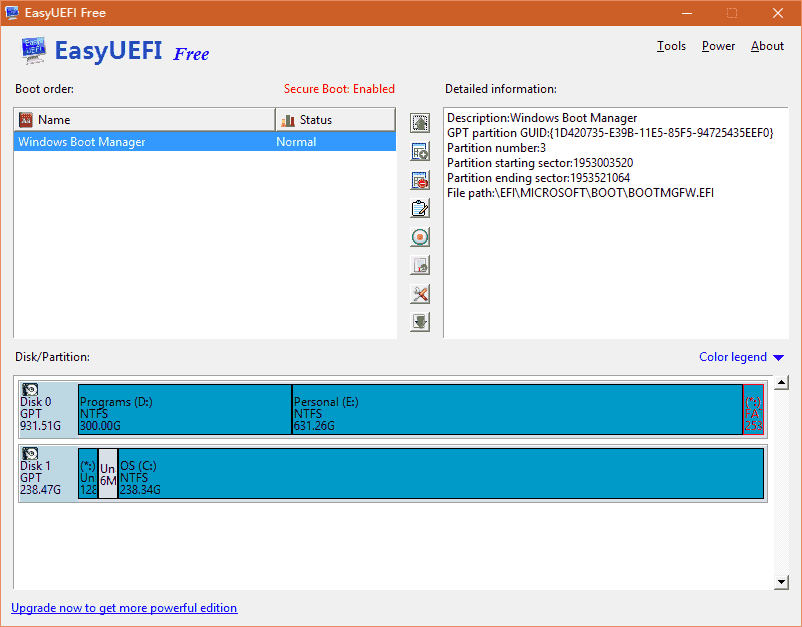
boot into bios and turn off
after I searched on google, it's seem something wrong with the winre/
Error code:
C:\Windows\system32>reagentc /info
Windows RE status: Disabled
Windows RE path:
BCD: fa940576-e2de-11e5-9544-81db5da3b575
C:\Windows\system32>reagentc /enable
REAGENTC.EXE: Operation failedL 3bc3
REAGENTC.EXE: An error has occured.
C:\Recovery\WindowsRE>ls
Winre.wim boot.sdi
C:\Recovery\WindowsRE>reagentc /setreimage /path C:\Recovery\WindowsRE
\\?\GLOBALROOT\device\harddisk1\partition2\Recovery\WindowsRE
nothing goes wrong here.
but.. same thing again.
C:\Windows\system32>reagentc /enable
REAGENTC.EXE: Operation failedL 3bc3
REAGENTC.EXE: An error has occured.
Do I have any option other than reinstall windows?