
Hardware second hand ps3 slim cfw,reformat hdd no boot

  • Thread starter Thread starter maynard14
  • Start date Start date
  • Views Views 6,412
  • Replies Replies 15

maynard14

Well-Known Member
Newcomer
Joined
Sep 3, 2016
Messages
57
Reaction score
12
Trophies
0
Age
38
XP
170
Country
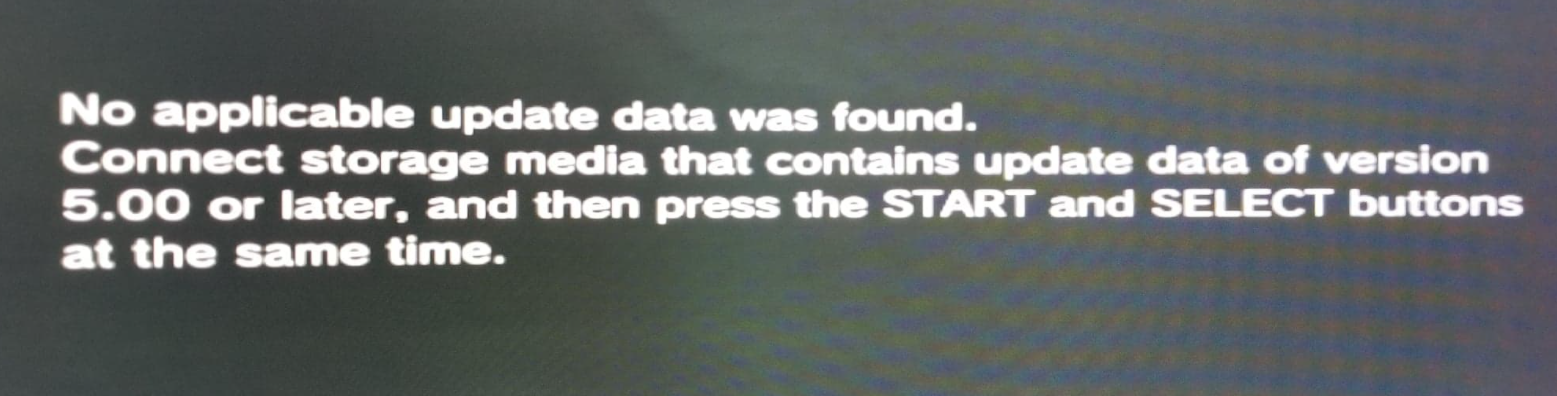
guys can you help me? i have a ps3 slim 200xx model, at first it is working properly, but i tried to remove custom firmware just by taking out the hardisk and formating the hardisk to pc, i tried to put it back to ps3 but no boot, it says on the below screen shot, my problem on which firmware it has running before i format, it says overflow but i dont know if it is 4.81 to 4.85
upload_2021-1-21_20-12-29.png
 
what i dont understand it saids update data of version 5.00 or later, i tried to reinstalll all overflow firmware, but no luck
 
any idea guys ? why it show 5.00 firmware, if im right there is no firmware 5.00 for ps3, i only know the last custom firmware intalled is overflow
 
yes i can access recovery menu, but no the hardrive is already formatted using pc, no back up
 
can you format the hard drive through recovery mode?
try downloading the latest official firmware and installing it through recovery mode.

you shouldn't have formatted the hard drive through your computer.
 
  • Like
Reactions: maynard14
Actually, formatting on the pc is the only way to completely wipe the hdd. The xregistry survives a format on the ps3. That's for a slim. With a phat, it doesn't matter.
 
Last edited by godreborn,
  • Like
Reactions: maynard14
I think this ps3 has been spoofed that is why it is giving me the message update firmware to 5.00 or higher. I tried rogero downgrader and rebug downgrader but no luck. Its gives me error when i try to install them
20210122_020337.jpg
 
Try another hdd. This is why you should always disable a spoof before installing firmware. Though 5.00 is a weird spoof version.
 
  • Like
Reactions: maynard14
i see, i will try another hdd, thank you. i will report back. yes it sucks i should have first check the cfw installed version first and remove the spoof before i formated the hardisk on the pc
 
To get back to ofw firmware just install ofw and format hdd to remove all traces. Do that after you fix the problem.
 
  • Like
Reactions: maynard14
got it fix, for those similar issue, i have tried to install rogero dowgrader, but gives me error above 8002F2BF it is because the hardisk im trying to install the fw is faulty, i have replace it with another hdd and now its working with OFW 4.87. thank you so much guys for giving me advise :)
 
  • Like
Reactions: godreborn
Ayuda me pasa esto en 2024
Este es un sitio de habla inglesa. Por favor, utilice solo el inglés y es posible que podamos ayudarle.
(This is an English speaking site. Please use English only and we may be able to help you.)
 
Este es un sitio de habla inglesa. Por favor, utilice solo el inglés y es posible que podamos ayudarle.
(This is an English speaking site. Please use English only and we may be able to help you.)
got it fix, for those similar issue, i have tried to install rogero dowgrader, but gives me error above 8002F2BF it is because the hardisk im trying to install the fw is faulty, i have replace it with another hdd and now its working with OFW 4.87. thank you so much guys for giving me advise :)
Help, this happens to me in 2024
Post automatically merged:

got it fix, for those similar issue, i have tried to install rogero dowgrader, but gives me error above 8002F2BF it is because the hardisk im trying to install the fw is faulty, i have replace it with another hdd and now its working with OFW 4.87. thank you so much guys for giving me advise :)
Help, this happens to me in 2024
 

Attachments

  • IMG_0806.jpeg
    IMG_0806.jpeg
    1.1 MB · Views: 73

Site & Scene News

Popular threads in this forum