ROM Hack [Release] Every File Explorer

  • Thread starter Thread starter Gericom
  • Start date Start date
  • Views Views 475,651
  • Replies Replies 945
  • Likes Likes 73
Gericom, any chance of Zelda's .ctxb/.bFlim file formats support with EFE...?

What're you hoping to find in the byaml files from Zelda.

Looking at the World Byaml files from A Link Between worlds its just lighting data for the stages, map data like item locations, light locations, even locations etc, no models or anything in these it seems, at least in this game all interesting files, like models, textures, animations, stages etc all seem to be in bch files and szs files (which are a container anyway).
 
What're you hoping to find in the byaml files from Zelda.
Looking at the World Byaml files from A Link Between worlds its just lighting data for the stages, map data like item locations, light locations, even locations etc, no models or anything in these it seems, at least in this game all interesting files, like models, textures, animations, stages etc all seem to be in bch files and szs files (which are a container anyway).

*.bflim. NOT *.byaml...

PAL ROM: romfs\EU_English\Layout
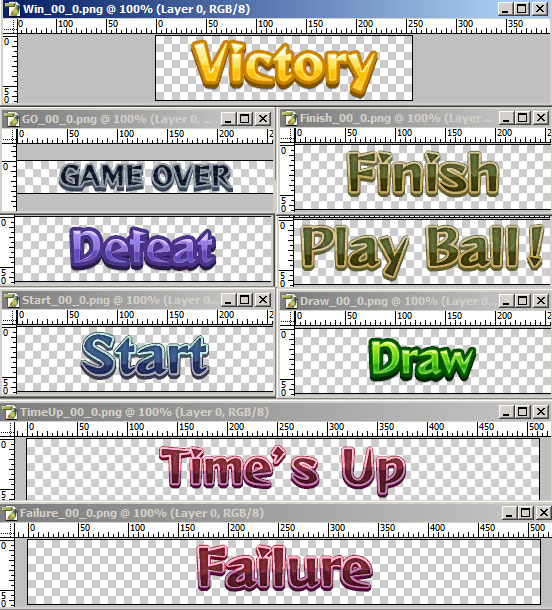
Here's bflim's (converted to .png), needed for translation:

8473139.jpg


I really want to convert that (after redrawing) back to correct *.bflim.

Interesting files are in romfs\EU_English\*.szs (Yaz0 compressed .sarc container) - here's all English game script.
I'm translating this game. I do not need to change 3D models, etc.
 
Which set of tools did you use?

I guess I'm going to link:

http://www.romhacking.net/utilities/826/

Btw, for those who are looking to decompress Sticker star, I tested this and it works.

You want to run blz.exe (I think it stands for backward lz which is what you told me).

You just batch process the files and most of them will work in efe, but some gives DICT errors....

If you have still my files I sent you earlier, you should be able to test it for yourself. Even the hex editor shows the proper header.

though, I'm going to try the python script on those that returned an error. if it works....then it decompressed properly.

The thing that annoys me with the python script is it doesn't seem to map the textures while your program can.

btw, I actually found blz compressed files that were actually arc files, I extracted them which gave were called bcptl and it opens, but complains about....weird things like the origin not making sense. I checked if the files itself were blz compressed, they weren't and the header seems to be clean....weird.

also, I found that the program reads and opens font files and they work, but is there any way to export that in some way?

I mean, would it be possible to have ttf files?

anyway, that's all I have for now. Will look forward to Friday updates :)
 
  • Like
Reactions: I pwned U!
I guess I'm going to link:

http://www.romhacking.net/utilities/826/

Btw, for those who are looking to decompress Sticker star, I tested this and it works.

You want to run blz.exe (I think it stands for backward lz which is what you told me).

You just batch process the files and most of them will work in efe, but some gives DICT errors....

If you have still my files I sent you earlier, you should be able to test it for yourself. Even the hex editor shows the proper header.

though, I'm going to try the python script on those that returned an error. if it works....then it decompressed properly.

The thing that annoys me with the python script is it doesn't seem to map the textures while your program can.

btw, I actually found blz compressed files that were actually arc files, I extracted them which gave were called bcptl and it opens, but complains about....weird things like the origin not making sense. I checked if the files itself were blz compressed, they weren't and the header seems to be clean....weird.

also, I found that the program reads and opens font files and they work, but is there any way to export that in some way?

I mean, would it be possible to have ttf files?

anyway, that's all I have for now. Will look forward to Friday updates :)

Thank you! I already found these before though for decompressing the Flipnote Studio 3D .blz files, and it is good to know that blz.exe will work for Sticker Star!

I wonder if any of these tools will also work for the .l files in Swapnote/Nintendo Letter Box or the .z files I found in another game.

Also, what type of compression could the Swapnote/Nintendo Letter Box .apd files be using?
sn apd.PNG
 
  • Like
Reactions: The Cringe
what about the szs format for Wii U games, did you look into that :)?
Wii U SARCs (which can have szs or rarc as the file extension) are the same as 3DS SARCs, other than the endianess, which is big instead of little.
Gericom said he will add support for them.
 
I'd love to see support for batch processing sometime. It'd be super handy!
I have implemented script support for the next build.
For example this script:
Code:
foreach(var v in Directory.EnumerateFiles(Args[0], "*.bcmdl", SearchOption.TopDirectoryOnly))
{
    Console.WriteLine("Found " + v);
    N3DS.NW4C.GFX.ToOBJ(v, 0, Args[1] + "\\" + Path.GetFileNameWithoutExtension(v) + ".obj");
}
Converts all bcmdl files in the folder specified by Args[0] to obj in the out folder Args[1].
Usage:
Put the code in a text file with extension .efesc. For example: MyScript.efesc
Then use the command line like this:
Code:
EveryFileExplorer.exe [Path to MyScript.efesc] [Args[0]] [Args[1]]
And so on. You can use as many arguments as you want. The script is just c# code.

Edit: One sidenote. The commands (like N3DS.NW4C.GFX.ToOBJ) need to be registered in the plugins to be able to use it.
 
One thing
I tried loading a 3D model of a MKDS course in the 3D Viewer, but it won't show up no mater how hard i try.
I tried zooming out by scrolling and moving with the arrow keys but still nothing.
Why does it happen and what do i need to do to fix it?
 
One thing
I tried loading a 3D model of a MKDS course in the 3D Viewer, but it won't show up no mater how hard i try.
I tried zooming out by scrolling and moving with the arrow keys but still nothing.
Why does it happen and what do i need to do to fix it?
That should just work. The Arrow keys do not move, but rotate. Use A, S, Z and X for moving.
 
It's been a while, did you happen to have the time to look into the MT Framework Mobile .tex textures yet? All Capcom 3DS games I've checked so far use it, so there's a good chance you could add support for a bunch of games at once.
(If you want to, I can resend my example files)
 
I tried, but still no result.
I still get the gray background

Which track did you try? Try Figure-8 Circuit (cross_course.carc). Zoom out a bit and go up with the A key. You should see it untextured. (for textures open the nsbtx in cross_courseTex.carc aswell)
 

Site & Scene News

Popular threads in this forum