PSP emulator for PC
Question: How to install this?
Answer: First lets see the minimum requirements
Minimum:
- OS: Windows 32bit or 64bit / Linux 32bit or 64bit / Mac OSX;
- CPU: Pentium 4 and up;
- GPU: Any graphic card supporting OpenGL 2.0 and up;
- Memory: 1GB RAM.
Recommended:
- OS: Windows Vista / Windows 7;
- CPU: Dual core @ 2.5 GHz;
- GPU: Updated graphic card supporting OpenGL;
- Memory: 2GB RAM or more.
Now Let's proceed to the first step:
1. Download Java Runtime
2. Download JPSCP
For Windows - 32bit
For Linux - 32bit
For Windows 64bit
For Linux - 64bit
For MacOSX
Next Step:
Run the Java Runtime and install
NOTE: It is strongly advised that even on a 64-bit OS, you should install the
32-bit JRE release and use JPCSP's 32-bit version, for compatiblity reasons.
Extract the JPCSP rar file that you've downloaded
a folder should be come out.
If you've downloaded the Windows version, use the batch (.bat) files located inside JPCSP's main folder (start-windows-x86.bat or start-windows-amd64.bat).
If you've downloaded the Linux version, use the shell script (.sh) files located inside JPCSP's main folder (start-linux-x86.sh or start-linux-amd64.sh).
If you've downloaded the MacOSX version, just double click the application bundle to start JPCSP.
A command promp window should pop out..
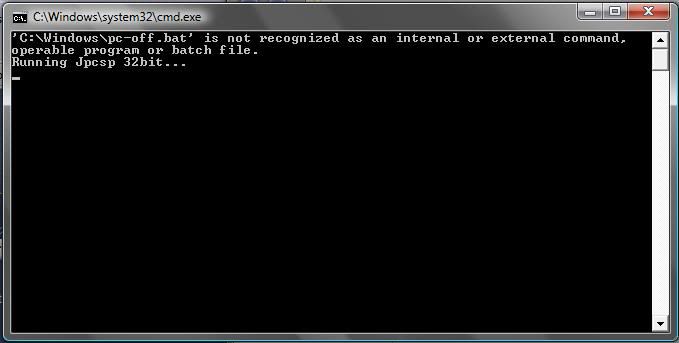
wait for a few seconds/minutes untill this pops out:
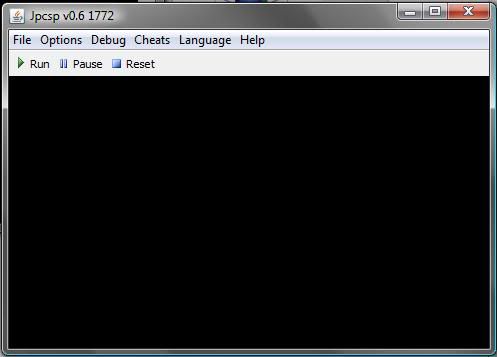
after that click File>Load UMD
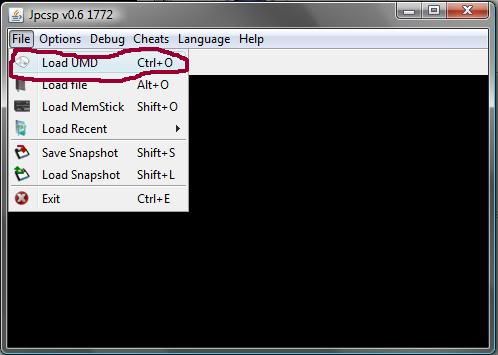
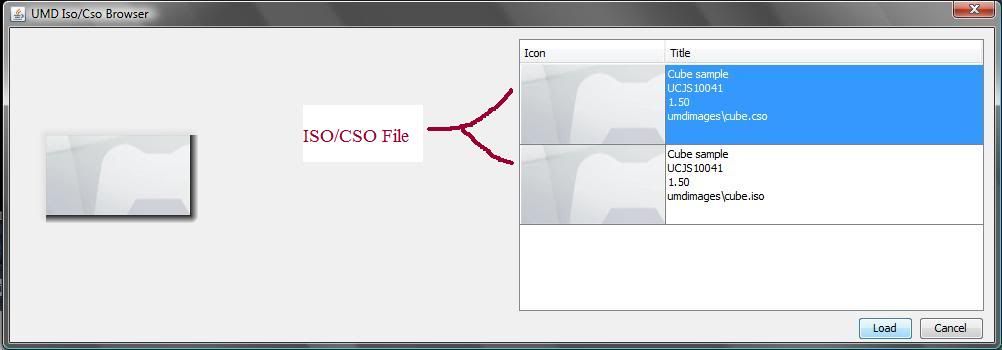
a new window should pop out, this is the UMD browser.
it's where your ISO/CSO files are located.
Pick a game you want to play then press load.
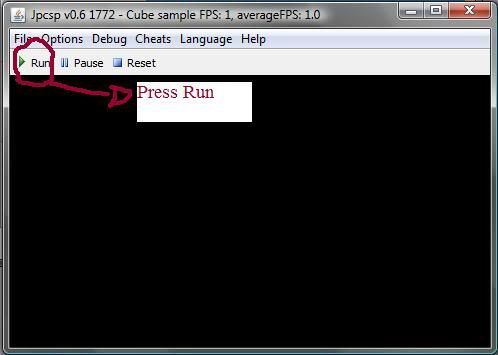
Now press play to play the game
Note: Not every game is playable trough this emulator
Question: How to put ISO/CSO files?
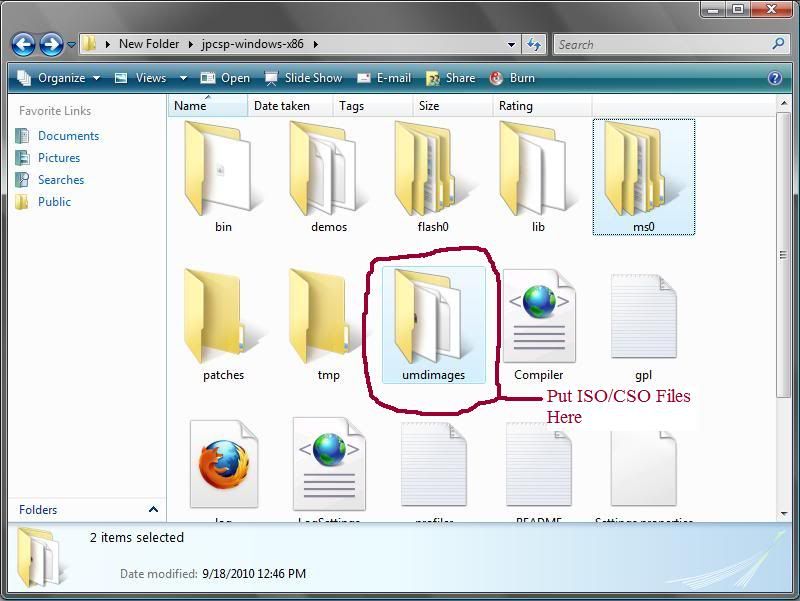
Answer: Place it under the "umdimages" folder (this folder can be changed under Options > Configuration > General).
For homebrew, place the application's main folder (which should contain the EBOOT file) under ms0 > PSP > GAME.
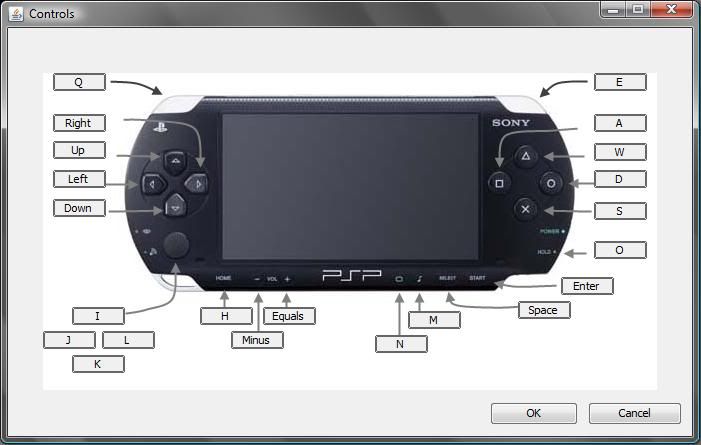
This is the Default Controls
Question: How to install this?
Answer: First lets see the minimum requirements
Minimum:
- OS: Windows 32bit or 64bit / Linux 32bit or 64bit / Mac OSX;
- CPU: Pentium 4 and up;
- GPU: Any graphic card supporting OpenGL 2.0 and up;
- Memory: 1GB RAM.
Recommended:
- OS: Windows Vista / Windows 7;
- CPU: Dual core @ 2.5 GHz;
- GPU: Updated graphic card supporting OpenGL;
- Memory: 2GB RAM or more.
Now Let's proceed to the first step:
1. Download Java Runtime
2. Download JPSCP
For Windows - 32bit
For Linux - 32bit
For Windows 64bit
For Linux - 64bit
For MacOSX
Next Step:
Run the Java Runtime and install
NOTE: It is strongly advised that even on a 64-bit OS, you should install the
32-bit JRE release and use JPCSP's 32-bit version, for compatiblity reasons.
Extract the JPCSP rar file that you've downloaded
a folder should be come out.
If you've downloaded the Windows version, use the batch (.bat) files located inside JPCSP's main folder (start-windows-x86.bat or start-windows-amd64.bat).
If you've downloaded the Linux version, use the shell script (.sh) files located inside JPCSP's main folder (start-linux-x86.sh or start-linux-amd64.sh).
If you've downloaded the MacOSX version, just double click the application bundle to start JPCSP.
A command promp window should pop out..
wait for a few seconds/minutes untill this pops out:
after that click File>Load UMD
a new window should pop out, this is the UMD browser.
it's where your ISO/CSO files are located.
Pick a game you want to play then press load.
Now press play to play the game
Note: Not every game is playable trough this emulator
Question: How to put ISO/CSO files?
Answer: Place it under the "umdimages" folder (this folder can be changed under Options > Configuration > General).
For homebrew, place the application's main folder (which should contain the EBOOT file) under ms0 > PSP > GAME.
This is the Default Controls